TL;DR: Logs are for debugging, metrics are for analysis. Log what was true when something happened, so you can reconstruct it later. Make it a metric when there’s a number you’ll track over time, even when nothing is wrong.
Since Sentry added Logs and Application Metrics, there are now two ways to record that something happened in your app, and they can look pretty similar: Sentry.logger.info("user.signup") versus Sentry.metrics.count("user.signup").
Both store attributes, both include shared context automatically, and both can be filtered, grouped, and counted. So when you’re instrumenting your code, which one do you reach for?
If you’ve read when to reach for errors, traces, logs, and metrics, you know we’ve covered this before. Logs and metrics are the two that trip people up most, and one signup flow is enough to show when to use which.
Logs, metrics, and traces, oh my!
Let’s say you’re writing a signup handler. Someone fills out the form and hits submit. What do you want to know about that event?
Who signed up?
How did they sign up: which method, which plan?
Did it work, and if not, why not?
How long did it take, and where did the time go?
There’s one more question you’ll want to answer eventually, whether signups are going up or down, but that’s a different kind of question. You’ll come back to it.
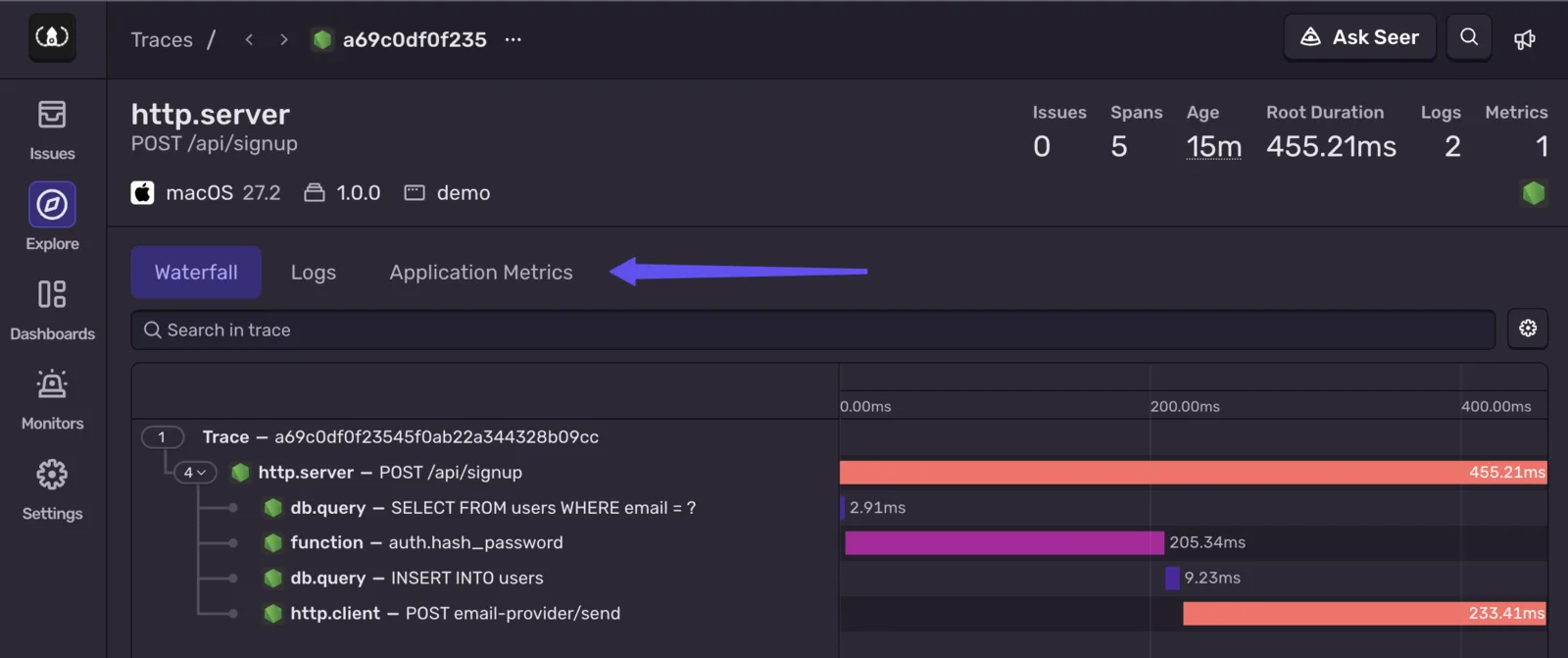
One of those four you get for free, just by having tracing enabled.
This trace shows that a signup happened, how long it took, and where the time went. Almost half of this request is the email provider, and most of the rest is hashing the password. You didn’t have to add anything to your code to learn that.
Traces also tie errors, logs, and metrics to the request they came from, so everything about a single signup shows up in one place.
But traces are sampled. You don’t need every signup request to debug a slow one, just enough to see where the time goes, so most are dropped to cut noise and cost. Sentry extrapolates from the ones it keeps, which gets you close, but not an exact count.
Logs and metrics aren’t sampled. You can still filter them in the software development kit (SDK), but whatever you send is kept, so you can rely on them when it counts.
The trace answered how long. Who signed up, how, and whether it worked, you record yourself.
A few attributes describe this signup and apply to everything you send about it. Rather than repeating them in every call, you can set them as shared attributes on the scope (available since SDK v10.61.0) to apply them automatically.
You know the signup method and the user’s plan as soon as the request comes in, so set them at the top of the handler. That way they’re included even if the signup fails:
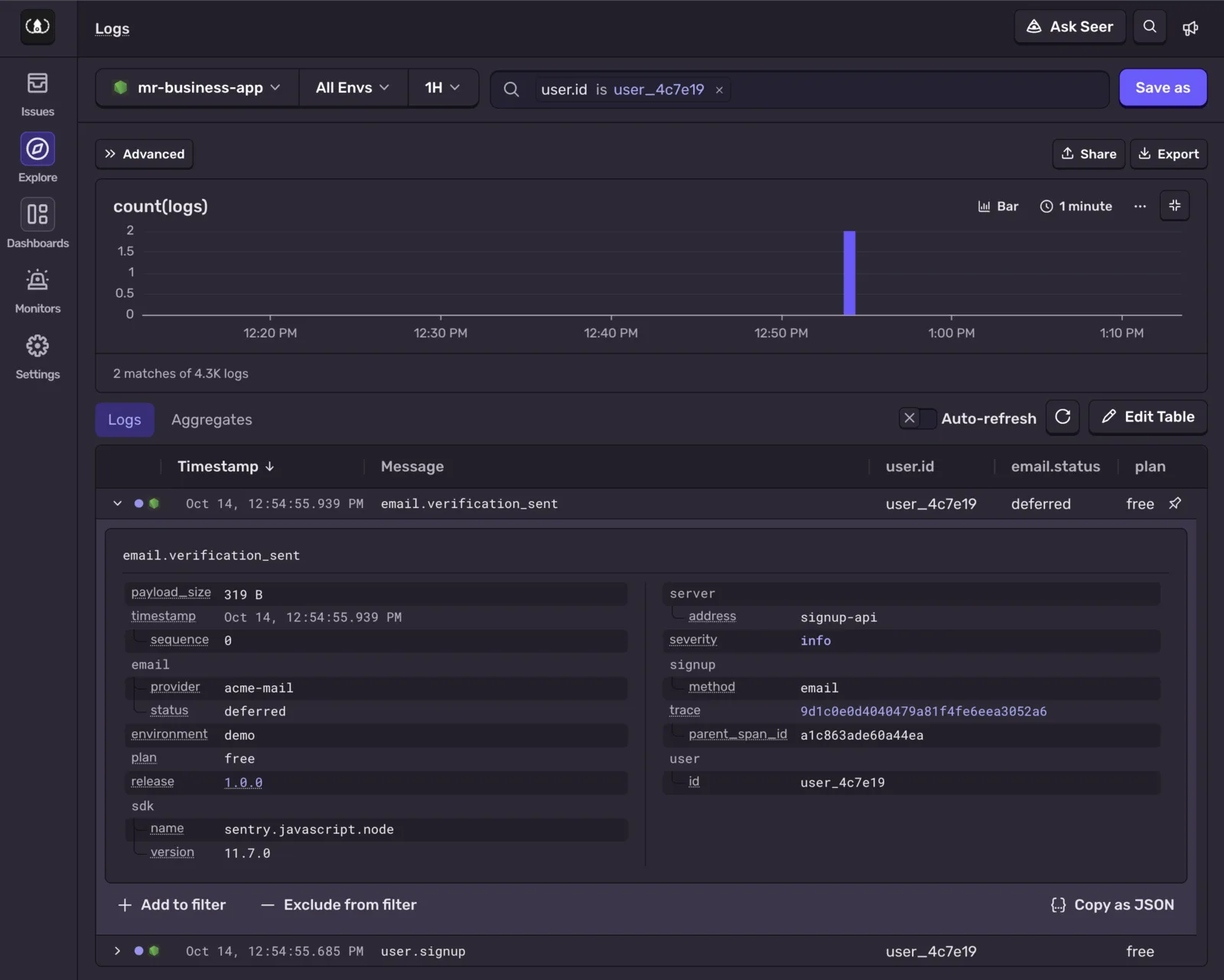
Both logs are tied to the same trace, so the signup’s trace shows them together. You can also start from the logs and filter on their user.id. The email status you were looking for is right there, with a link to the trace.
The trace could have told you all of this, but traces are sampled, so this user’s trace was probably dropped. Their logs weren’t.
Why are signups failing?
After this morning’s release, a few people tell you they can’t get past the signup form.
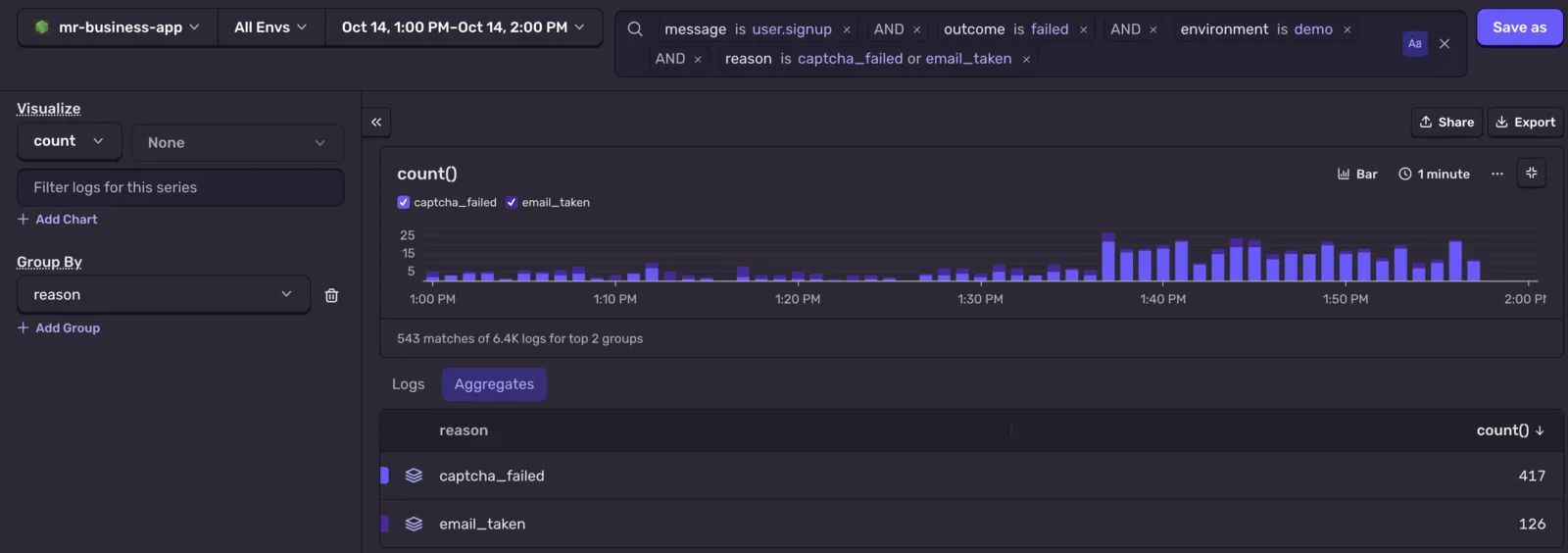
Every signup attempt writes the same user.signup log, once, whether it worked or not. A failed one gets outcome: "failed", a warn level, and the reason. There’s no user yet, but signup.method and plan are already on the scope:
This is a judgment call. Normally, I’d create a metric to count failed signups. But if this log line is always going to be there, you can count it instead.
Group by reason, chart it over time, and a spike in captcha_failed after a release shows up just as clearly as it would on a counter.
So should failed signups be a metric too? That depends less on the count and more on what you’re going to build on it.
What a metric is for
Both of those questions start with something going wrong, or at least looking off.
A log is insurance. You write it at a decision point in your code so that later, when someone asks what happened, you (or your agent) can reconstruct it. Most logs are never read, and that’s fine. For what’s worth writing at those decision points, and what to leave out, Ben Coe’s When and what should I be logging? is a good guide.
That also makes logs easy to change. Plenty are temporary, added to watch a new feature or an edge case and removed a release later. Messages get reworded in code review, and whole levels get dropped to cut costs. None of that matters while you’re debugging. It matters a lot if a dashboard is counting them. If someone decides info logs aren’t worth sending in production, every chart built on them flatlines.
A metric is a question you decide to ask in advance. You go and look at the answer on purpose, even when nothing is wrong. Naming one is a commitment: dashboards and alerts get built on it, nobody renames it on a whim, and filtering your logs doesn’t touch it.
So for failed signups: if the failure rate is a number your team watches, count it too, with the same user.signup counter and outcome: "failed".
Questions worth a metric
Are signups going up?
This is the question you set aside earlier. It’s about the trend across all signups.
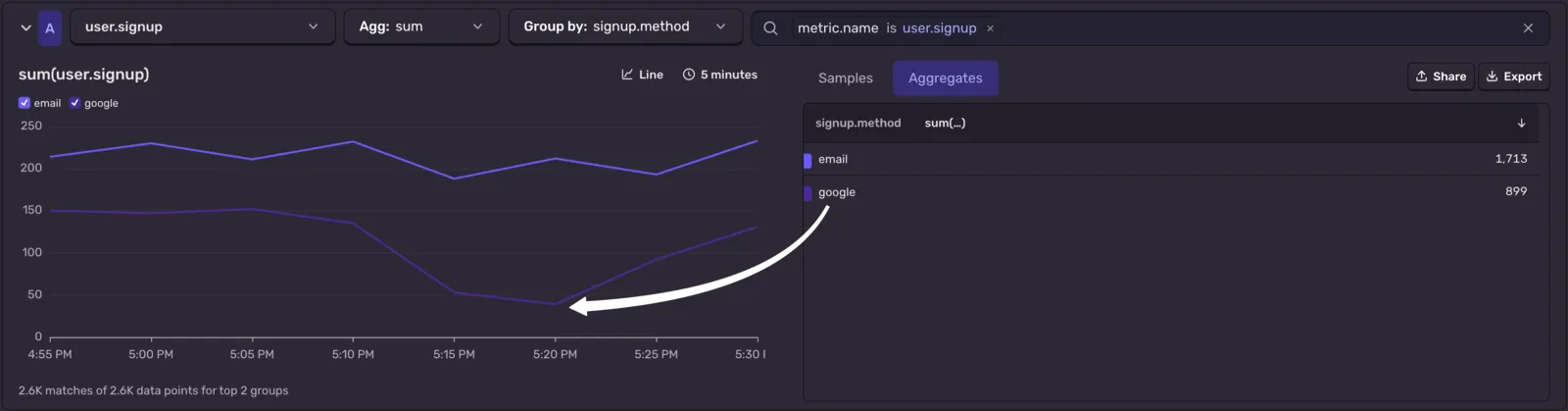
That’s what the user.signup counter is for. It picks up the same scope attributes as the log, so you can break it down by plan or signup.method with no extra work. Group by signup.method and you can see how people sign up, and whether a dip hits everyone or just one method:
If that dip lines up with a release, pull up the failed-signup logs from that window.
Where do new signups drop off?
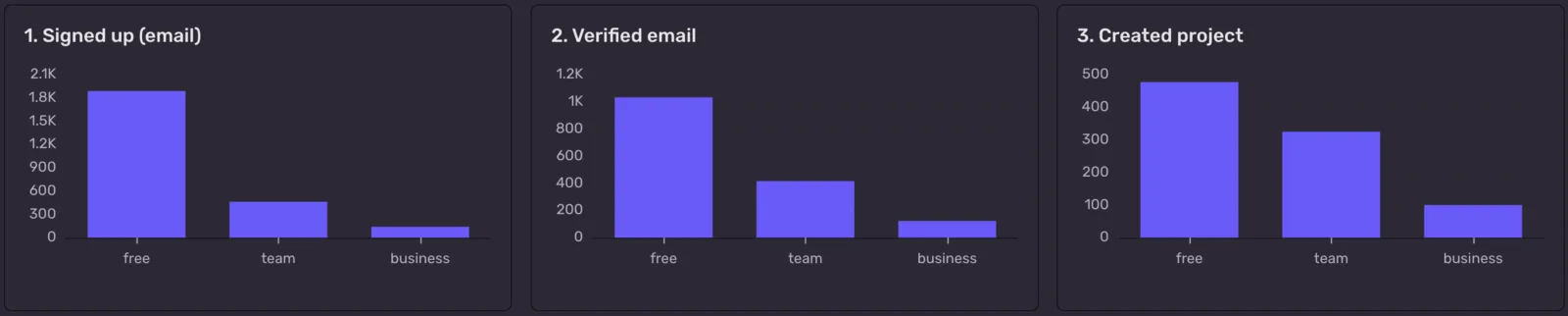
A signup is the start of a funnel, not the end of one. Say you have a key performance indicator (KPI) for how many people get from an email signup to their first project:
user.signup → email.verified → project.created
Each step is a counter, emitted wherever it happens. Those places might be different services, and the steps might be days apart, so the signup’s scope is long gone by the time someone clicks the verification link. Pass the attributes you want to group by again at each step:
Chart the three counters side by side and you can see the whole funnel, one step at a time:
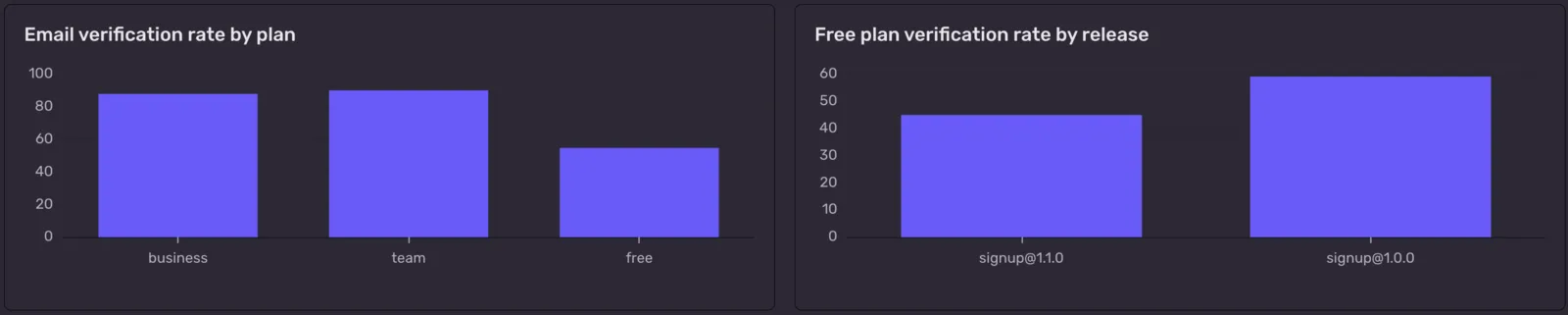
Group each step by plan and you might find that people signing up for a paid plan verify almost every time while free signups don’t. That’s not a bug. Nothing errored, nothing was slow, and no log would ever have been written about someone who simply never came back. It’s a product question, and it’s one you have to decide to ask.
Group by release instead and it becomes an engineering question again: did a change to the signup form hurt the verification step?
A metric won’t follow one person through those steps, build cohorts, or tell you about retention. That’s what product analytics tools are for. But for “is this step getting worse?”, having the funnel next to your releases, errors, and traces makes it a cheap question to ask.
Is the email queue backing up?
So far every metric here is a counter: something happened, add one. Sentry has two other metric types, and each one answers a different shape of question.
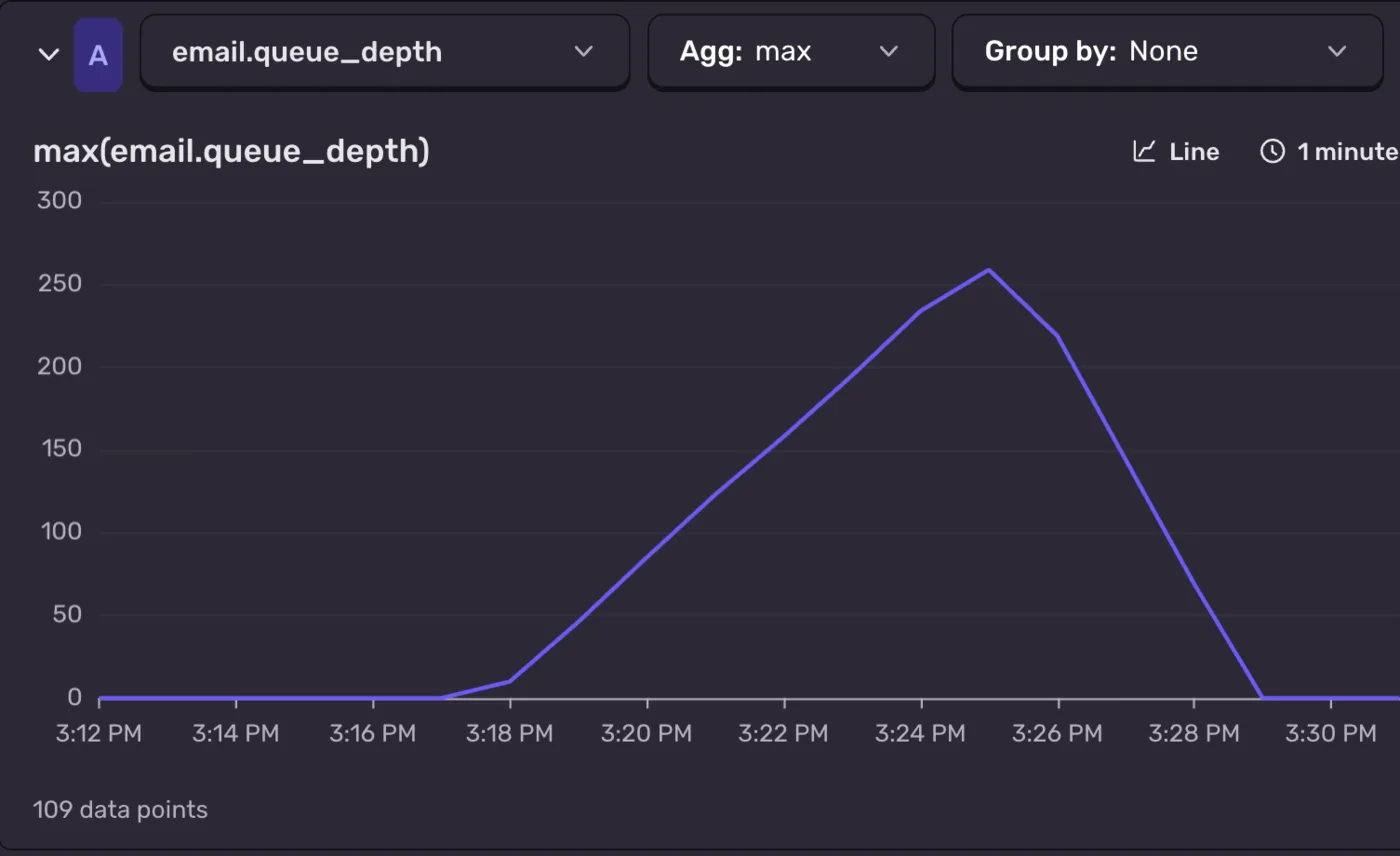
A gauge records what a value is right now, like queue depth or open connections. You’re sampling a level, not counting events, so adding the samples up wouldn’t mean anything. What you care about is how high it got, or where it sat on average. Emit it on a timer, or each time your email worker checks its queue:
If verification emails start getting deferred, a climbing queue tells you before the next “I never got my verification email” ticket does.
How long does it take to verify?
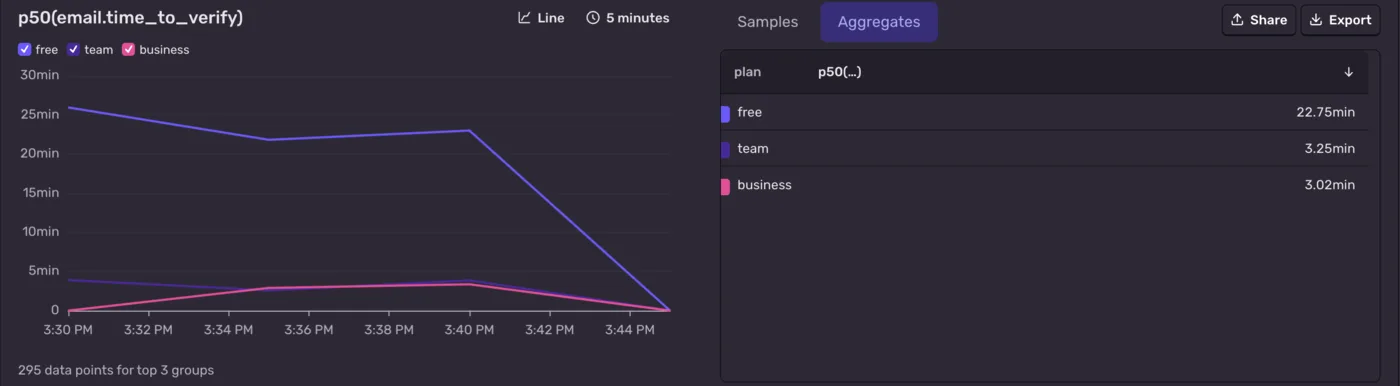
A distribution records how much, with a unit, and keeps the spread of values so you can chart averages and percentiles. For anything timed inside a request, a trace already gives you that. A distribution is helpful when a trace can’t measure the value: a size, a ratio like the one that caught a file-size estimate off by up to 83%, or the gap between two requests days apart. How long people take to verify their email is one of those:
Emit it next to the email.verified counter, with the same attributes. Group by plan and paid users verify in about three minutes at the median, free users in about 23. At p95, free users take nearly two hours. No trace could show you that, because the clock starts in one request and stops in another.
Choosing between a log and a metric
When you’re instrumenting something, ask what kind of question you’re answering:
Ask yourself
It’s
Reach for
In the signup example
What was true when this happened?
State
Log
Why did this signup fail?
What do I want to know about how it’s used, or whether it works as expected?
A question you chose
Metric
Are signups going up?
Log state at the point where the code makes a decision. Give a metric a name that reads like the question.
One quick tell: if you want a count while debugging something you already log, count the logs. If it’s a number you’ll track over time, make it a metric.
That doesn’t mean logging everything just so you can count it later. You’d be paying to store every event to compute a number you could have emitted directly as a metric. Count the logs you’d already be sending to debug with.
What’s worth sending to Sentry
You might already be sending logs and metrics somewhere else. You don’t need to move all of it, and you shouldn’t pay to store the same data twice.
Keep access logs, infrastructure and platform logs, compliance archives, CPU and memory graphs, and debug-level chatter where they already live. They’re high volume, and you rarely need them next to a stack trace.
Send Sentry the application logs you’d reach for while debugging, like the failed signup and the deferred verification email, plus the handful of metrics that answer questions you chose. In Sentry, those sit next to the error, the trace, and the release that changed things. When an issue comes in, you (or your agent) can go from the stack trace to what your code was doing at that moment without switching tools or lining up timestamps.
You can draw that line in the SDK, before anything leaves your app. beforeSendLog sees every log and can drop it by returning null:
If you already log through Pino or console, the integrations take a list of levels. Forward the levels you debug with to Sentry, and everything else keeps going wherever it goes today:
Use the same name and the same attribute keys on both. If user.signup is a log and a counter, the filter that finds a spike in one finds the rows behind it in the other.
Choose what you send on purpose. A few metrics you’ll look at and logs from code you debug. Each one should be meaningful, so don’t track something just because you might need it later.
Set the user and shared attributes once, at the top.setUser() and scope attributes keep every log and metric in the request consistent, without repeating the same keys in every call.
Decide what setUser() sends. An ID you can look up is usually enough. Leave out the email address unless you mean to collect it. See Scrubbing Sensitive Data.
Give gauges and distributions a unit. Sentry uses it to display and convert values, so a time in seconds doesn’t get charted as a plain number.
Don’t keep the only copy of something on a span. Spans are great for timing. They’re also sampled.
Getting started with Logs and Metrics in Sentry
Logs and metrics both come with the Sentry SDK, and they’re connected to everything else. When a metric moves, the logs from the same requests are one filter away, and from there it’s one click to the trace and any error.
Developer, Team, and Business plans include 5 GB of logs and 5 GB of Application Metrics per month. On Team and Business, more of either is $0.50/GB. The changelog has the details for Logs and Application Metrics, and the docs cover setup for logs and metrics.
Logs are on by default from SDK v10.71.0. On earlier versions, set enableLogs: true in Sentry.init.
Then ask it to apply the same patterns to your code:
Add Sentry logs and metrics
FAQs
Can't I just count log lines? ▾
Yes, for anything you're already logging. The Logs explorer can count, group, and chart any log query, and you can build dashboard widgets and alerts on it. Reach for a metric when the question isn't about debugging, or when it's a number you'll track over time and need to keep counting even if you change which logs you send.
What types of metrics can I send to Sentry? ▾
Three. A counter (Sentry.metrics.count) counts how many times something happened, like a signup. A gauge (Sentry.metrics.gauge) records a value at a point in time, like the depth of a queue, and charts as min, max, or average. A distribution (Sentry.metrics.distribution) records how much, like the time it takes to verify an email or a file size, and charts as percentiles. Give gauges and distributions a unit so Sentry can display the values correctly.
I already send logs somewhere else. Why send them to Sentry too? ▾
You don't need to move all of them. Keep access logs, infrastructure logs, and compliance archives where they already live. Send Sentry the application logs you'd reach for while debugging. In Sentry, every log is linked to the trace it was recorded in, so when an error comes in, the logs that explain it are already attached.
What does it cost? ▾
Developer, Team, and Business plans include 5 GB of logs and 5 GB of Application Metrics per month. On Team and Business, more of either is $0.50/GB. See Sentry pricing for details.
How do I keep the cost down? ▾
Filter in the SDK with beforeSendLog, forward only the levels you debug with from your existing logger (for example, the Pino integration), and keep metrics to the questions you'll actually check.
How should I name things? ▾
Name the event, not the signal. Use user.signup for both the log and the counter, not signup_log and signup_count, and keep attribute keys like signup.method and plan identical on both. Then the filter that finds a spike in the metric also finds the logs behind it. Keep names stable and put anything that varies in attributes, never in the name itself. How to structure a log covers stable event names and scoped attribute keys in more depth, including how to enforce them with a linter.
What about personally identifiable information (PII)? ▾
Decide what setUser() and your shared attributes send, because they end up on every log and metric. An ID you can look up is usually enough. Scrubbing Sensitive Data covers filtering and the beforeSend* hooks.
Over 40 changes between 8.43.0 and 8.54.0 cut SentryAndroid.init time by 20-30%, reduced memory allocation, fixed memory leaks, and lowered background CPU time.
We moved Android SDK operations to a worker isolate, then streamlined scope updates by removing duplicate normalization and encoding JSON directly into UTF-8 bytes.