Most advice about surviving a traffic spike is about capacity. Scale the fleet, warm the caches, load test the checkout path. All of it assumes you can fix whatever breaks the moment you find it.
Mobile apps don’t work that way. I spent an hour on a workshop with Jay Henry, a senior engineering manager at Etsy who owns engineering strategy across three teams covering CI, build, test, release, observe, and SRE. Jay’s take: a web team having a bad day can revert in minutes. The debugging still has to happen, but it happens with the bad code already off production.
Mobile has no revert. Once a bug ships inside a binary, it has to travel the whole path out: discovery, root cause analysis, reproduction, design, testing, merge, submission, app store review, and rollout. You can’t control when or if users install the fix, and if they don’t, the broken version keeps running.
So Etsy’s holiday prep isn’t a capacity exercise. It’s a set of decisions made in October about what they’ll be able to see, route, and mitigate in November, when reverting isn’t an option.
Here are some highlights from our conversation, most of which aren’t specific to e-commerce.
Etsy runs a code slush, not a code freeze
A code freeze is a hard stop: for some time window, changes don’t merge or don’t ship. It’s a blunt instrument, but it works, which is why most teams reach for it.
Etsy runs a slush instead. Three phases nested inside each other, each one raising the bar on what ships.
Phase one starts in mid-October, when sellers are staging their holiday inventory. The guidance to engineers is to merge mindfully, and the specific test is whether a change would force a seller to learn a new way of running their business during their busiest weeks. If it would, the change waits until after the holidays.
Phase two is infrastructure fortification. Changes shouldn’t tax the infra, and any experiment that intends to add load goes through the scalability team first.
Phase three is peak, roughly Thanksgiving through Cyber Week. Nothing ships without very senior sign-off, and in Jay’s phrasing, only to make things better.
There’s no list of qualifying changes, but there is a gate: nothing moves without a senior yes. At the point where being wrong costs the most, the decision goes to a person.
If you borrow one thing from the slush, borrow that. Then decide who is making the call, and what criteria they’re weighing. “Get a senior yes” makes sense if you can answer both.
If “get a senior yes” won’t fly, write the judgment down as a few questions in order, so most changes never need an approver.
Is a user hitting this right now? If not, it waits.
Can you stop it without shipping, by turning off a flag or changing a config value? Then do that instead. The fastest fix is the one that skips app review.
If it does have to ship, can you undo it in one step? A change you can’t back out of is a different conversation than one you can.
Does it touch checkout, auth, or payments? Those go to a named approver no matter how small the diff looks.
The questions make sure when you’re arguing about a specific change under load, you’re arguing about that change, and not about what the rule was supposed to be.
A freeze gives you one date to argue about. A bar that raises on a schedule gives engineers a rule they can apply to the change in front of them six weeks out, which is when the risky merges happen.
Don’t hand engineers a new tool at peak
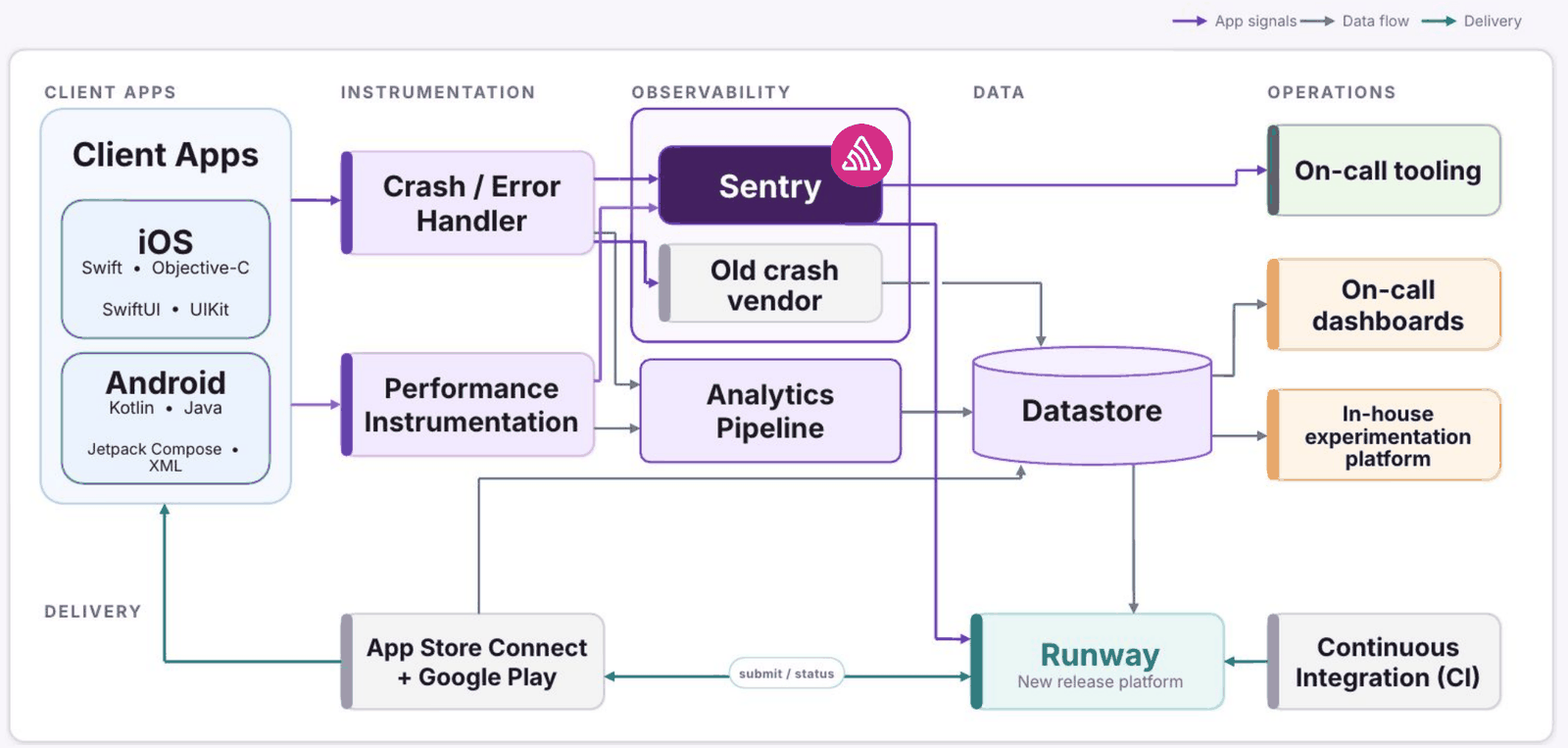
Etsy moved their mobile apps onto Sentry in 2025, and the work landed right before slush. But they kept the old tool running.
On Android through the provider list and on iOS through two branches in their crash reporting layer, they set up a dual reporter and sent crashes to both vendors straight through the holidays instead of choosing between them.
“We were not going to change things for our engineers across the most tentative time of the year,” Jay said. Nothing was taken away. Every engineer went into peak already fluent in the tool they’d been reading all year, with the new one available to go deeper.
Running both also answered the question an evaluation can’t. Both tools reported a crash-free rate. Did they agree? Did they agree under the heaviest load of the year? Peak became the proving ground, and by the time 2026 started they had the confidence to sunset the old platform.
Steal this idea. A reporting layer that can fan out to two destinations turns a vendor change into a config change instead of a huge project. Build it before you need it, so the switch is ready when you decide to make it.
Know which levers reach your code
You can’t force a user to update. What you can do is decide, in advance, how many ways you have to turn off the thing that’s hurting them.
Etsy has three layers. Most experiments sit behind an experimentation flag, so a bad variant can be switched off as long as the app isn’t crashing at runtime. Changes that aren’t experiments go behind operational flags. And in rare cases they can show a forced upgrade prompt that blocks the app until the user updates, which they almost never do, because users hate it.
Anything outside those layers, you live with for the whole tail. Jay’s analogy: shipping an app is like shipping AOL discs. Once it’s out there, it’s out there until they get the next one.
Which is why the flag audit belongs in October, next to everything else on this list. Walk the crash-prone features and check that each one has a remote flag that disables the failing code path without an app release. A flag that exists in the code is useless if the broken path never checks it.
Alert fatigue is quiet, and it starts around week three
Jay described a failure mode I’ve watched happen on my own teams, and it’s sneaky. Nobody ever announces they’ve started ignoring notifications.
Week one, people read the notifications. Week two, they skim. Week three, they write a filter. Week four, nobody is reading them, and nobody deleted them either. Everyone assumes somebody else is watching.
Onboarding into a new tool makes this easy to walk into, because the defaults could be email-heavy and nothing is triaged by priority yet, so everything arrives looking urgent. This is a good time to pay close attention and quickly figure out what is worth the alert and what isn’t.
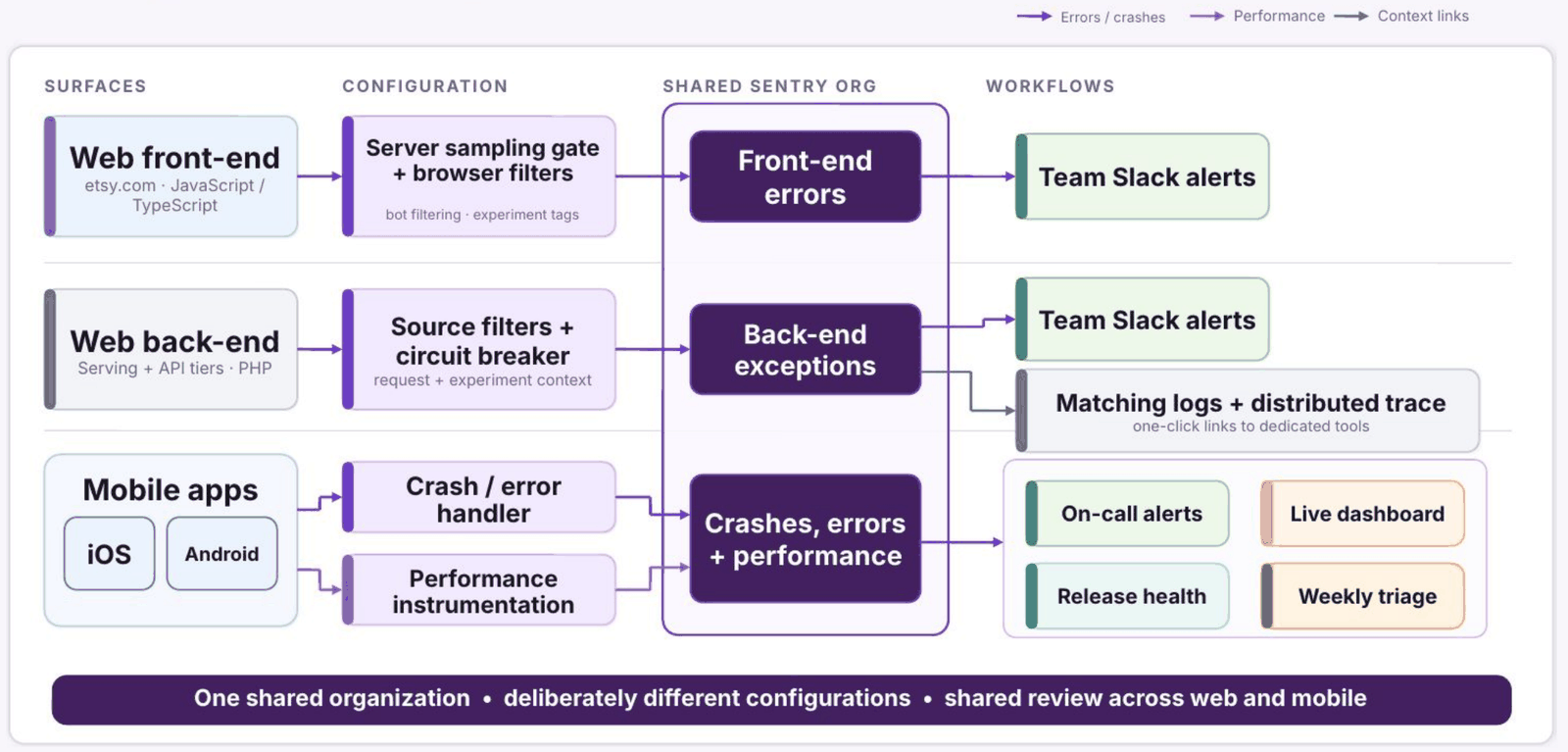
Etsy runs the opposite. Only two things trigger noisy alerts: crash-free rate, and crashes per hour outside their historical norms. Tripping either one sends an alert to Slack and opens a corresponding incident.
Everything else lands in a separate Slack channel that does carry a stream of issues you don’t want to just discard. It’s not there to wake anyone. It’s there so someone can look at what’s rising and route it to a team.
Two things to add to that. Alert on the floor, not just the ceiling. Jay found a specific checkout type dwindling only because he happened to be building an unrelated Grafana dashboard. It turned out to be an expected migration, but he had no alerting that would have told him. Silence is a signal most people aren’t monitoring.
And thresholds go stale. Volumes change, so the number that meant something last year doesn’t now. Jay’s own practice is to react when an alert gets noisy, and his advice is a quarterly pass through the list.
Sentry groups issues by code structure. Etsy’s ownership is organized around surfaces: screens, features, and the teams behind them. Those two things don’t line up, and during peak, that gap can cost you hours.
Here’s how this played out. In one issue, 25% of the errors were on the listing page, 25% on the home page, and 50% in the cart. Every team looked at it and correctly said, “that’s not ours.” Nobody was being a bad actor. The data just didn’t say who owned the problem.
Rather than rearchitect the grouping, Etsy added custom tags, including the last screen the user was on, so an issue could carry surface context. Then they went issue by issue and wrote rules to split the groups that swallowed unrelated crashes, and merged the ones that had fragmented. Their in-house experimentation system doesn’t plug into the integration, so experiments go in as tags too.
None of it was systematic, and it’s still in progress. But in October, “which team owns this” is a question you want answered by a tag rather than by a Slack thread.
Start at the issue list, even when you know the error
When something spikes, Jay starts at the issue list, even when he already knows which error he’s chasing. He wants to see where it sits in the mix.
The sparkline on each issue is most of the diagnosis. A long low-volume line that suddenly ramps reads differently than a spike that’s already trending down. He’ll widen the window to 14 or 30 days almost immediately, because 24 hours hides the pattern.
What he’s looking for is whether nearby issues are rising in unison. If they are, the cause is usually one thing: a release, or an experiment ramp. Then the ramp shape gives him a window to check against, and the tags tell him what percentage of events carry the suspect experiment. Fix the cause and several issues close together.
The alternative is what the notification wants you to do, which is spend an afternoon on one issue and leave its four siblings running.
Put crashes in the language the business already uses
This is the takeaway I keep thinking about.
Jay’s old CTO ran a monthly meeting on availability metrics, and other teams could connect their technical health directly to business impact. Crashes didn’t have the same easy connection, so “a crash happened, so what” was a hard conversation to have with a product manager.
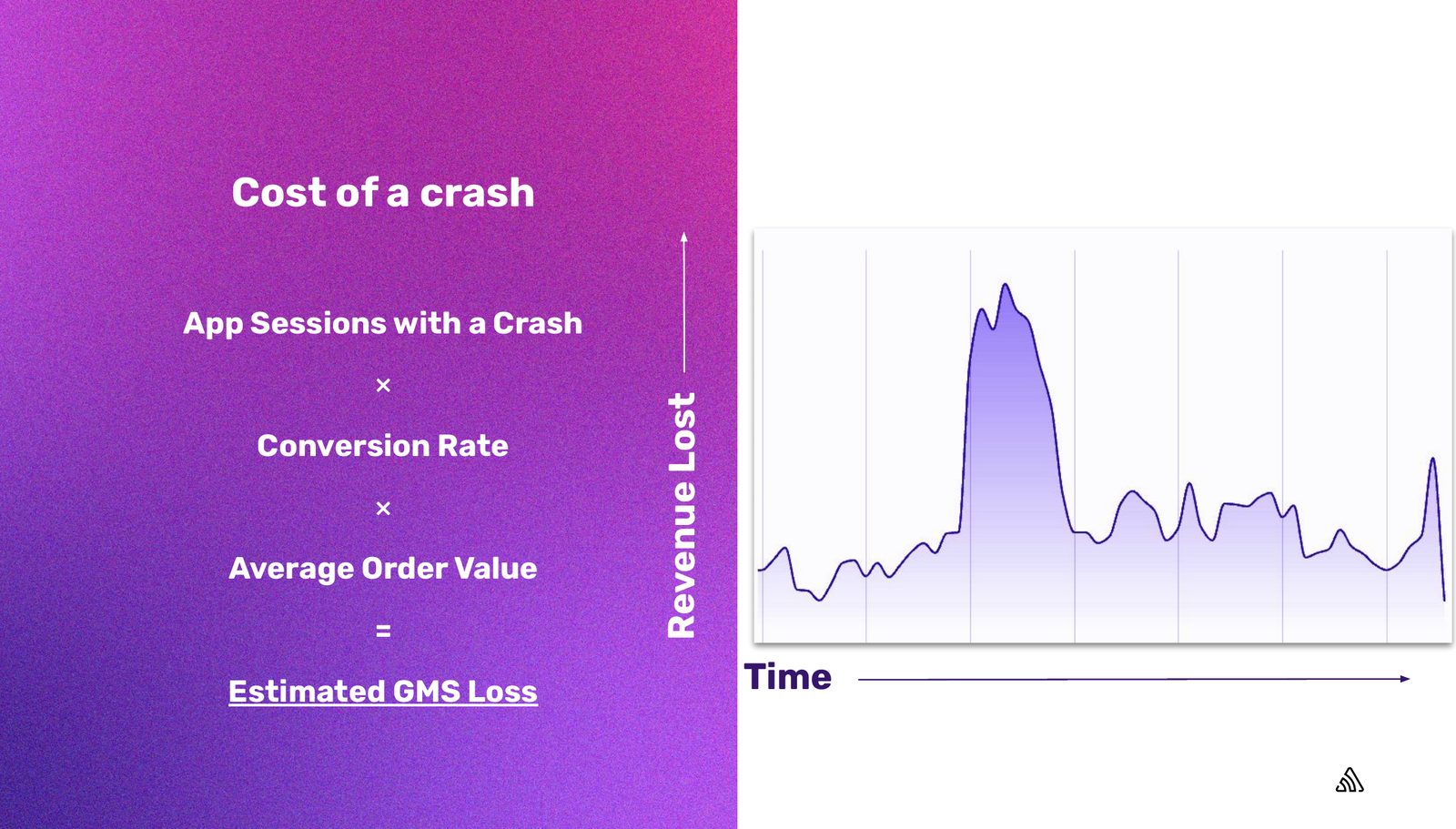
He fixed it by working with Etsy’s business analysts, who sit embedded with product teams and measure thousands of experiments a year against metrics nobody argues about. The formula they landed on:
Jay flags the obvious objection himself. It’s an estimate, and not every crash costs you an order. That’s fine. The number isn’t there to be precise, it’s there to make crash rate a thing you can discuss with anyone in the building. He reports it monthly, up to his CTO.
If you’re trying to get observability funded, this is the move. Find the two or three metrics your business already runs on and connect your technical health to them. Hours saved works the same way: prove a job that took an afternoon now takes ten minutes, multiply by loaded engineer cost, and you’ve made the case in a currency the business already tracks.
Earn the automation by doing it manually first
Etsy’s crash triage didn’t start automated. It started with somebody asking, “hey, can you go look at this week’s crash rate?”
That only goes so far, so they formalized it: a manual process of checking both platforms, finding the top issues, routing them to teams, and following up on the ones lagging. Then it became a weekly rotating shift with capacity allocated in the sprint. Then engineers being engineers, they wired the Sentry MCP server into it to generate the report that goes into the weekly ticket. Now it’s an agent skill, and the next step is putting it behind an agent.
The accuracy story is the useful part. Early on, the automated version assigned about three out of ten crashes correctly, which is not good enough to trust. It got better by adding signals: the custom tags they’d built, git blame, and Seer’s root cause output. It’s still a work in progress.
I’ve watched a lot of people skip straight to the agent. What they get is a loop they can’t debug, because they never ran it themselves and don’t know what the right answer looks like. Etsy knew, because they’d done it by hand for months, which is also what let them score the agent’s output at all.
Where to start
If your peak is coming and you have six weeks, the order Jay’s experience suggests is:
Cut your alert list to what’s worth waking someone for, and give everything else a channel instead of an inbox.
Add the tags that answer “whose is this” before you need to ask it under pressure.
Check which of your mitigation levers reach the code you’re worried about.
Write down what a crash costs, roughly, in a number your business already uses.
Change nothing about your tooling in the four weeks that matter.
None of that is a capacity problem. It’s all decided before traffic arrives.
The full workshop recording runs about an hour, including the audience questions. If you want a checklist to work from, we keep one in the holiday e-commerce guide. If you want to work through the mobile side of this, the release health docs cover crash-free rate and session tracking, and alert rules cover the thresholds worth paging on.
FAQs
What is a code freeze, and how is a code slush different? ▾
A code freeze is a hard stop on merging or shipping changes for a defined window, usually ahead of a high-traffic or high-risk period. A code slush keeps the same goal but raises the bar in stages instead of flipping a switch. Etsy runs three nested phases starting in mid-October: merge mindfully, then infrastructure fortification (no changes that tax the infra, and load-adding experiments go through a scalability review), then peak, where nothing ships without very senior sign-off and only to make things better.
How do you prevent alert fatigue during peak traffic? ▾
Keep the list that interrupts a human short enough that people still read it, and give everything else a channel instead of an inbox. The test for getting on the short list is whether the condition is worth waking someone up for. Etsy uses two: crash-free rate, and crashes per hour measured against their own historical normal. Everything else goes to a separate Slack channel used for triage and routing, not paging. Alert on the floor as well as the ceiling, since a metric going quiet is also a signal, and revisit thresholds quarterly because traffic volumes move.
How do you measure the business cost of an app crash? ▾
Etsy multiplies app sessions with a crash by their conversion rate and their average order value to get estimated GMS lost to crashes. It is an estimate, since not every crash costs an order, but it converts crash rate into a number the rest of the business already uses. The general pattern is to find the two or three metrics your company runs on and connect technical health to them.
Can you roll back a mobile app release? ▾
Not the way you can roll back a web deploy. Once a bug ships inside a binary, the path to a fix runs through discovery, root cause analysis, reproduction, the fix itself, testing, merge, store submission, app store review, rollout, and the user choosing to install it. What you can do is decide in advance which mitigation levers reach the code: experiment flags, operational flags, and, rarely, a forced upgrade prompt.
Over 40 changes between 8.43.0 and 8.54.0 cut SentryAndroid.init time by 20-30%, reduced memory allocation, fixed memory leaks, and lowered background CPU time.
We moved Android SDK operations to a worker isolate, then streamlined scope updates by removing duplicate normalization and encoding JSON directly into UTF-8 bytes.
The back/forward cache is one of the most impactful performance features on the web and one of the least observable, because success looks like silence. Here's how we made it measurable.