
← Back to Blog Home

Errors, traces, logs, metrics: when to reach for what
When should I reach for a log, a trace, or a metric? I hit that question constantly when I instrument code, and I watch coding agents hit it too. It sounds like it should be obvious. Errors, traces, logs, and metrics are the four kinds of telemetry most apps run on, four tools in one box, and they overlap enough that the honest answer is every developer’s favourite: it depends. You can stuff context into span attributes instead of logging it. You can count log events instead of emitting a metric. You can add a duration to a log and call it a span.
[I had a spiderman meme here but legal told me it would be infringing so I removed it]
But the fact that you can doesn’t mean you should. Each signal exists because it answers a different question, and feeds a different workflow once it lands. Left without solid guidelines, the default is to reach for whatever’s most familiar or already there, and miss what the other kinds are for.
This post is the guidance I wanted to have, for myself and my robots. Want just the skill? Skip to the end.
In Sentry, errors, traces, logs, and metrics all come from one SDK, included on every plan. Errors and tracing have been around for years (2012 and 2020), structured logs landed last year, and Application Metrics completed the set back in May of this year. If you’ve had your application instrumented with Sentry for a while, errors and traces are probably already flowing, with logs and metrics left as tools for you to complete your telemetry story.
Errors, traces, logs, metrics: one question each
Errors: “What just broke?”
A stack trace and an exception type, grouped into an Issue that gets deduplicated, assigned, and tracked until it’s resolved. If your code threw an exception, it’s an error.
Traces: “Did the request flow the way it was supposed to?”
A trace is a waterfall of timed spans. It’s how you follow a request across your services and see where the time went: the DB query that dragged, the API call that timed out, the LLM tool call that took 8 seconds instead of 200ms.
Metrics: “How’s this trending over time?”
Counters, gauges, and distributions, each kept as an individual measurement you can slice by any attribute and drill from an aggregate back into the samples (and the trace) behind it. Not just “12,000 checkouts this week,” but 8,400 from the US, 2,600 from the EU, and 1,000 from everywhere else, and how that line moved across the last deploy. Metrics are a historical signal as much as a right-now one, which makes them an easy candidate for dashboards and alerts (but you can still set up alerts on pretty much all signals from Sentry).
Logs: “What was happening at this point in the code?”
The state of the system at one specific moment, captured as a structured event: config values, feature flags, the inputs and outputs of a function, the user ID. Logs are the trail through a function’s decision tree: the markers you drop at the points where the code makes a choice, so that later, a human or an agent can follow the reasoning. They fill in the why once errors and traces have told you what broke and where the time went.
A real(ish) world example
Let’s say you run a storefront with a React frontend and a Python API. Support starts forwarding tickets: the product recommendations on the account page look generic for a chunk of logged-in customers: bestsellers, not the personalized picks they’re used to. The vibes are off.
Did anything crash?
First place I’d look is Issues. No exception in the React app, no failed request, every call to /recommendations/{user_id} came back 200. As far as error tracking is concerned, the app is perfectly healthy.
Was anything slow, or did the request go off-path?
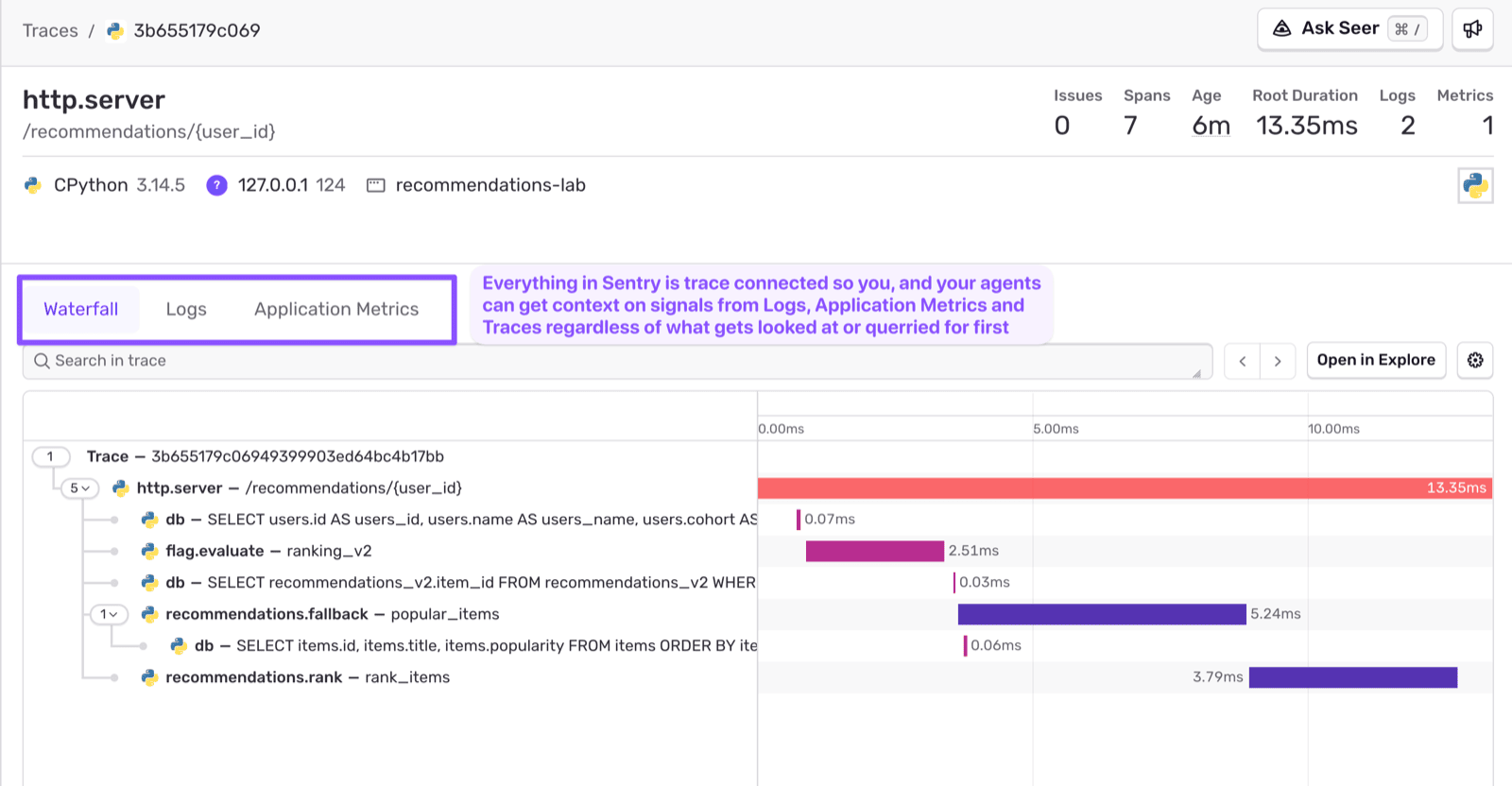
Pull a trace for one of the affected requests. The route and the database queries are auto-instrumented; I added a few named spans for the recommendation steps:

The request loaded the user, evaluated the ranking_v2 flag, queried recommendations_v2, fell back to popular items, and ranked them. The path is right and the timing’s fine. That recommendations_v2 query succeeded (returning zero rows is a perfectly successful query), so the code did what it was built to do and fell back. The trace tells me the request flowed as designed. It can’t tell me the design just quietly failed this user. On the surface, everything is fine.
Can we dig a little deeper?
Search the logs for the user from the ticket, and the structured log from inside the handler will give you the state at the moment it decided to fall back.
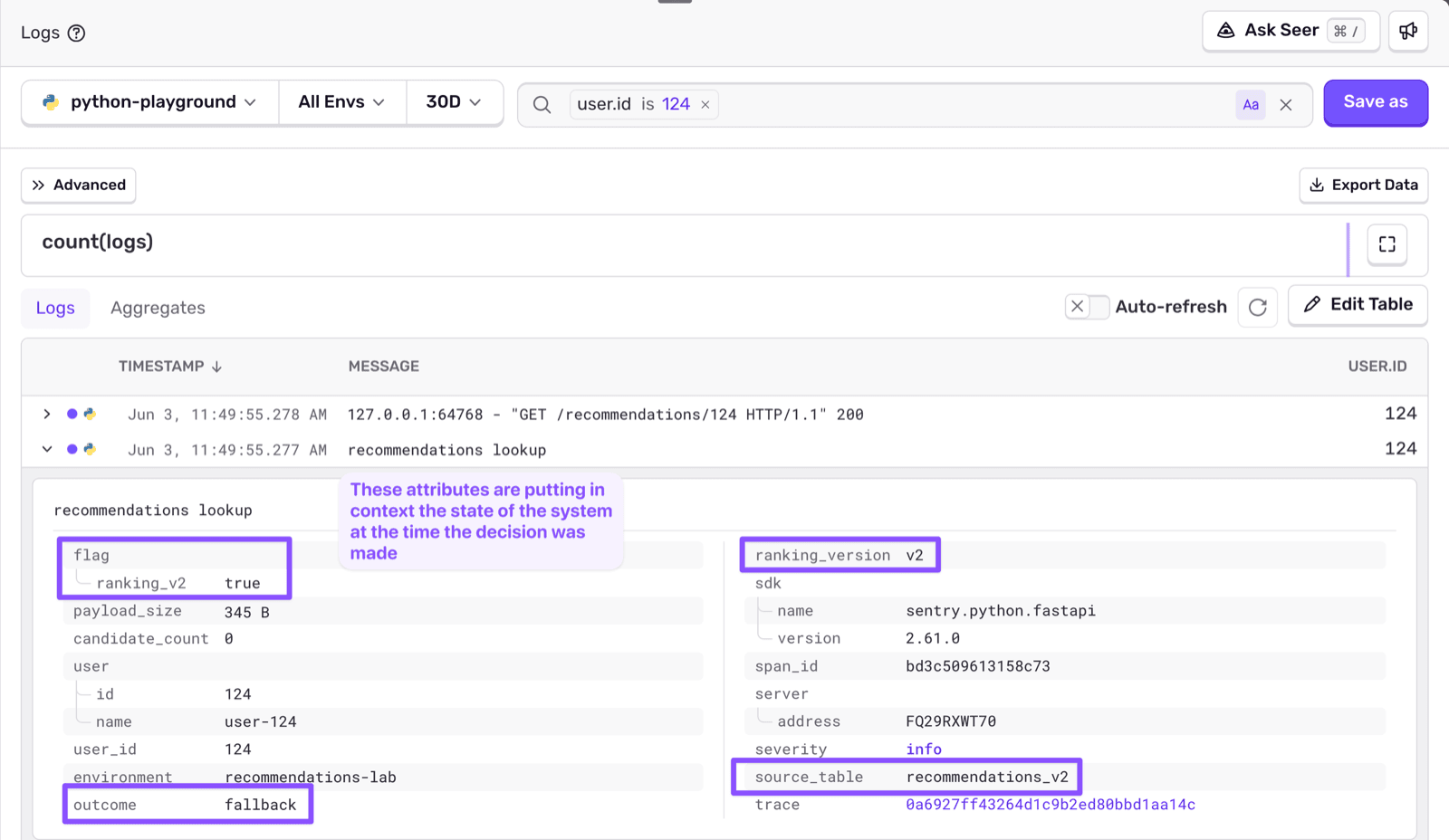
This user got bucketed into the ranking_v2 feature flag, which reads personalized picks from a new recommendations_v2 table. The table shipped, but the rows were never backfilled, so the lookup came back empty. To the code, an empty result is a perfectly valid “no personalized recs for this user,” the same thing a brand-new user with no history would get. So it falls back to bestsellers and returns 200.
Why not just attach this data on the span? You could set outcome and candidate_count as span attributes. But traces might be sampled, and the one request a customer is complaining about usually ends up being the one that’s sampled out (at least with my luck). A span attribute is great for reading a trace you’ve found; it can’t help you find one. Logs aren’t sampled.
How many people hit it?
One affected customer is a support ticket. Knowing whether it’s a small subset of users or a significant chunk is the difference between fixing it Monday and paging someone tonight. A recommendations.served counter, tagged with ranking_version and outcome, draws the line:
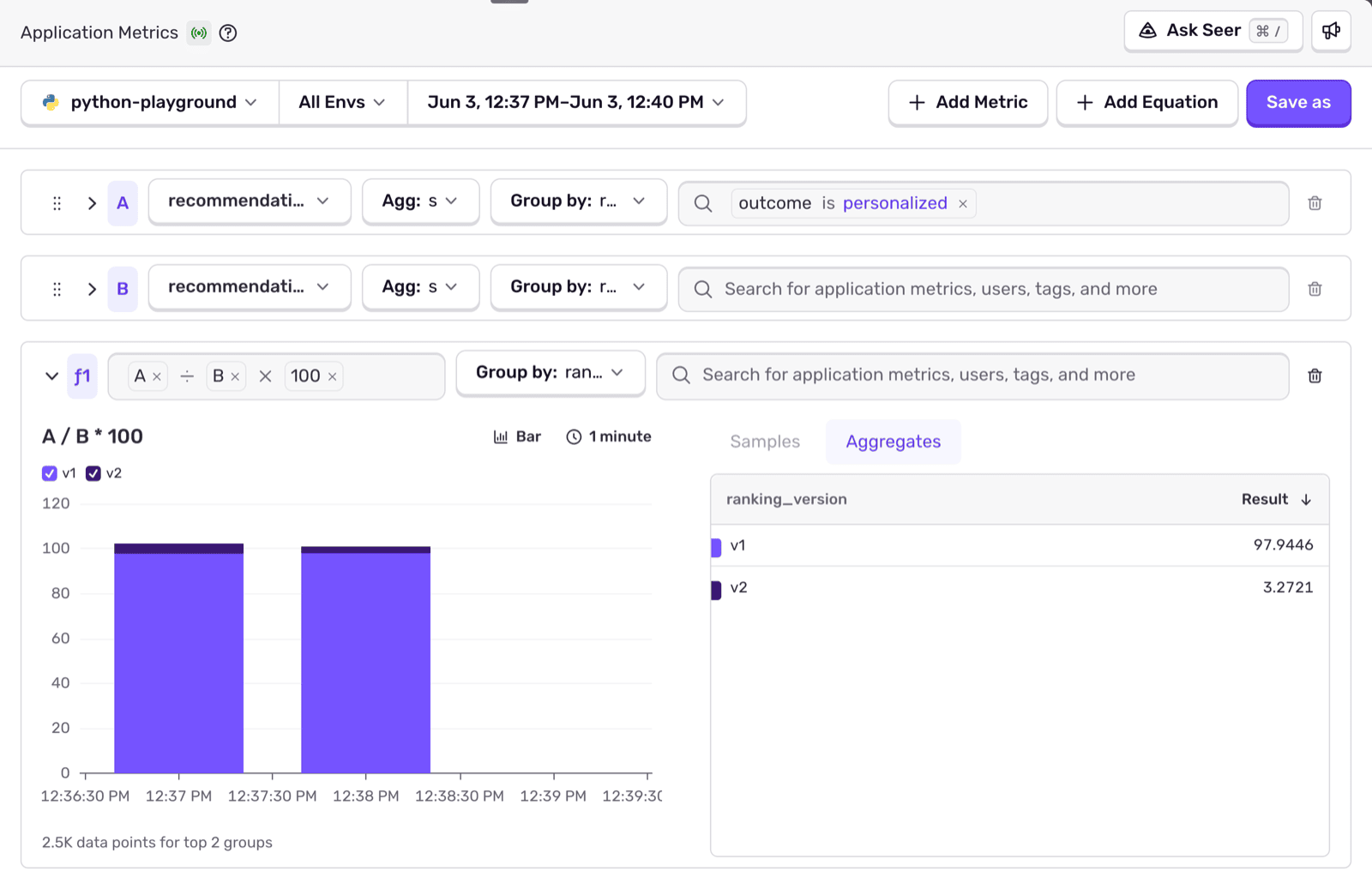
The v2 path is serving almost nothing but fallbacks, v1 is normal, and the drop lines up with the flag rollout. Scope and trigger, without opening a single trace.
No one signal cracked it; each ruled something out. No Issues in the feed meant it wasn’t a crash. The metric said it wasn’t a one-off: the whole v2 cohort was falling back. The trace, where one was sampled, showed the path running exactly as designed, which is why it slipped through. The log, pulled up by the user_id from the ticket, said why, and I never needed the trace to get to it.
When to reach for what
I use this as a gut check:
| What you want to know | Reach for |
|---|---|
| Something crashed, show the stack trace | Errors |
| How long did this take? Which step is slow? | Traces |
| Did the request flow through the steps I expected? | Traces |
| What was the state when the code made this decision? | Logs |
| What did this function receive and return? | Logs |
| How often does X happen? Is the rate normal? | Metrics |
| Did something change after the deploy? | Metrics |
The tricky cases are the overlaps, and of course there is nuance to all of this because the same value can show up in more than one signal.
Span attribute or metric?
If it’s context about one request’s flow through the system and you want it while reading that trace, it’s a span attribute. It rides on the span in the waterfall. If it’s a standalone value you want to chart, alert on, or slice over time across all requests, it’s a metric. The same number can warrant both: candidate_count as a span attribute lets me read one request; recommendations.served as a metric lets me watch the rate. One is for inspecting a single flow, the other for watching the aggregate.
Log or span?
The span is the timed node in the flow, and most of them are auto-instrumented, so you rarely write them. The log is the decision-point state inside that node, and you always write it on purpose. Span answers where and how long; log answers what was true and why.
Log or metric?
A log is one request’s story, the needle. A metric is the aggregate, the question of whether the haystack is normal. When you want to find the specific request that went wrong, that’s a log. When you want to know how many requests went wrong, that’s a metric.
Error or log?
If it needs a stack trace and should be tracked as an Issue, it’s an error. If it’s an unexpected-but-handled condition worth recording, it’s a log. If it’s truly non-critical, logger.warning(exc_info=True) captures the traceback in logs without creating noise in your error feed.
What the instrumentation looks like
Everything above came out of one endpoint: the GET /recommendations/{user_id} route from the walkthrough, the function that loads the user, checks the ranking_v2 flag, queries recommendations_v2, and falls back to popular items when it comes back empty. Here’s that same handler with the instrumentation in place.
Most of it you don’t write. The FastAPI integration traces the request, the database integration traces every query, so you get the path and the timing without a single hand-written span.
What you do place by hand are the deliberate signals: a span attribute or two to enrich the flow, the decision-point log, and the metric.
import sentry_sdk
from sentry_sdk import logger

# The route is auto-instrumented. FastAPI gives you the request span;
# the DB integration gives you a span for every query below. You write none of it.
@app.get("/recommendations/{user_id}")
def get_recommendations(user_id: int):
    user = db.get_user(user_id)                          # auto-instrumented db span
    use_v2 = flag_enabled("ranking_v2", user)
    ranking_version = "v2" if use_v2 else "v1"

    candidates = db.personalized_recs(user_id, version=ranking_version)  # auto db span
    outcome = "personalized" if candidates else "fallback"
    items = candidates or db.popular_items()             # auto db span on the fallback

    # SPAN ATTRIBUTE: context about THIS request's flow, read inside the trace.
    # It rides on the auto-instrumented request span; no new span needed.
    span = sentry_sdk.get_current_span()
    span.set_data("ranking_version", ranking_version)
    span.set_data("recommendation.outcome", outcome)

    # LOG: the trail through the decision tree, the state at the moment the
    # code chose personalized vs. fallback. The only signal that records *why*.
    logger.info(
        "recommendations lookup",
        attributes={
            "user_id": user_id,
            "ranking_version": ranking_version,
            "flag.ranking_v2": use_v2,
            "source_table": f"recommendations_{ranking_version}",
            "candidate_count": len(candidates),
            "outcome": outcome,
        },
    )

    # METRIC: the rate across all requests, sliceable by version and outcome.
    sentry_sdk.metrics.count(
        "recommendations.served",
        1,
        attributes={"ranking_version": ranking_version, "outcome": outcome},
    )

    return items
Three deliberate touches, each carrying a piece the others can’t. The span attribute tags the request’s flow with the ranking path so it’s right there when I open the trace. The log records what the function decided and why, at the instant it decided. The metric counts the outcome with enough dimension to slice it later.
If you do want a sub-operation timed in the waterfall (say the ranking step, or a call to an external recommender), you can wrap it in a custom span with sentry_sdk.start_span.
Beyond what you write, the SDK fills in even more on its own. Frontend SDKs tag everything with the browser, OS, and release. Call sentry_sdk.set_user() once and that user follows the errors, spans, logs, and metrics for the request. And because all four come from the same SDK, they share a trace_id and correlate on their own: every log carries the trace it belongs to, and you can jump from a metric spike straight into the traces behind it, without gluing four vendors together to get there.
All of this is ready for you to use and included in every plan. The deliberate signals (the span attributes, the decision-point logs, the metrics) are the ones you place yourself, and they only help if you do it ahead of time, at the spots where your code makes a decision worth questioning later.
Right tool for the job
The split above isn’t just conceptual. It’s baked into the APIs, and each one is tuned for its job. The Metrics API is built for emitting counts and measures you’ll aggregate. The span API is built for measuring durations and the shape of a request. The log API integrates with your favourite structured logging library, so the lines you already write become queryable events. Reaching for the API that matches the workflow usually means reaching for the one that matches the kind of value you have: a count, a duration, or a moment.
Sampling falls out of the same logic. Traces are best as a sampled representation of your traffic: you don’t need every request to understand where time goes, so a percentage is plenty (and cheaper). Logs are the opposite: you keep all of them, because the entire point is to find the one rare request that went sideways, and you can’t find what you sampled away. Metrics aren’t sampled either; like logs, you filter them with before_send_metric. Match the retention to the question: a representative sample for “where does time go,” every single event for “what happened to this request.”
You’re not the only one debugging your codebase anymore
Cody from Modem instrumented his AI agent to find out where it was spending time. He worked with Codex to wrap the async work and the logical chunks (everything that runs before the call to the model, say) in spans. Cache hits and time-to-first-token became metrics he could watch over time. Values that only meant something next to a specific operation stayed as span attributes, and the lightweight “this happened here” markers became logs. The span-attribute-versus-metric call wasn’t always obvious to him; his rule was that if a value only made sense in the context of a span, it lived on the span.
With the tracing in place, he pointed Codex at the Sentry data through the MCP server, feeding it real runs from his Playwright tests in development, and gave it one goal: optimize the code path. The agent read the spans, found work that could run in parallel, and rewrote the code to stop awaiting results until they were actually needed.
It could do that because a trace is a structured dependency tree with timing on every node, a format an agent can reason about directly. Hand it the same information as a stream of log lines and it would have to reconstruct the call graph from timestamps and string matching first.
But what about wide events?
There’s a popular argument that the four signals are overkill: emit one rich, wide event per request and derive the rest later. It’s half right.
Emit wide, absolutely. The best version of any signal is a structured event packed with context (the flag that was on, the user, the inputs and the outputs), not a bare number or a one-line string.
But the shape you emit is the shape you get to work with. One fat event in a columnar store charts fine after the fact, but it can’t group itself into a deduplicated Issue, render itself as a waterfall, or fire a real-time alert on a threshold you haven’t defined yet. Those are workflows, and each needs its data in a particular shape.
So emit wide, into the signal whose workflow you actually need. That’s why the handler emits both a metric and a log: same decision, same trace, two shapes, because watching a rate and reconstructing one request are different jobs.
Getting started
Logs and metrics are the two you probably haven’t turned on yet — they’re relatively new to Sentry, and people are still just finding them. Both are included on every plan.
You don’t have to wire them up by hand. Point your coding agent at Sentry’s setup skills for your stack and it installs the SDK, turns on tracing, logs, and metrics, and drops instrumentation at the decision points. Then aim it at your Sentry data through the MCP server and give it something real: your slowest trace, your newest issue.
Prefer to grab just the decision framework? It’s a skill of its own:
npx skills add getsentry/sentry-for-ai --skill sentry-instrumentation-guideThe telemetry you emit to debug is the same telemetry it reads to help.
Want to go deeper on the logging side? Ben’s follow-up post, When and what should I be logging?, covers what to log, how to structure your messages, and what to avoid.
FAQs
When should I use a log vs. a trace vs. a metric?
Reach for a trace (mostly auto-instrumented) when you want to see where the time went and whether the request flowed as designed; a log when you need the state and the why at a specific decision point, which is not sampled, so you can always find one request; and a metric when you want the aggregate rate or trend across all requests over time. Anything with a stack trace that should be tracked to resolution is an error.
Can I just log everything and skip traces and metrics?
You can, but you lose the workflows the other signals are built for. Traces render as a waterfall a human or agent can reason about; metrics are cheap aggregates you can chart and alert on; errors group into deduplicated Issues with stack traces. Deriving a rate by counting log lines means paying to store everything just to compute a number you could have emitted directly as a metric.
Do I need all four signals from day one?
No. Errors are captured the moment the SDK is initialized, and roughly 80% of spans are auto-instrumented by your framework and database integrations. The deliberate work is the other 20%: drop decision-point logs and a few metrics where your code makes a choice worth questioning later.
How should I think about sampling for each signal?
Traces are the one you sample: set a traces_sample_rate to keep a representative slice (higher in dev, lower in production). Errors are captured by default. Neither logs nor metrics are sampled: you filter them with before_send_log and before_send_metric instead of dropping a random fraction. Every log and metric you send is kept and tied to its trace, which is why you can always find the one request that went sideways and drill from a metric back to the samples behind it.