TL;DR — We’re launching Seer Agent, which lets you ask questions and get answers based on everything Sentry knows about your app. Seer Agent is available in beta for all users today. Pop into Sentry, hit Cmd + / or at mention it in Slack to fix anything. Keep reading to see how cool it really is.
This is a story about an engineer’s night that could have been bad, but ended up… not so bad.
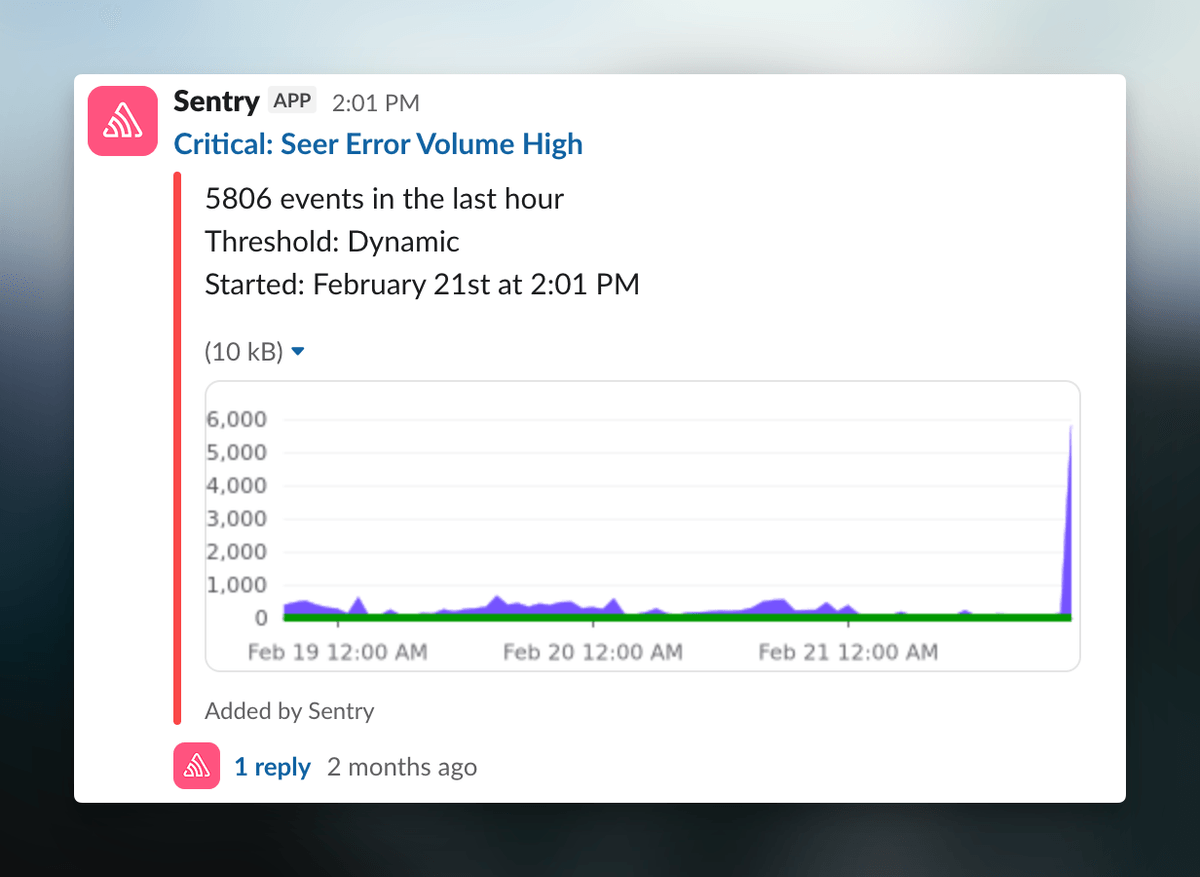
A few weeks ago, on a Saturday, our AI debugger, Seer, started failing.
Note the big scary spike on the right.
The errors were generic failures from the LLM calls, nothing that pointed at a root cause. Most of the team wasn’t scheduled to be on this weekend, and it just so happened Indragie, our Head of AI, was online. He started paging engineers.
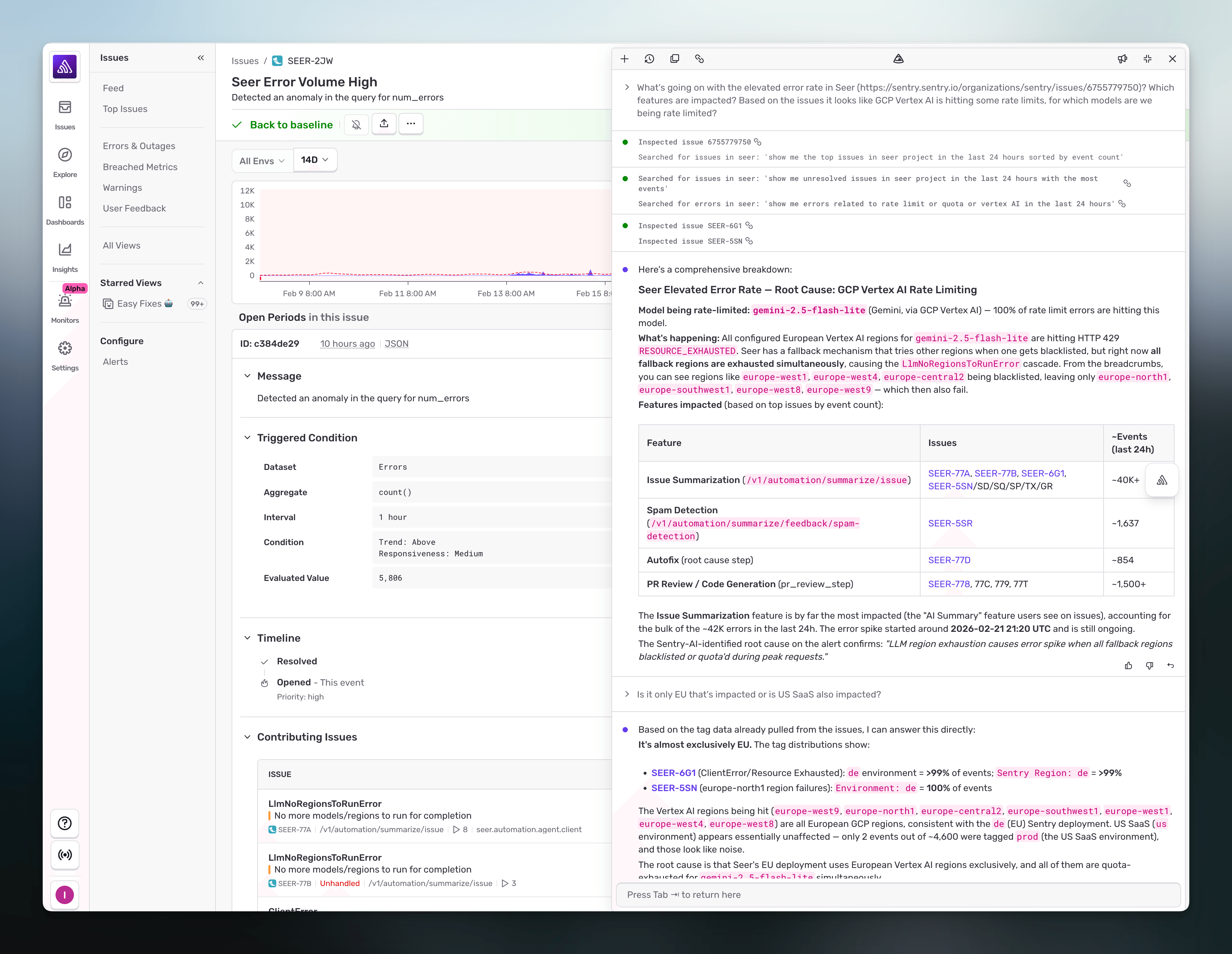
While he waited for people to come online, he opened up a tool we’ve been testing internally for a few months now: Seer Agent. Indragie told Seer Agent a bit about what he was seeing, and asked it to figure out what was going on.
It came back in seconds. The model calls were being rate-limited in specific regions for a specific model, even though we had enough provisioned throughput to handle the traffic. The rate limiting turned out to be a symptom of an upstream infrastructure outage on the provider’s side, which we confirmed after the incident, but Seer Agent had already pointed us at the exact region-and-model pattern that made the provider’s role obvious. Everything else was fine.
That’s the kind of finding that would normally start with someone pulling up a dashboard, filtering by region, cross-referencing traffic against error rate, noticing the shape, and then working backwards to why one specific region was stumbling. Indragie knows his stuff, but he’s not contributing to the codebase day to day, he’s management ;), so it would have taken him at least half an hour to get there. If we’re being honest, probably longer.
He had the root cause ready before the on-call engineer joined the channel.
That’s the job Seer Agent is for: to investigate any issue in your application from ‘big super visible outage that has people shouting at you on Twitter’ to ‘things are running slow and you don’t know why’.
Today, we’re rolling out Seer Agent to everyone in open beta.
The problem isn’t always an issue
Seer’s original premise was simple: when Sentry catches an issue, Seer reads the stack trace, the trace data, the logs, replays, commit history, and the code, and tells you what’s wrong. It works well because the investigation has a concrete starting point (the issue), and the data you need is already linked to it.
But a lot of debugging doesn’t start with an error.
Sometimes it starts the way Indragie’s example started: you do have an issue, but the error message isn’t the most helpful and the real failure is somewhere upstream that the stack trace doesn’t reach.
In all of those cases, you know something about the symptom. You just don’t know where to look.
So you start manually: open the trace explorer, write a query, filter by environment, group by region, switch to logs, pivot on a tag, go look at the service that’s upstream of this one, check its error rates, go back to traces, try a different span attribute. You’re not debugging yet. You’re navigating to where the debugging will happen.
Seer Agent is the tool that does that navigation for you. You describe what you’re seeing, and it does the traversal across all of the context Sentry has on your system and tells you what it found.
Your telemetry is already a graph
You can already search across your telemetry in Sentry’s Explore product. You can write queries against traces, filter logs, pivot on attributes. Explore is powerful, and for people who already know the ins and outs of their Sentry data it’s the fastest way to answer a specific question.
The problem with starting a debugging session in Explore is that you have to know the shape of your data before you can ask anything. If you don’t know which service is upstream of the failing one, you can’t filter for it. If you don’t know what span attribute to group by, the group-by is a shrug. Explore rewards operators who already have the map.
Seer Agent doesn’t search your telemetry the way a generic LLM with a search tool would. Sentry’s telemetry is already trace-connected. When an error happens, we know the trace it happened in. It knows the spans inside that trace, the logs emitted during those spans, the deploy that was live at the time, and the commits in that deploy. The agent walks those connections directly. It isn’t guessing at time ranges and hoping the right rows show up in a text search; it’s traversing a graph that was built at ingest.
Concretely: if you ask about an error, Seer Agent can pull the exact trace that produced it, the exact spans in that trace, the exact logs emitted by those spans, and the exact source lines the spans came from, without a single WHERE timestamp BETWEEN clause. Then it can walk the same graph in the other direction: which other services participated in traces that touched this endpoint, which of them were unhealthy at the same moment, and what their error rates looked like.
That’s what made Indragie’s investigation fast. He didn’t tell Seer Agent “look at region-level error rates for the Vertex AI provider.” He gave it the Sentry issue. It pulled the trace, saw which regions the failing calls were routed to, cross-referenced against recent calls to other models that went through the same provider, noticed that one specific model family was failing in specific regions while others were fine, and surfaced the pattern. Four steps of manual pivoting, done in one pass.
Fixing the hard issues
Some bugs are fun to investigate and tackle yourself. “Lmao look at this silly line of code, who wrote this — oh no, it was me.”
Others are not. They’re big and ugly and complex and require you to have (or quickly obtain) an absurd amount of context in your brain just to know where to start. Not coincidentally, these are things Seer Agent is very good at.
Failures whose root cause is upstream of your service. Your stack trace ends at your own call site; the real cause is a 429 from someone else’s data center. Without Seer Agent you go find the provider’s status page, check whether the region you use is affected, and correlate against your own traffic. Seer Agent correlates the traffic against the request shape (provider, model, region, time) and tells you whether the failure is distributed in a pattern that indicates an upstream cause before you open another tab.
Failures that don’t trigger a clean alert. A slow degradation on a single endpoint, a 1% error rate that started two hours ago, a tail-latency increase that’s only visible in p99. These are the investigations that start with “I noticed this and I want to know if it’s real.” Seer Agent can pull the baseline for you, compare the current window against it, and tell you whether the thing you noticed is statistically interesting or noise.
Failures that span services. An issue fires in service A, but the real cause is that service B started returning malformed responses ten minutes ago. A trace-connected graph is the only way to see this cleanly, and a human walking the graph manually will lose context two hops in. The agent doesn’t.
The bottleneck moves from “where do I look” to “what do I do about what I found,” which is where you actually want your engineers spending their time.
Multiplayer Mode in Slack
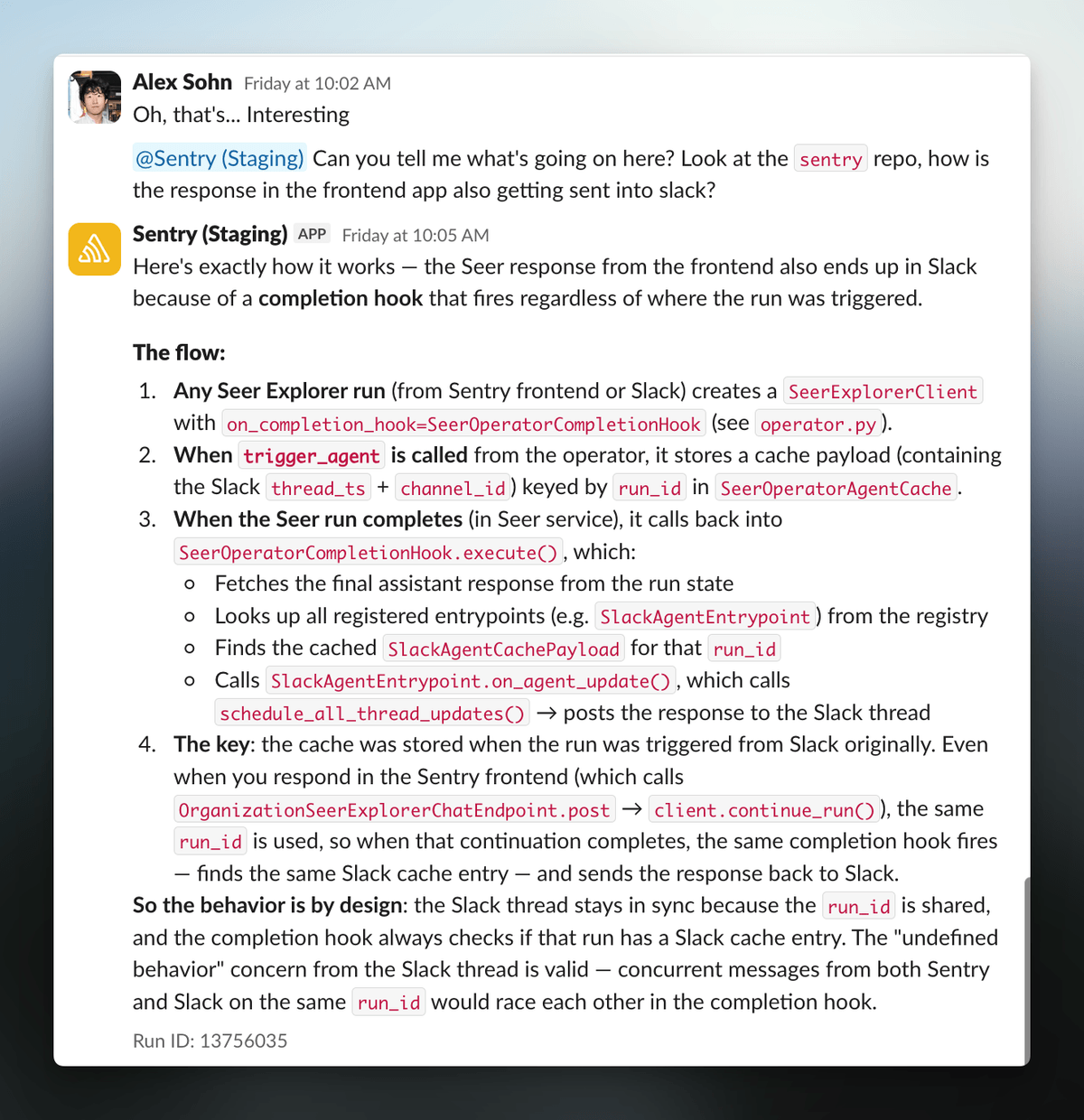
The Slack Seer agent is in active development, but in beta and ready to use today. You’ll be able to start an investigation the same way you’d ask an on-call engineer, by DMing or mentioning it in an incident channel, without having to bounce to the Sentry UI while you’re trying to put out a fire. Here’s an example how we were using Seer Agent in Slack while building it:
The more interesting thing is that the investigation becomes multiplayer. In the Sentry UI, Seer Agent is a solo tool. But in Slack, anyone in the channel can redirect it mid-step, add context the agent didn’t have, or just watch the traversal and learn the system a little better. The investigation also stays in the thread after the incident resolves, so when the same pattern shows up next month, someone can search for it instead of starting over.
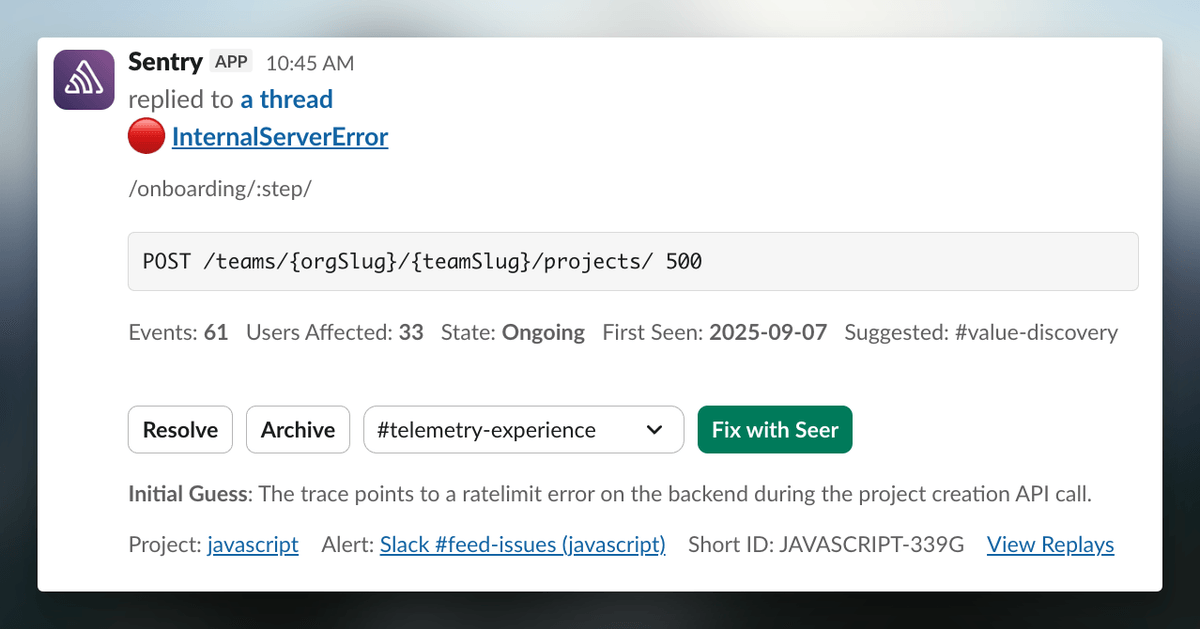
You can also trigger Autofix directly from Slack. Sentry alerts now include a “Fix with Seer” button and an initial read on the likely error. Clicking it kicks off the full Autofix workflow. This is currently in public beta. Read more about it in the docs.
The setup is light. If you already have the Sentry Slack integration installed, the Fix with Seer button on your error alerts is already live. If you don’t, install it from Settings → Integrations. To DM Seer Agent or @mention it in a channel, run /sentry link in Slack to connect your account — if the Sentry app is already installed, just pick the same workspace when you link and the new features turn on.
What we’re building next
A few of the things on the short list, roughly ordered by when you’ll see them:
Auto-triage on incident creation. Right now, you have to go to Sentry or Slack and prompt Seer. The better version is the one where an incident getting created automatically fires off an investigation and posts the findings back to the incident channel before anyone has to ask. There’s a design for this on our side, and we’re starting with our own incident workflow.
Proactive follow-ups. When the agent finishes an analysis, it should suggest the next question, not wait for you to figure out what to ask next. “Do you want me to check whether this pattern exists in other services?” is a cheap prompt to generate and a large quality-of-life win for investigations that run long.
Message queueing and forceful interrupts. Small items, but both high-frequency complaints: you can’t queue a follow-up while the agent is thinking, and sometimes you want to kill the current step and redirect without losing the session. Both are on the near-term list.
How to try it
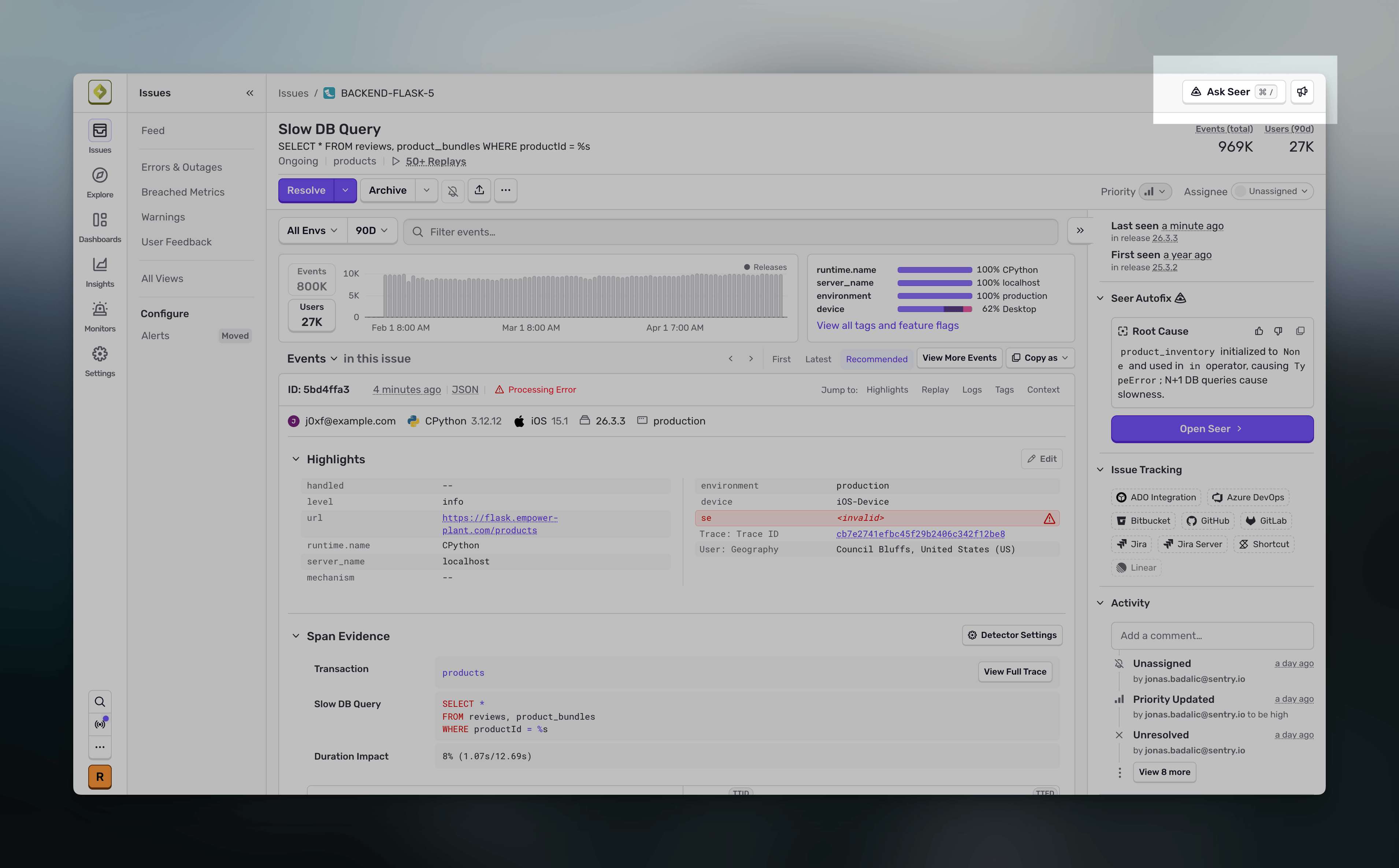
Seer Agent is in open beta for all Sentry users. Open any page in Sentry, hit Cmd + / or click the “Ask Seer” button, and ask it something.
Peek a the docs here, and we’ll run a workshop on it next month if you want to watch the team drive it live.
If you find a case where it falls over, tell us. Half of what’s on the “what we’re building” list above came from people using it and telling us exactly where the agent went wrong.
Sentry's Flutter SDK 10.0 makes streaming traces the default, fixes crash-free rate accuracy for unhandled errors, and adds dedicated app startup traces on Android and iOS.
The OpenTelemetry instrumentation packages needed a Node module loader, a package.json file, and a mutable exports object. v11 replaces all of that with a source transform and diagnostics channels, so tracing now works on Cloudflare Workers, Bun, Deno, and bundled server deployments.
With Unreal Engine 5.8, your coding agent can drive the editor through Unreal MCP. The Sentry plugin adds tools and skills so it can set up Sentry, upload debug symbols, and root-cause crashes for you.