The traditional dashboard workflow, teams slowly handcrafting visualizations to track critical KPIs, is dying in a world of AI agents.
A few years ago, in a pre-agentic-everything world, we tried to make it easier for developers to monitor critical experiences. We introduced Insights pages, which were pre-configured dashboards any Sentry user could adopt instantly that surfaced common health signals, like Web and Mobile Vitals.
The idea was right, but there was a problem: while many companies share common signals, every organization is unique. Without meaningful customization, most teams still ended up having to slog through manually building dashboards themselves. So we kept iterating.
Large language models are what finally made a reality of on-demand, customizable dashboards possible. Visualizations remain one of the most information-dense ways for humans (and agents) to communicate. What changed is the cost of creating those views.
Instead of assembling dashboards widget by widget, you can now prompt an agent to create or edit dashboards directly in Sentry, or use the Sentry CLI to connect Sentry to other models, and generate a dashboard tailored to the task at hand.
Insights pages are now Sentry-built Dashboards. Clone them, then ask an agent to customize them for your project. Dashboards can now be created in seconds, used for the lifetime of a project or investigation, and discarded once they stop providing value.
What’s new
Agentic dashboard creation & editing (beta): All organizations with AI-powered features enabled can now create and edit dashboards in Sentry using an agent-powered chat experience.
Insights are now Sentry dashboards: We replaced Insights pages with clonable, editable Sentry dashboards that you can customize to fit your specific use case.
Dashboard creation & editing via the Sentry CLI: You can create and manage Sentry dashboards from your terminal via the all-new Sentry CLI.
You can now create and edit dashboards in Sentry agentically via the same capabilities that power Seer, Sentry’s AI debugger (Note: while Seer is an add-on option, agentic dashboard creation is a separate feature that is available for free). When you create or edit a dashboard, you still have the option to add or edit manually, but you can now just tell Sentry what you want and we’ll put it together for you automatically. Creating and editing dashboards with AI makes the experience of going from concept to final dashboard much faster than manual creation:
It’s a best practice to use agentic dashboard creation as a starting point for a new dash or edits to an existing dash, and then verify and tweak the updates to make sure it’s exactly what you want. This experience is still in open beta, so we’re still ironing out some of the kinks.
Many more dashboards can now easily be created. With this in mind, we’ve created a markdown widget to encourage you to leave notes and document what you’ve built:
Dashboard revision history
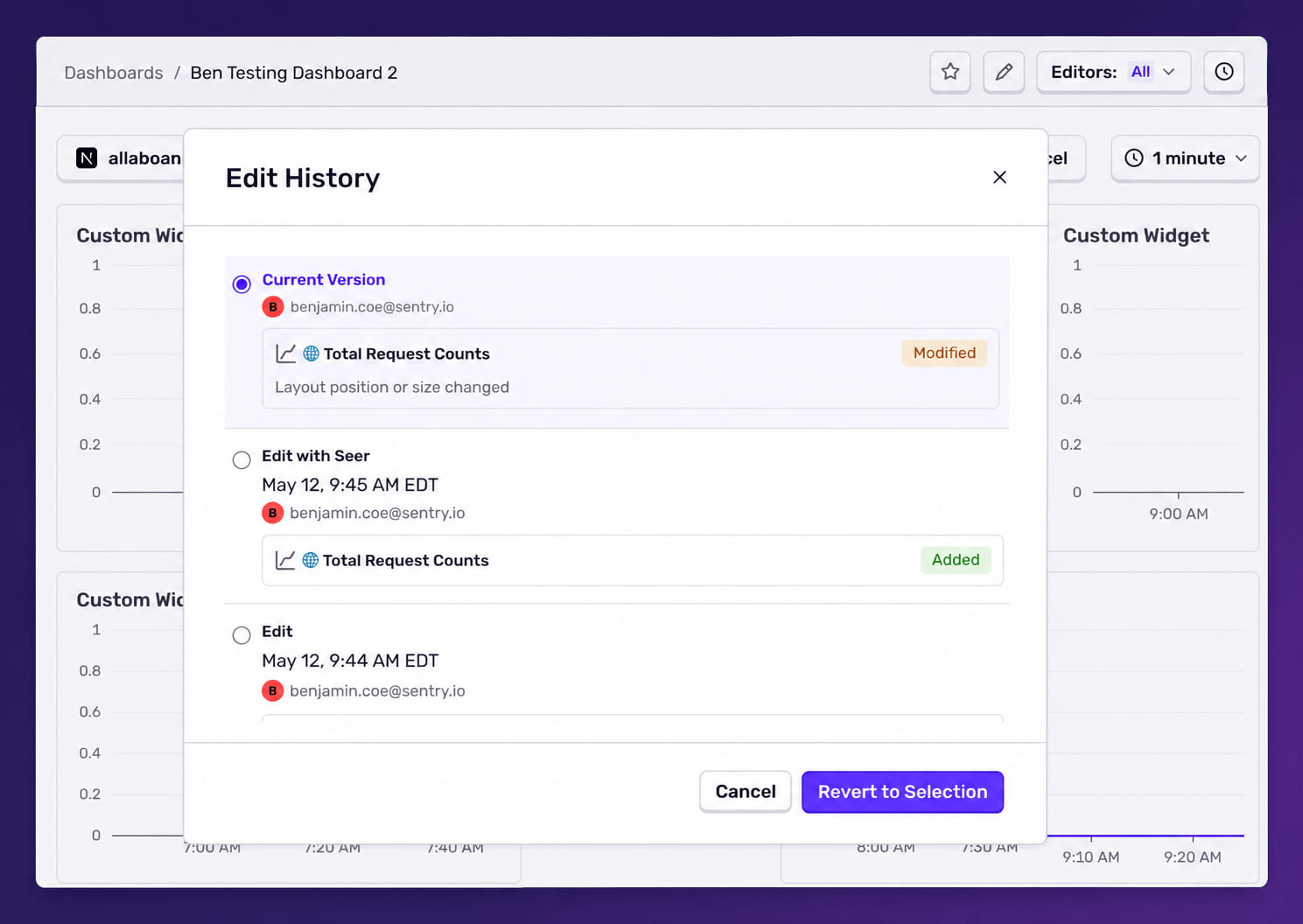
Dashboards now maintain a revision history. Any edits made through the UI, Seer agent, or API are automatically tracked. To view prior revisions, click the clock icon in the upper-right corner.
If you, or a 🤖, make a mistake, you can restore a known-good version by selecting a previous revision and clicking Revert to Selection.
Sentry use case: fixing and monitoring jest tests
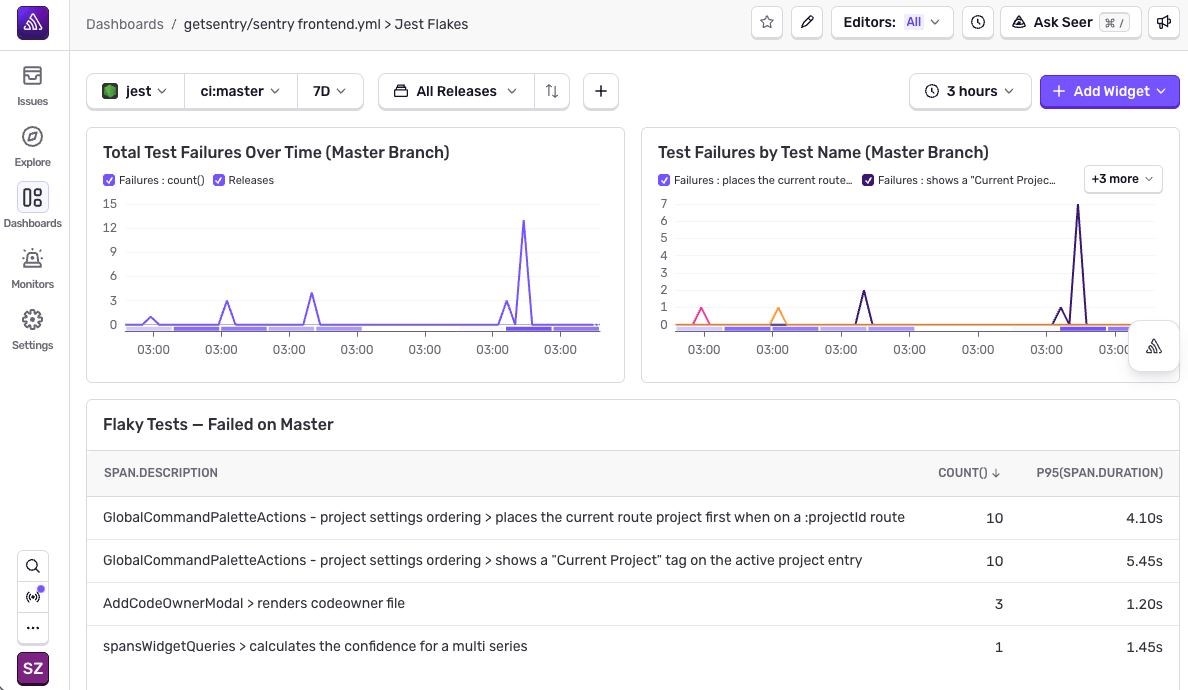
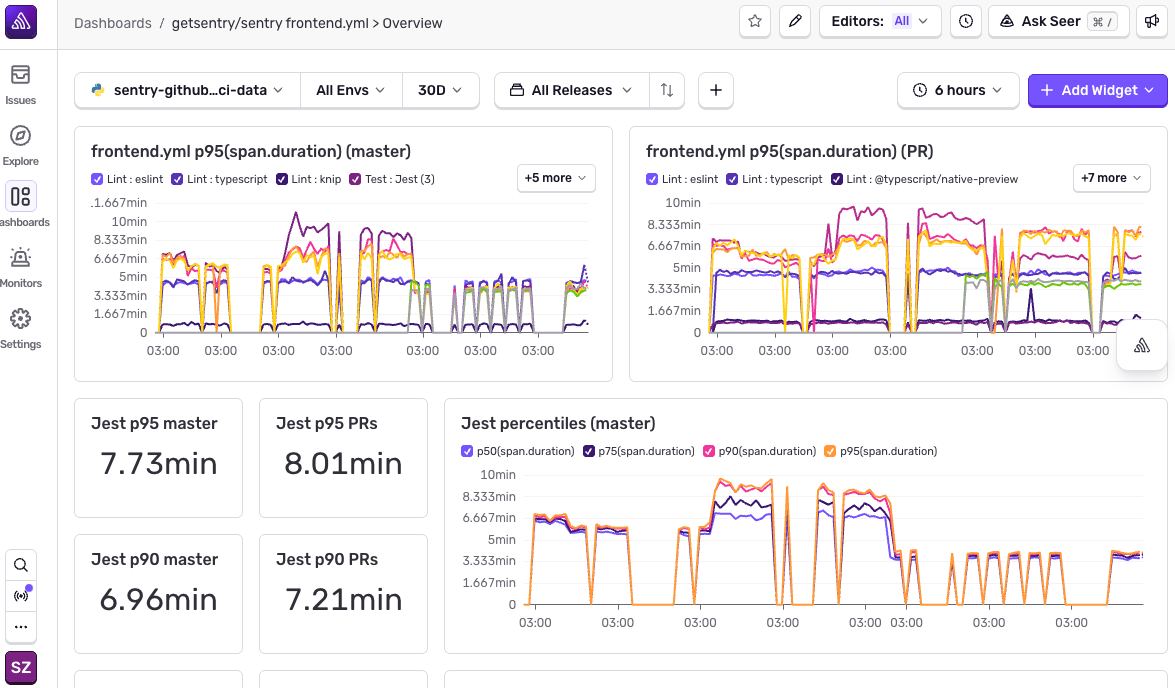
Last week, we increased the number of CI runners we use for jest tests, moving from 4 to 8 on our main branch. We’ve had 4 runners for years to parallelize the work. Total CI time depends on how long the slowest runner takes to do its work; to make sure that everything finishes at the same time we measure the duration to run each test file and parallelize based on that. More runners should mean faster CI time.
Instead, we noticed that overall CI time had been regressing for a few days, going from 6 minutes up to 10. The culprit was that the balancer script wasn’t running successfully because tests were failing out. Once we fixed some flaky tests, that time went down from ~10 minutes to less than 4. Our new runner configuration did improve overall CI time after all!
To prevent this from happening again we used agentic dashboard creation (plus some manual metric creation) to whip up some new dashboards (and monitors) to keep tabs on flakes, balance failures, and overall slowness:
Insights are now Sentry dashboards
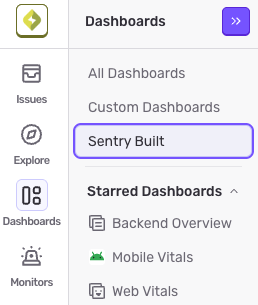
In the Dashboard nav item, you’ll see the option to explore Sentry Built dashboards:
This is a collection of dashboards pre-built by Sentry to address common monitoring use cases. The Sentry-built dashboards cannot be edited, but they can be duplicated to create custom dashboards. You can think of them as templates that can be adapted to address your specific use case.
On the frontend side, the Web Vitals dashboard surfaces LCP, INP, CLS, and TTFB across your real users, broken down by page, with a Performance Score that flags which pages have the most room to improve. Frontend Session Health connects deployments to crash and error rates, so you can see when a release tanked your stability. Frontend Assets shows you which JS and CSS assets are slow or render-blocking, useful when LCP regressed and you don’t yet know why.
On the backend side, you get dashboards for slow queries (with drill-downs into individual query summaries and sample events), cache hit/miss rates, queue throughput and processing latency, and outbound API requests grouped by domain. The Backend Overview ties these together with p50/p75 duration and the most time-consuming queries and domains.
For mobile, there’s Mobile Vitals (cold/warm app starts, slow and frozen frame rates, TTID/TTFD), Mobile Session Health (crash-free sessions and users, with release annotations), and dedicated drill-downs for app starts and screen rendering.
There are also framework-specific dashboards: a Next.js Overview with a tree-based SSR view for finding performance bottlenecks, and a Laravel Overview tuned for Laravel-specific metrics.
Creating dashboards via the Sentry CLI
The Sentry CLI includes a full dashboard command, bringing dashboard creation and management out of the browser and into your shell. You can list, view, create, and modify dashboards, including adding, editing, and deleting individual widgets, without ever leaving your terminal. With the new dashboard command, dashboards become code-adjacent artifacts: scriptable, repeatable, and reviewable. Define dashboards in shell scripts or CI pipelines, commit them alongside your application code, and roll them out the same way you ship features.
Every command supports --json output, making it straightforward for scripts, internal tools, or AI coding agents to provision and update dashboards programmatically (that means you can easily create dashboards from Claude Code, GitHub Copilot, Cursor, or your agent of choice).
Whether you’re cloning a Sentry-built dashboard as a starting point, prompting an agent to spin one up from scratch, or scripting dashboard creation directly from your terminal, the goal is the same: spend less time building the view and more time acting on what it shows you:
Sentry Dashboards are available now on all plans. Open Dashboards to see them.
Custom Dashboards are available on all plans. Click Create Dashboard to start from scratch, or duplicate a pre-built dashboard.
Agentic Dashboard creation is live now for organizations with AI features enabled. If you don’t see the Generate Dashboard option, check your org’s AI settings.
The all-or-nothing sendDefaultPii boolean is going away. dataCollection replaces it with a dial for each category of data, so you can keep the headers you debug with and drop the values you would rather not store.
A full roundup of everything that shipped for Sentry Logs this summer — log pinning, overhauled exports, chart enhancements, terabyte-scale search, and a pile of usability fixes.
A stack trace tells you where your game died, not why. Session Replay for the Sentry Unreal Engine SDK attaches the last few seconds of gameplay to every crash report so you can watch what actually happened.