Note: Since this blog was written, AI Autofix is now called Seer.
There’s a common misunderstanding that profiling is only useful for tiny savings that impact infra costs at scale - the so-called “milliseconds matter” approach. But by dogfooding our own profiling tools, we fixed a problem that saved tens of seconds off each user interaction with our AI agent (and for those of you who like math, that’s four orders of magnitude bigger than those milliseconds that matter). This post covers what I found, how I fixed it, and why profiling isn’t just for shaving off milliseconds - it’s essential for performance and customer experience.
Speed matters - for devs, and for users
Sentry’s always been focused on using everything at our disposal to help improve debugging workflows. So, we figured the best use of generative AI within Sentry was to build Autofix, a tool that uses issue details and a tight integration with your codebase to contextualize and reason through problems. Autofix uniquely works together with developers, rather than completely independently, to find the root cause and suggest accurate code fixes.
Autofix’s whole job is to make debugging faster, but when using it, it started to feel… slow. Cold starts were sluggish, and workflows took 10-20 seconds longer than they should. These slowdowns were impacting both our own developers and our early adopters, and we knew if we released Autofix to production like this, it would feel half-baked.
We had to fix our performance issues before launch. But debugging AI-driven workflows is tricky. Was it a slow response from a 3rd party LLM provider which could only be solved with tweaks to our design? Maybe our task queue (Celery) was bottlenecked by poor infra? Both of these hunches would require huge investigations and if they were the cause, some major architectural changes. But maybe…the root cause was buried in our observability data.
That’s where Sentry Profiling came in. By analyzing execution data from real user devices in our early adopter program, we found two bottlenecks that we were in no way anticipating: redundant repo-initialization and unnecessary thread waits during insight generation. Caching and thread optimization reduced execution times by tens of seconds, making Autofix noticeably faster and more responsive. No architectural changes needed.
What even is a profile, and how can I make use of it?
Feel free to skip ahead if you’re already familiar, but here’s a quick explainer. Profiling captures data about function calls, execution time, and resource usage _in production _so you can identify performance bottlenecks at the CPU & browser level that are impacting real users.
CPU profiling** tracks where your code spends CPU cycles, helping you spot inefficient functions, blocking operations, or unnecessary loops. Browser profiling **focuses on frontend performance, capturing details like page loads, rendering delays, and long tasks in the browser renderer. There’s even Mobile profiling, which does the same with screens in native and hybrid mobile apps.
All of these types of profiles are rendered out as a flame graph, which illustrates the call stack over time. These can take a little getting used to, but here’s a quick way to read them:
**X-axis (time):**represents the timeline of code execution. Each block’s width indicates the duration of a function call.
**Y-axis (call stack depth):**shows the hierarchy of function calls. This shows the parent-child relationship between code-level functions.
**Color coding:**In Sentry, flame graphs are colored by system vs. application frames, symbol name, package and more, aiding in distinguishing different parts of your codebase or types of operation.
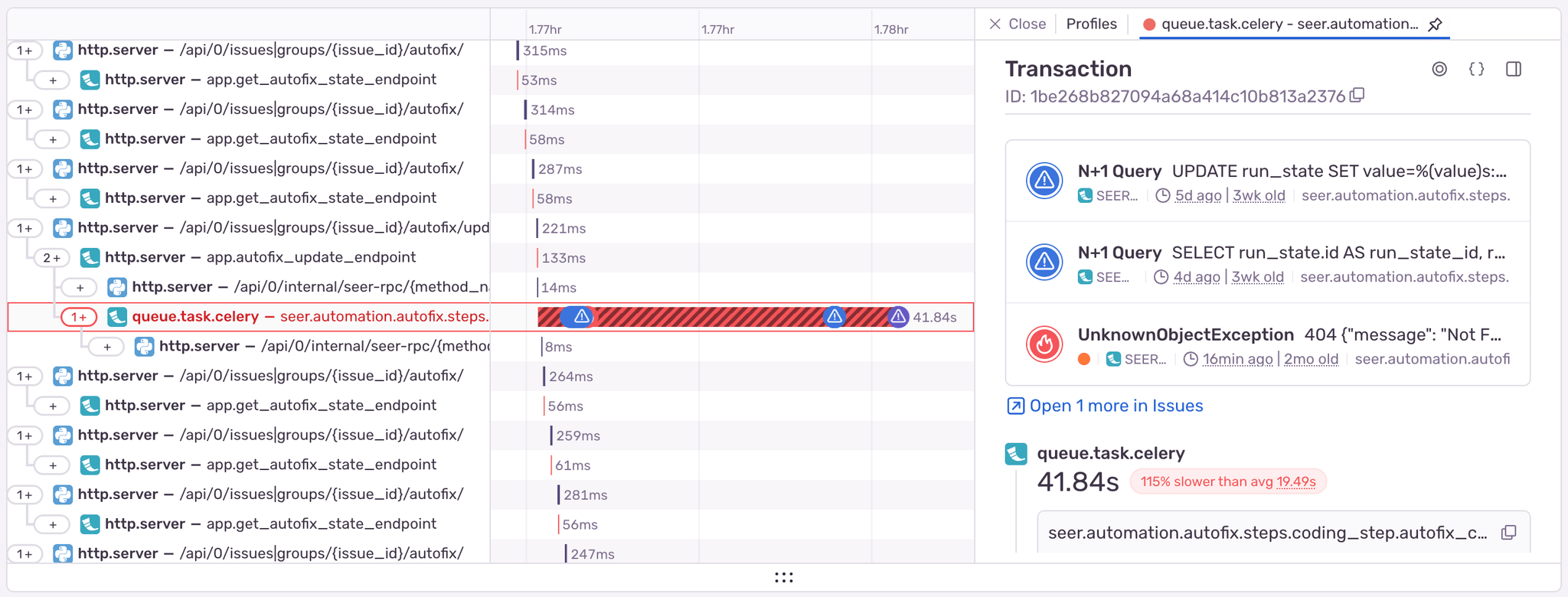
You can also see profiles alongside a distributed trace, giving you an intuitive understanding of how the browser, client CPU, and network calls are all working together. You can see individual profiles (like the one below), aggregate profiles, and even differential profiles to spot slow / regressed / new functions faster.
To enable profiling in Sentry, initialize the SDK as early as possible in your application and set the profiles_sample_rate option to 1.0 to capture 100% of sampled transactions. For example, in a Python application:
import sentry_sdk

sentry_sdk.init(
    dsn="",
    traces_sample_rate=1.0,  # Capture 100% of transactions for tracing
    profiles_sample_rate=1.0,  # Capture 100% of profiles (tune this down in prod)
)
Problem 1: Cold starts were giving Autofix the chills
**The issue: **
The whole goal of Autofix is to offer developers insights into the bugs in their application as fast as possible. But with a noticeable startup lag of several seconds every time it ran a root cause analysis or suggested a code fix, and generally long run times once it finally did start, it felt unacceptably heavy and archaic for a cutting-edge AI agent. If we didn’t improve this, developers would find the workflow frustrating and Autofix less valuable.
Typically, this investigation would start with an architecture & design meeting, followed by adding line-by-line logging, adding stop points in our code, and digging into a bunch of other open-ended questions. However, I knew we had Seer (our AI service) instrumented with Sentry Profiling. So naturally, I opened up a profile that one developer had recently run on Autofix, and dug in.
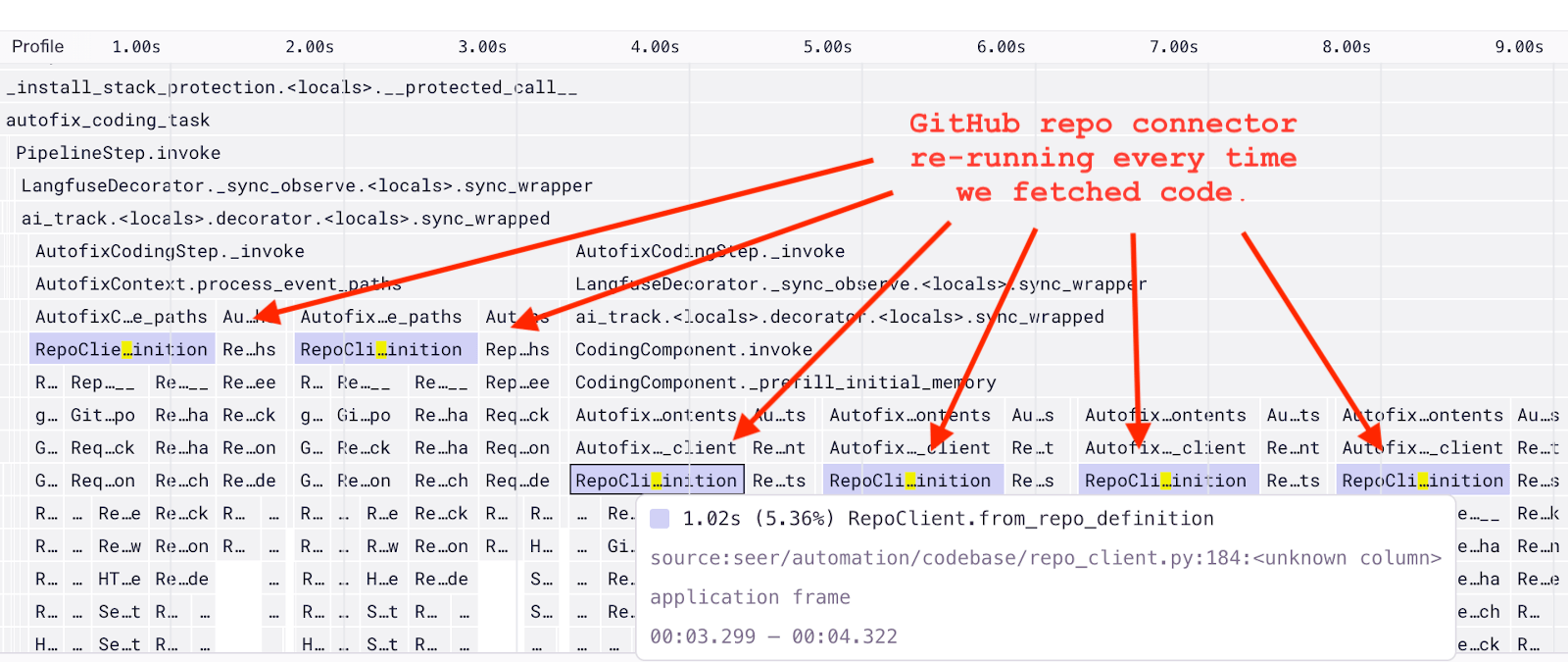
Immediately, the flame graph revealed something totally unexpected. Our from_repo_definition method, which was used to integrate with developers’ GitHub repositories, was being called over and over again – multiple times when processing the stack trace, multiple times loading relevant code at the start of the fix step, and once every time Autofix looked at a code file. Even worse, it added over a second of lag each time.
This simple visualization quickly gave me a better understanding of how our code operated. We had no idea that this was an issue, but it offered a quick high-impact opportunity to reduce our cold starts and execution time.
The fix:
I opened up the relevant functions highlighted in the flame graph and quickly understood that for the same repository, we were re-initializing our integration client redundantly. And each client initialization made HTTP requests to GitHub behind the scenes, causing the lag.
The fix was then simple. I made sure every part of the code that wanted repo access was calling the same method to do so: from_repo_definition. I then added a one-line @functools.cache decorator to the method so that if Autofix wanted to interact with the same repo multiple times, it didn’t have to wait to re-initialize it every time.
@functools.cache# only added this one linedeffrom_repo_definition(cls, repo_def: RepoDefinition,type: RepoClientType):# initializes a client to talk to a specific GitHub repository# ...
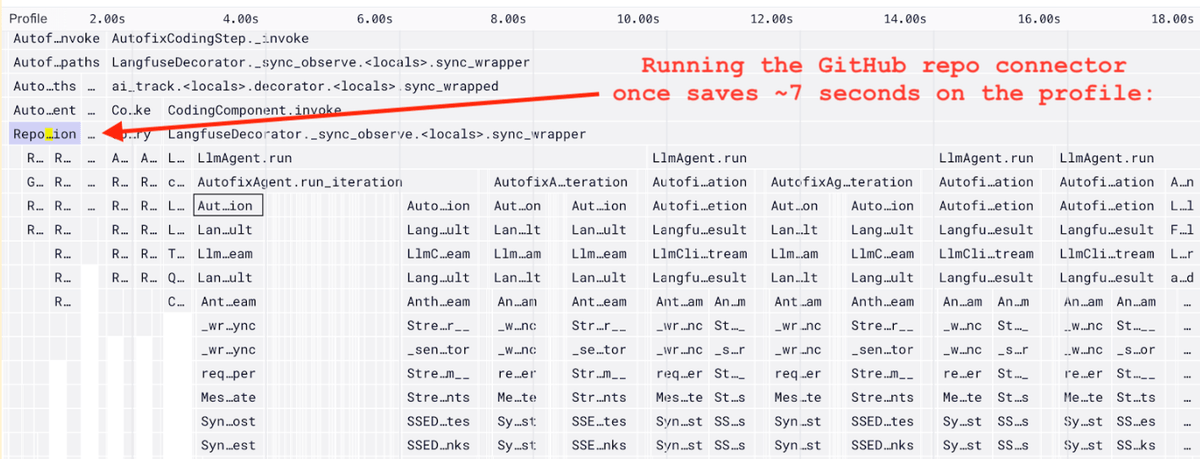
With that fix deployed I could verify that our from_repo_definition method was only called once at the start.
The result:
Within 20 minutes, I had dramatically reduced Autofix’s cold starts and lag that had been haunting us for months, all thanks to Sentry Profiling. The time saved includes:
~1 second every time Autofix looks at a code file, which happened many times in a run
~1.5 seconds before any Autofix step is started
~5 more seconds before starting the coding step
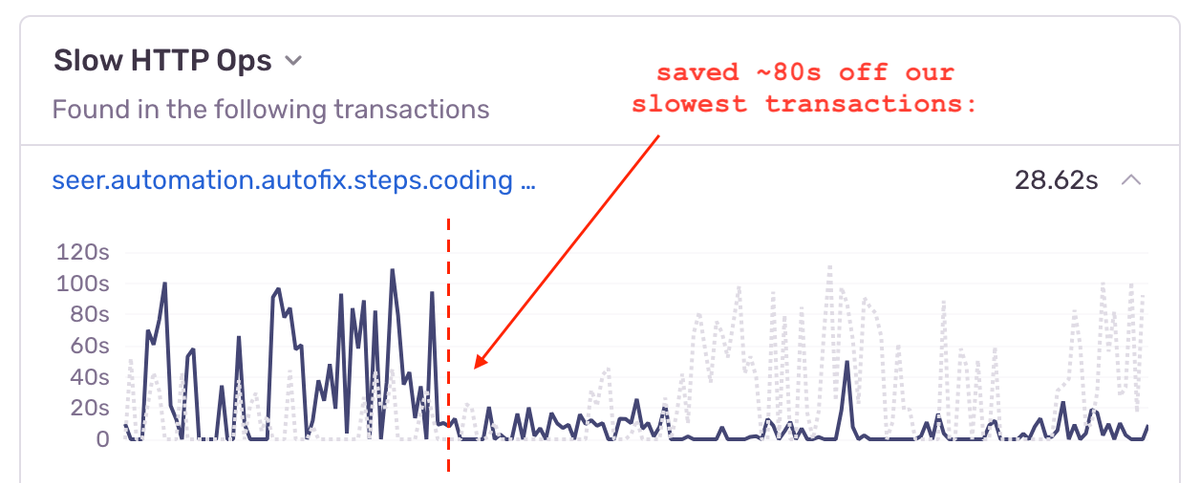
As a result, Autofix feels much snappier and helps developers debug in less time than ever. The impact is clearly visible in the Backend Insights tab:
Problem 2: Redundant threads
The issue:
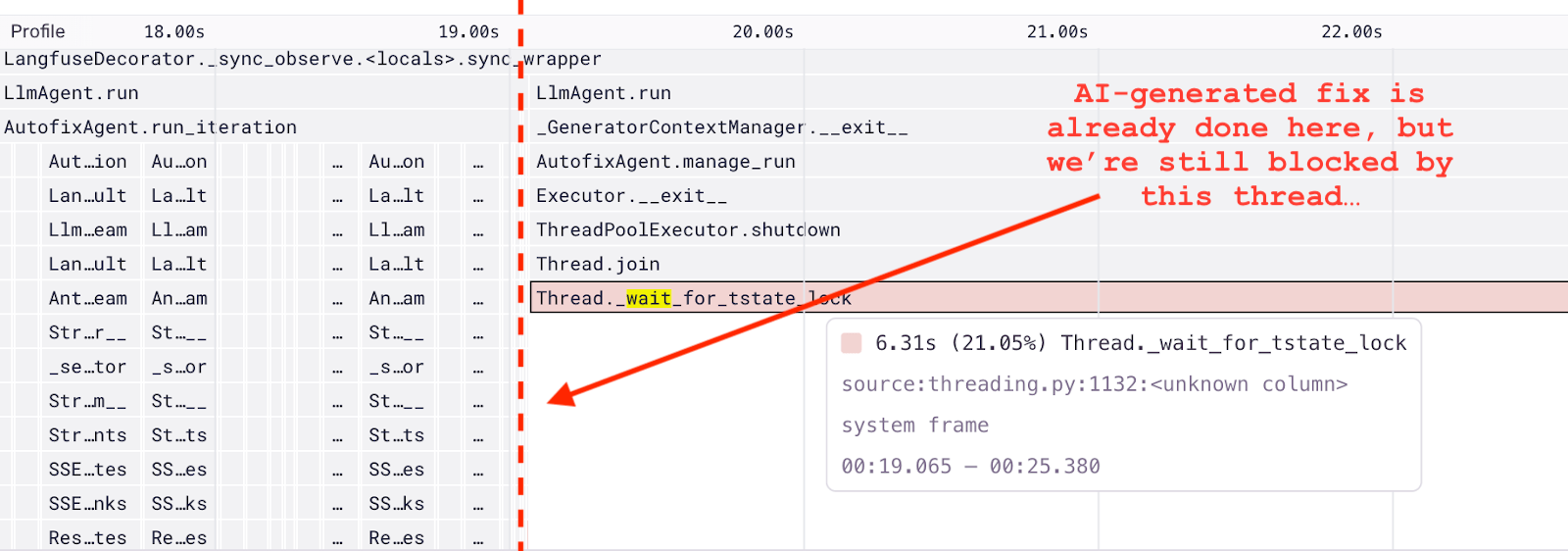
Impressed by how easy it was to discover and fix that lingering, latent issue, I opened up another profile for Autofix’s coding step. Maybe I’d find some more opportunities to improve Autofix’s performance even more. And immediately I did:
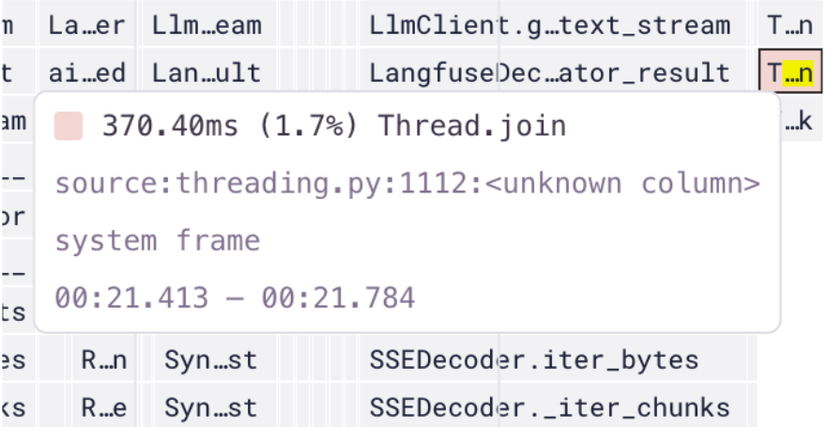
I noticed a huge block in the flame graph (over 6 seconds long) where we were waiting for a thread to complete. This was at the end of the agent’s iteration, which meant that while Autofix was doing nothing at all, it was making developers wait an extra 6 seconds for its final output.
The cause:
For context, as Autofix runs, it shares key takeaways in its line of reasoning with the user, even before it gets to a final conclusion. Since generating these insights takes a few seconds each time, we generate them in parallel to the main agent on a separate thread. For safety, we wait for threads to complete before exiting entirely. So I went straight to Autofix’s insight generation code and asked myself, “why are we waiting so long for insight generation to complete _after _the agent is done?”
I realized that when Autofix gave its final answer, we were starting a new insight generation task, as we did on every other iteration the agent took. But this was redundant. We were about to share the final conclusion with the developer anyway, so any insight we generated would say the same thing.
I also noticed that insight generation tasks queued up since we were only using one thread worker, adding to the wait time at the end of the run.
The fix:
Once I understood how the code was behaving through the profile and studying the relevant code, the fix was simple. I added a condition to not start a new insight generation task if we were about to end the run. And I simply bumped the number of thread workers from 1 to 2.
# log thoughts to the user
cur = self.context.state.get()if(
completion.message.content # only if we have something to summarizeand self.config.interactive # only in interactive modeandnot cur.request.options.disable_interactivity
and completion.message.tool_calls # only if the run is in progress <- ONLY ADDED THIS CONDITION TO THE IF STATEMENT):# a new thread is started here to generate insights# ...
defmanage_run(self):
self.futures =[]
self.executor = ThreadPoolExecutor(max_workers=2, initializer=copy_modules_initializer())# BUMPED MAX_WORKERS TO 2withsuper().manage_run(), self.executor:yield# all Autofix runs wait for the threads to complete before the run exits# ...
The result:
As a result, I completely eliminated the 6 second delay at the end of each Autofix step, getting developers valuable results much faster. And as a side effect, I reduced the noise and increased the value in the insights we were sharing.
Overall, with these two opportunities uncovered by Sentry Profiling, I shaved an estimated 20 seconds off of Autofix’s total run time.
Profiling doesn’t have to be hard
The causes for these cold starts and slowdowns could have easily gone unnoticed, tanking Autofix’s performance in production and crushing our first impressions. Without profiling, we might have missed these issues completely… or found them too late.
Could we have debugged this manually? Maybe, but would we have succeeded? Probably not. It would have been painful: stepping through logs, instrumenting lines of code, timing ops, and tracking threads.
Sentry made it brutally simple. With dedicated traces, stack traces and profiles, I found the issue in minutes: redundant from_repo_definition calls and unnecessary thread waits. The fixes - caching repo logic and optimizing thread handling - shaved over 20 seconds off execution time and made the whole Autofix experience that much snappier.
Profiling isn’t just for shaving milliseconds to optimize tiny CPU inefficiencies - it’s a tool for understanding how your code runs in the real world, and addressing any performance issues that arise. It helps you pinpoint inefficiencies and resolve issues with precision, turning runtime behavior into actionable insights. Where performance matters, profiling gives you the context you need to make meaningful improvements.
Imagine fixing 10 seconds of lag for every user in just 10 minutes. That’s what we did with Sentry Profiling. Your turn.
Set up profiling in just a few lines of code by following our product walkthrough, If you don’t have a Sentry account yet - it’s free, make one today here.
We removed all advertising cookies from sentry.io two years ago and never looked back. Here's what we learned about where the growth budget went and how to measure what you can't track.
Native crashes on Android have always been harder to debug than they should be. The platform has its own crash reporter () that captures the crashing thread,…
A little while ago, when agents were telling me "You're absolutely right!", I was building webvitals.com. You put in a URL, it kicks off an API request to a…