Setting up crash reporting is rarely the most exciting part of shipping a game. Paste a DSN, flip a few checkboxes in Project Settings, turn on symbol upload, package a build, crash it on purpose and check that the event shows up in Sentry… It’s not hard to do (and important), but it’s the kind of work you’d happily hand off to someone else.
With Unreal Engine 5.8, that someone else can be your coding agent. Until now, agents could only read and write your C++, while the editor remained a black box to them.
Unreal MCP is a new experimental engine feature that runs a first-party MCP server right inside the editor, letting agents drive it directly. Out of the box, Epic provides hundreds of tools for spawning actors, creating materials, running automation tests and a lot more.
Importantly for us, that list isn’t fixed. Plugins register their own tools with the editor, in C++ or Python, and agents see them right next to Epic’s. That’s exactly the hook the Unreal plugin uses, which means your agent of choice, whether it’s Claude Code, Cursor, or Codex, now has everything it needs to set up Sentry, instrument your project, and help you debug captured crashes.
What the Sentry plugin brings to the table
When the editor starts with MCP enabled, the Sentry plugin registers a small toolset that can inspect and change the SDK from inside the running editor and several agent skills that tell the agent how to use it.
The tools are the hands; the skills are the playbook. If you’ve used the Sentry agent plugin for Claude Code or Cursor, these will look familiar, because they mirror the same workflows, adapted for Unreal:
Get Started takes the DSN from your Sentry account, applies it, and confirms a test event arrives.
Fix Stack Traces turns on automatic debug symbol upload and helps set up the required credentials.
Instrument wires up tracing, structured logs, metrics, session replay, and user feedback on top of crash capture.
Debug Issue pulls a Sentry issue’s full context, root-causes it against your project source, and helps you ship the fix.
Each skill carries the kind of advice we’d give if we were sitting next to you during setup. Get Started knows that an editor DSN overrides the project one, so it checks where the DSN comes from before changing anything. Fix Stack Traces knows symbol upload only runs for packaged builds, so it verifies your credentials up front instead of making you wait for a full build to find out. And every skill follows the same ground rules. It asks before changing your project, never reads or prints secrets like your auth token, and applies settings in place so the editor never needs a restart.
Getting it up and running
All you need is Unreal Engine 5.8 and Sentry plugin 1.24.0 or later, as everything else ships with them:
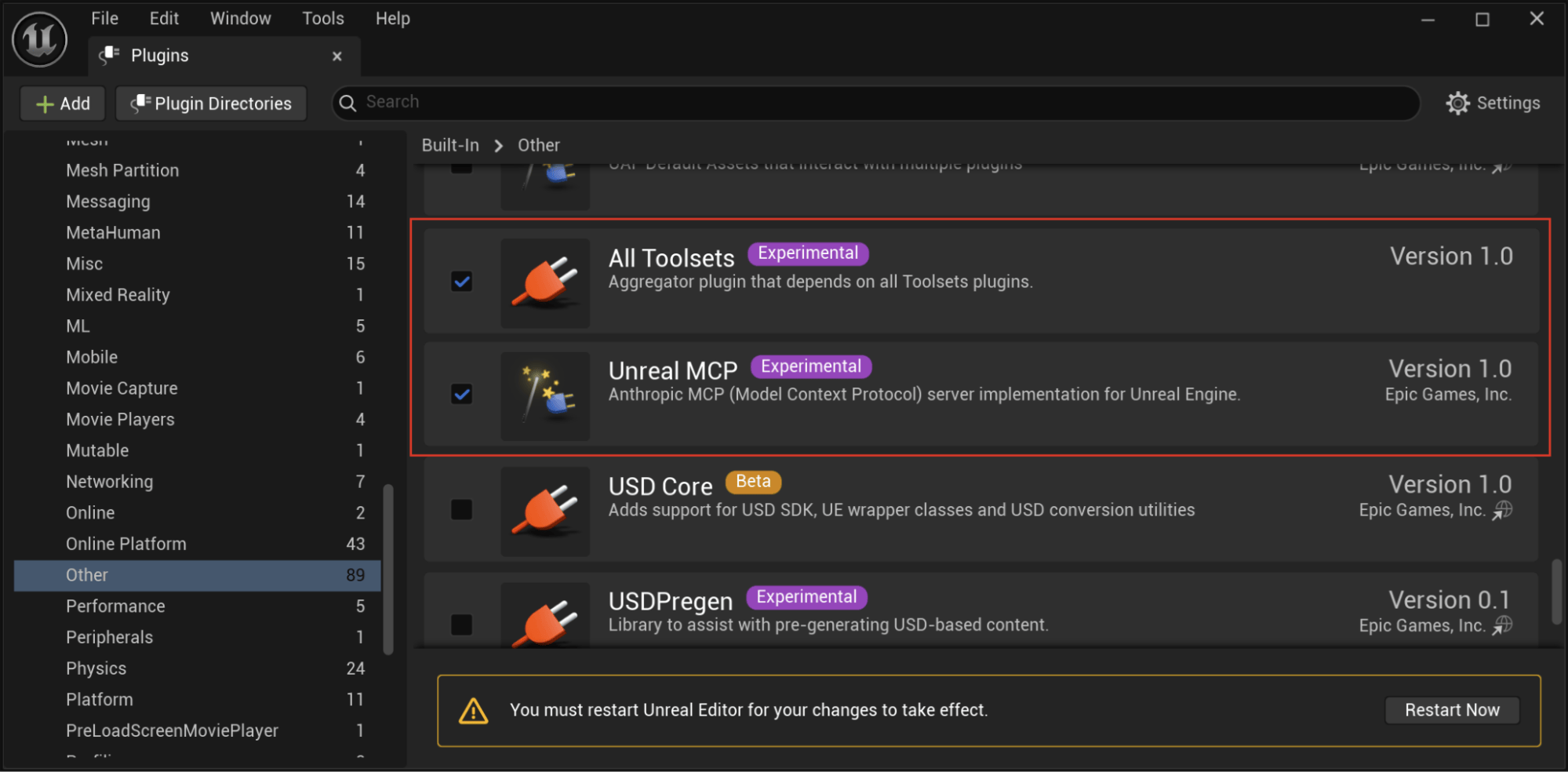
In Edit > Plugins, enable Unreal MCP and All Toolsets, then restart the editor. The first runs the server; without the second, the server has no tools to offer.
Generate a config for your agent by running a console command:
This writes an .mcp.json to your project root, which Claude Code picks up when launched from that folder (Cursor, VS Code, Codex, and Gemini get their own config files).
To start the server either run ModelContextProtocol.StartServer in the console, or turn on Auto Start Server under Editor Preferences > Plugins > Model Context Protocol so you don’t have to think about it again.
Launch your agent from the project directory with the editor open, and it will pick up the editor’s tools, Sentry’s included.
Close the loop with Sentry MCP
The editor tools can only see your project’s side of the story. They can set a DSN, but they don’t know which DSN. They can send a test event, but they can’t tell you whether it arrived.
That’s where the Sentry MCP server comes in. With it connected, the agent can list your organizations and projects, fetch the right DSN (or create a project if you don’t have one yet), and look the test event up by ID once it lands. For issue debugging, it’s what lets the agent pull stack traces, breadcrumbs, and Seer’s root cause analysis instead of asking you to paste them.
There are two ways to hook it up:
Connect it to your agent directly by following the Sentry MCP docs. This is the simplest option if your agent already talks to Sentry.
Route it through the editor. Enable the MCPClientToolset plugin and add https://mcp.sentry.dev/mcp under Editor Preferences > Plugins > MCP Toolset Servers. The editor then proxies Sentry’s tools alongside its own, so any agent connected to Unreal MCP gets them for free.
Skipping this step is fine. The skills still run, but you’ll paste the DSN yourself and check for the test event in Sentry by hand.
Taking it for a test drive
To see how this holds up outside our test fixtures, we tried it on the Sentry Tower demo game, with Claude Code connected to both the Unreal editor and Sentry MCP. The project started with no Sentry configuration at all.
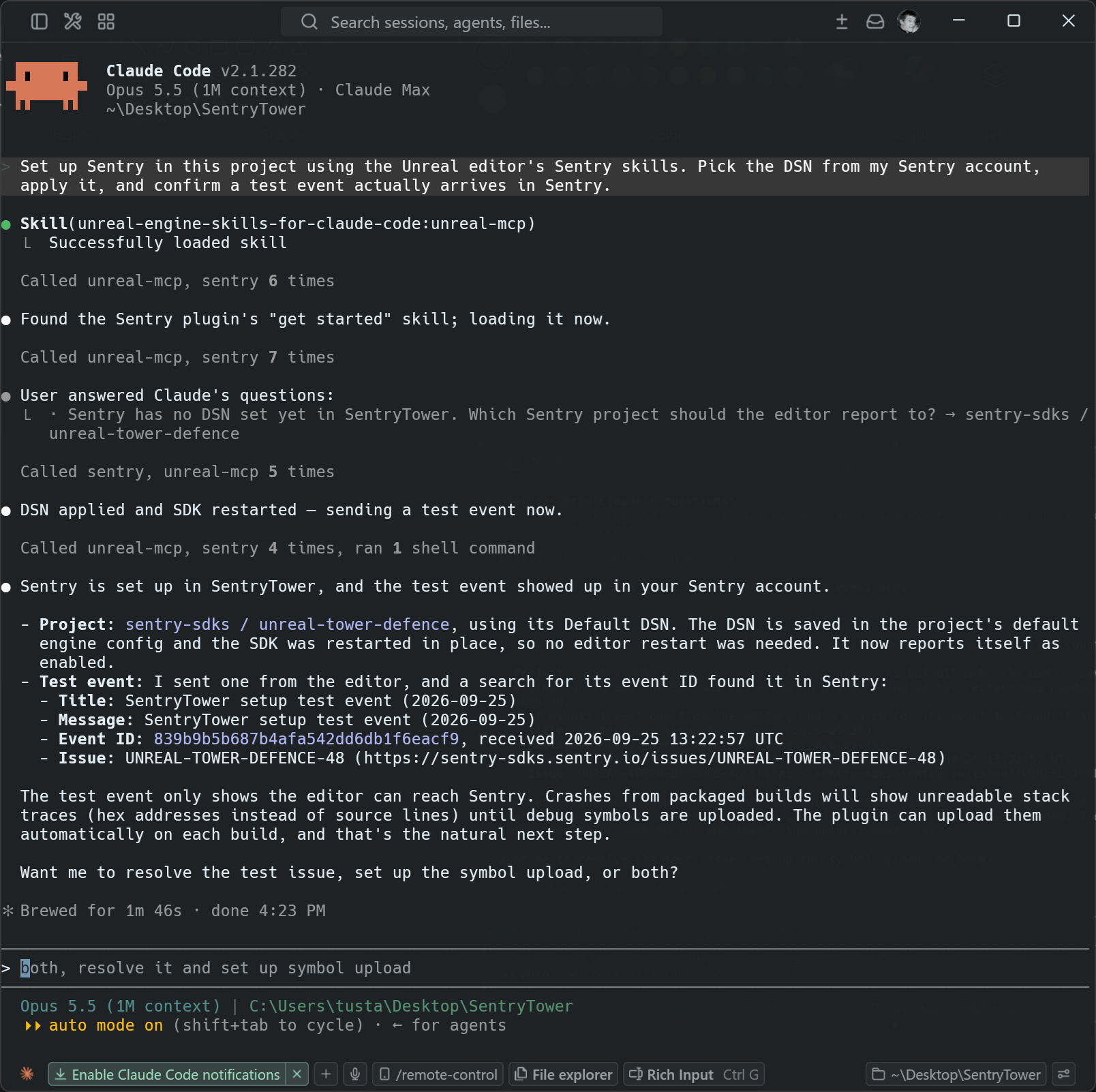
We started with “Set up Sentry in this project using the Unreal editor’s Sentry skills.” The agent checked the SDK state, listed our projects through Sentry MCP, asked which one to use, and applied the DSN without ever editing project configuration files by hand. It then sent a test event and looked it up in Sentry using its event ID.
The first phase ended with one important warning: crashes from packaged builds would still show hex addresses until debug symbols were uploaded.
So symbol upload was next. Two setting changes enabled symbol upload and source bundling. The agent then created a sentry.properties file with the organization and project, confirmed it was gitignored, and left the auth token for us to paste in - the only manual step. Once the token was in place, it verified the credentials using the Sentry CLI bundled with the plugin.
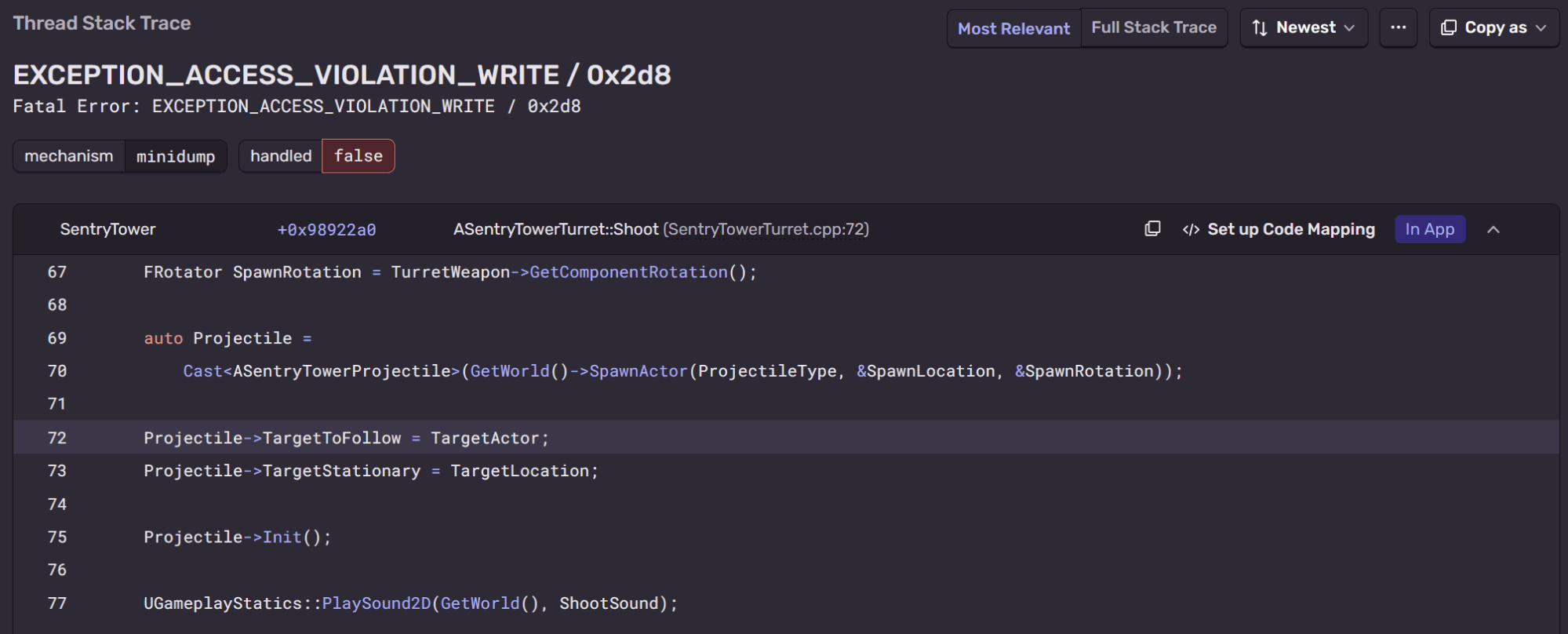
Finally, the real test: a packaged build and a crash. The agent packaged the game, uploading its debug symbols along the way, ran it until it crashed, and then opened the resulting event in Sentry. The stack trace was fully readable, down to the source line with context.
A null write in Shoot looked like a straightforward C++ bug, and the obvious fix would have been a null check. Instead, we asked the agent to find the actual root cause.
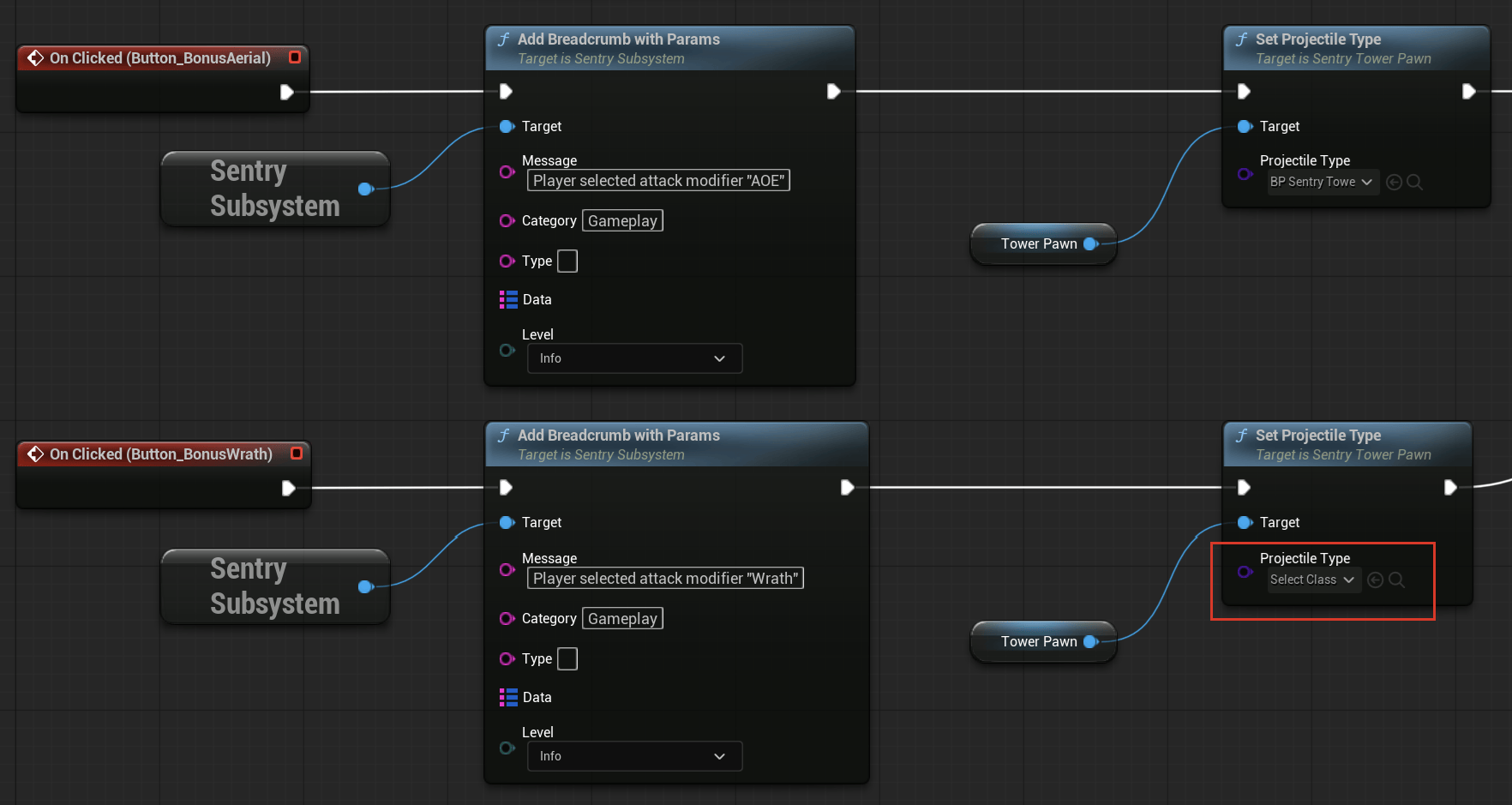
The breadcrumbs on the crash event showed the player picking the “Wrath” upgrade, followed moments later by a projectile that failed to spawn. The agent followed that trail back into the editor and found that the Wrath button in the level-up screen was configured with an empty projectile class. The matching projectile Blueprint was already in the project - it simply wasn’t wired up.
The agent proposed pointing the button at the correct Blueprint, along with adding a null check in Shoot as a safety net.
Two questions and one pasted token took us from a project with zero Sentry setup to a readable crash with its root cause identified, while the agent handled everything else through the editor’s Sentry tools and Sentry MCP.
A few rough edges
Unreal MCP is still experimental and it shows in a few places:
Agents don’t always find the tools. Unreal MCP runs in tool-search mode by default, so rather than listing every tool upfront, it hands the agent a few meta-tools to discover the rest. That keeps the context small with hundreds of editor tools around, but agents sometimes skip discovery entirely and go straight to editing project files by hand. If that happens, nudge them: “Use the Unreal editor’s MCP tools and the Sentry skills to set up Sentry.” One sentence is usually enough.
The connection is fragile across restarts. If the editor restarts mid-session, the MCP server goes with it and the agent loses its tools until the server is running again.
A client-side plugin helps a lot. Epic ships the Unreal Engine skills plugin for Claude Code, which adds an unreal-mcp skill and a session hook that tells Claude it’s in an Unreal project and should reach for the editor’s tools first. In our testing it noticeably reduced the need for extra prompting:
If you’re already on UE 5.8, it takes just a few minutes to get started: update the SDK, enable the Unreal plugins, connect Sentry MCP, and ask your agent to set things up for you. The full integration flow is covered in our Unreal MCP docs.
This is the very first iteration, and both Unreal MCP and our skills will continue to evolve as Unreal’s AI toolset matures. In the meantime, give it a try, see what your agent can do and let us know where it gets stuck on GitHub or Discord!
Sentry's Flutter SDK 10.0 makes streaming traces the default, fixes crash-free rate accuracy for unhandled errors, and adds dedicated app startup traces on Android and iOS.
The OpenTelemetry instrumentation packages needed a Node module loader, a package.json file, and a mutable exports object. v11 replaces all of that with a source transform and diagnostics channels, so tracing now works on Cloudflare Workers, Bun, Deno, and bundled server deployments.
Should you use Seer or just connect the MCP to your agent? A breakdown of what Seer, the Sentry agent plugin, the CLI, and coding agent handoffs each do — and when to reach for one over the other.