Sentry’s Flutter SDK 10.0 makes streaming traces the default and changes how unhandled Flutter errors affect Release Health. Errors that leave your app running no longer mark the session as crashed, so your crash-free rate better reflects actual app crashes.
The release also gives app startup its own trace on Android and iOS, simplifies logs and metrics setup, expands Dio network error capture, and respects Flutter’s sensitive-content markings in Replay and screenshots.
Streaming traces by default
Previously, the SDK waited for a transaction to end before sending its spans. In v10, it sends spans in batches as they finish. Automatic instrumentation uses this streaming model by default.
If a screen loads its catalog but a recommendations request is still running, the completed catalog span can reach Sentry without waiting for the entire transaction to end.
For custom instrumentation, wrap the work you want to measure with Sentry.startSpan:
The span ends when the callback completes, and the SDK queues it for sending.
Tracing still requires a configured tracesSampleRate or tracesSampler. During the upgrade, migrate custom transaction and child-span calls to the streaming span APIs, and review transaction filters and sampling callbacks.
If you need more time to migrate, you can keep transaction mode by setting options.traceLifecycle = SentryTraceLifecycle.static during initialization.
More accurate crash-free rates
An unhandled Flutter error doesn’t necessarily crash your app. Flutter can report the error and keep running, but previous SDK versions marked the session as crashed, lowering your crash-free rate.
In v10, these errors are still captured in Sentry, but they no longer mark the session as crashed. The session stays running. If it ends without an app crash, it’s classified as unhandled. If the app later crashes, the session is classified as crashed.
App startup gets its own trace
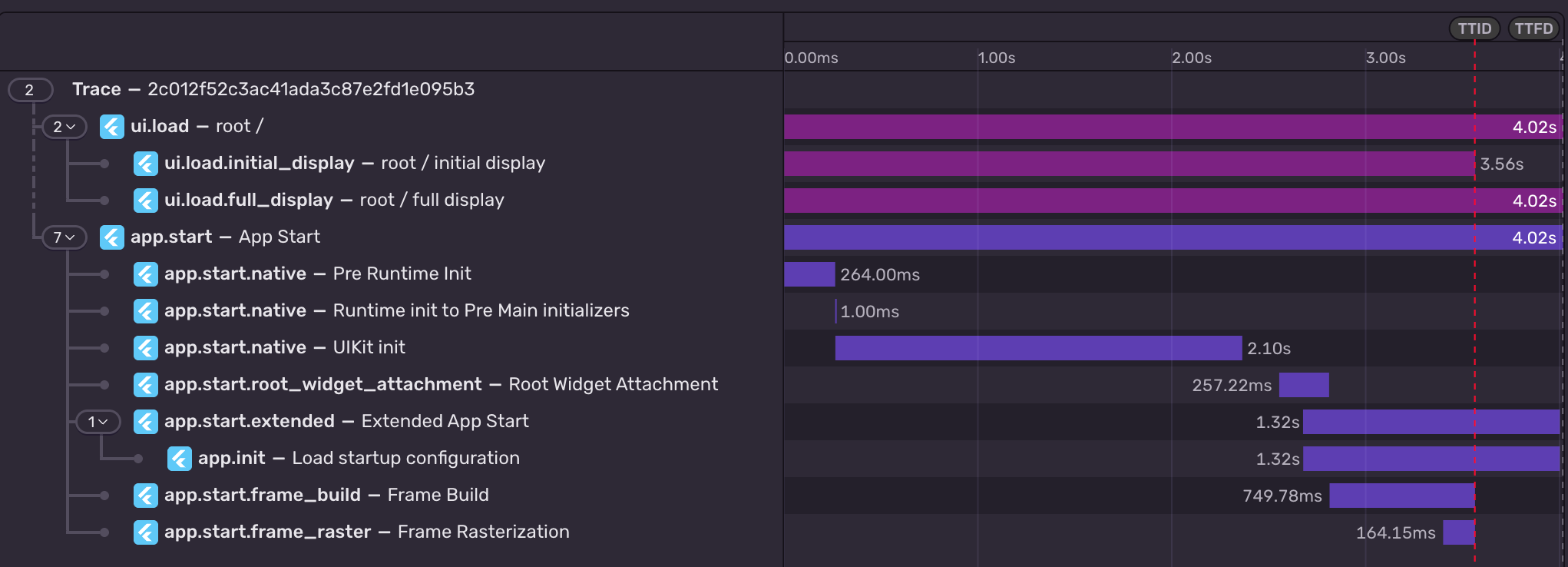
On Android and iOS, v10 records startup as a separate app.start root with its own sampling decision. It was previously attached to the first navigation transaction.
The startup breakdown includes root-widget attachment, Flutter frame builds, and first-frame rasterization, making it easier to see which part of startup is taking time.
You can also extend the measurement to include work beyond the first frame, such as loading the data your initial screen needs. Call SentryFlutter.extendAppStart() before the first frame renders, then SentryFlutter.finishExtendedAppStart() when that work finishes.
Review startup dashboards and custom sampling rules during the upgrade. A sampler that only accepts ui.load roots may exclude the new app-start trace.
Simpler logs and metrics setup
In v10, calling Sentry.logger or Sentry.metrics sends telemetry without a separate enable flag. The enableLogs and enableMetrics options have been removed. You can still filter logs and metrics with beforeSendLog and beforeSendMetric.
If you use sentry_logging, LoggingIntegration now forwards records as Sentry logs starting at Level.INFO by default.
If you only want the integration to create breadcrumbs and error events, set minSentryLogLevel to Level.OFF.
Capture network failures that have no HTTP response
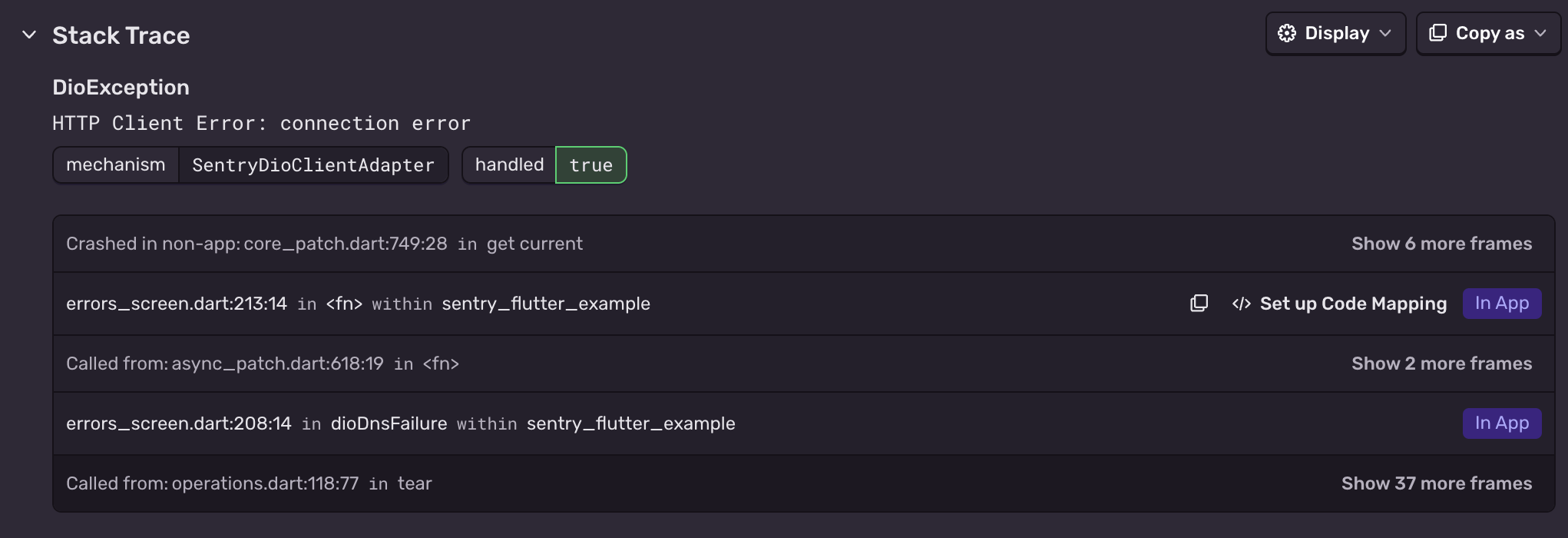
A failed request doesn’t always produce a status code. DNS resolution can fail, or a connection can time out before the server responds.
In v10, sentry_dio captures these failures when failed-request capture is enabled and the request matches your configured targets. Caller-initiated cancellations without a status code are excluded.
HTTP integrations also use stable exception types, including DioException in obfuscated builds. Dio events include response status and metadata in their response context.
Review existing filters and grouping rules when upgrading. Dio now matches failed-request targets against the resolved full URL, so patterns written for relative paths may need updating.
Flutter’s sensitive-content markings apply to captures
If your app uses Flutter’s SensitiveContent widgets, Sentry now masks widgets marked sensitive or autoSensitive by default in Session Replay and screenshots.
Upgrading to v10
Version 10 requires at least Dart 3.12, Flutter 3.44, Android API 26, iOS 15, and macOS 12. On iOS and macOS, the Sentry Flutter plugin now installs the native SDK through Swift Package Manager.
Update sentry_flutter and any directly declared Sentry integration packages to matching v10 releases:
dependencies:
  sentry_flutter: ^10.0.0
Also check these changes before upgrading:
Profiling has been removed.
Native failed-request capture on iOS and macOS is now opt-in.
Breakpad is now the default native crash backend on Windows and Linux. Crash reports are uploaded after the application restarts.
The OpenTelemetry instrumentation packages needed a Node module loader, a package.json file, and a mutable exports object. v11 replaces all of that with a source transform and diagnostics channels, so tracing now works on Cloudflare Workers, Bun, Deno, and bundled server deployments.
With Unreal Engine 5.8, your coding agent can drive the editor through Unreal MCP. The Sentry plugin adds tools and skills so it can set up Sentry, upload debug symbols, and root-cause crashes for you.
Should you use Seer or just connect the MCP to your agent? A breakdown of what Seer, the Sentry agent plugin, the CLI, and coding agent handoffs each do — and when to reach for one over the other.