The things that separate an MVP from a production-ready app are polish, final touches, and the Pareto ‘last 20%’ of work. Many of the bugs, edge cases, and performance issues will come to the surface after you launch, when the user stampede puts a serious strain on your application. If you’re reading this, you’re probably sitting on the 80% mark, ready to tackle the rest.
In this article, we’ll look at the case of how to paginate large datasets at scale, where things can go wrong, and how database indexes shape the outcome.
This article is part of a series of common pain points when bringing an MVP to production:
Paginating Large Datasets in Production: Why OFFSET Fails and Cursors Win (this one)
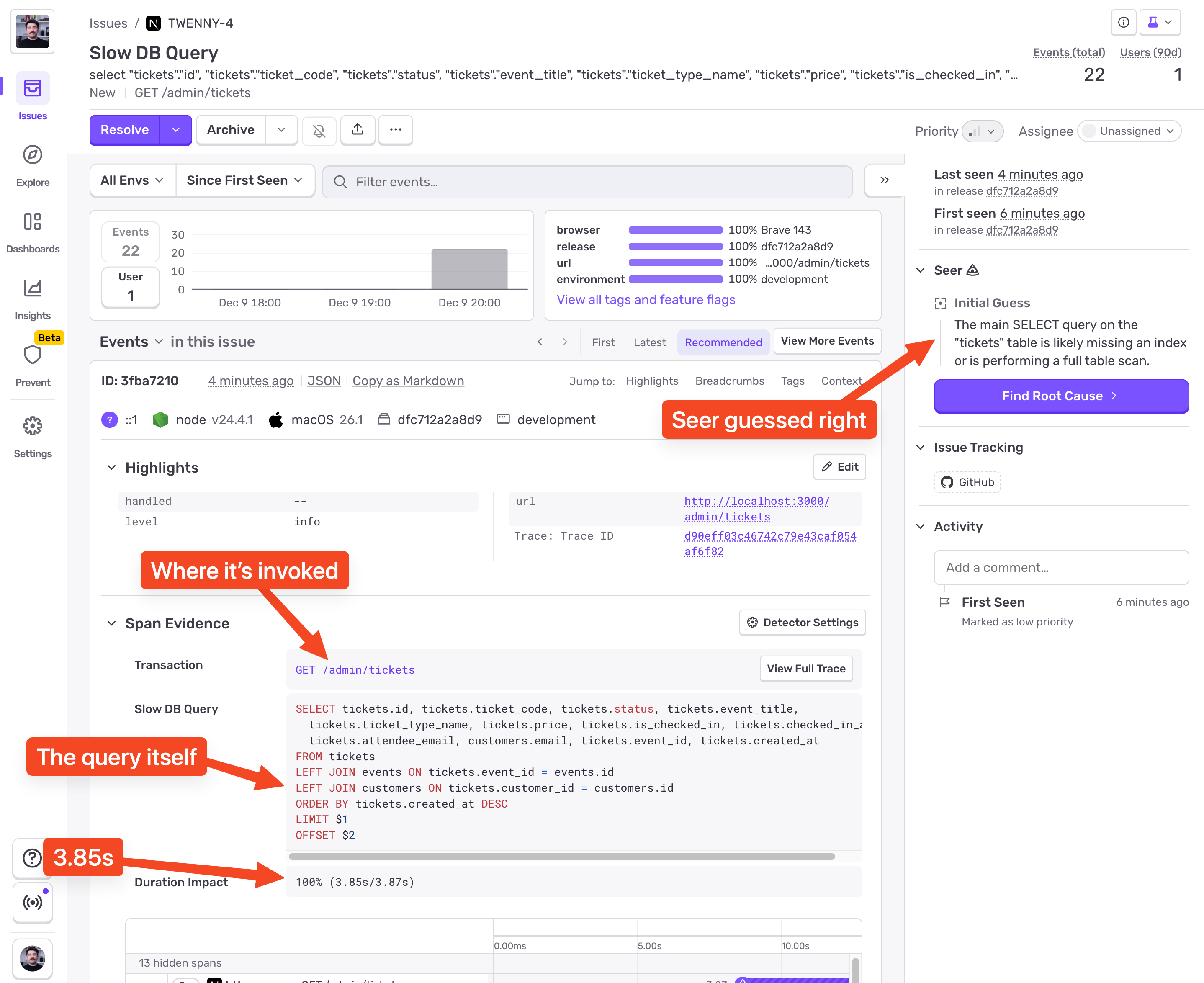
Everything was fine during testing, but after a while pages started taking seconds to load. The smart move is to have Sentry set up before you launch. Even if you don’t do any custom instrumentation, Sentry will let you know when your database queries get slow:
The screenshot shows a Slow DB Query issue in Sentry. Because I used Drizzle ORM with node-postgres, Sentry automatically instrumented all database queries for me. With that telemetry data, Sentry is able to surface slow database queries.
If we scroll a bit lower we’ll see the request info:
From this, we can see:
The query was invoked in the GET /admin/tickets request
The query contains OFFSET so it’s an offset-based pagination query
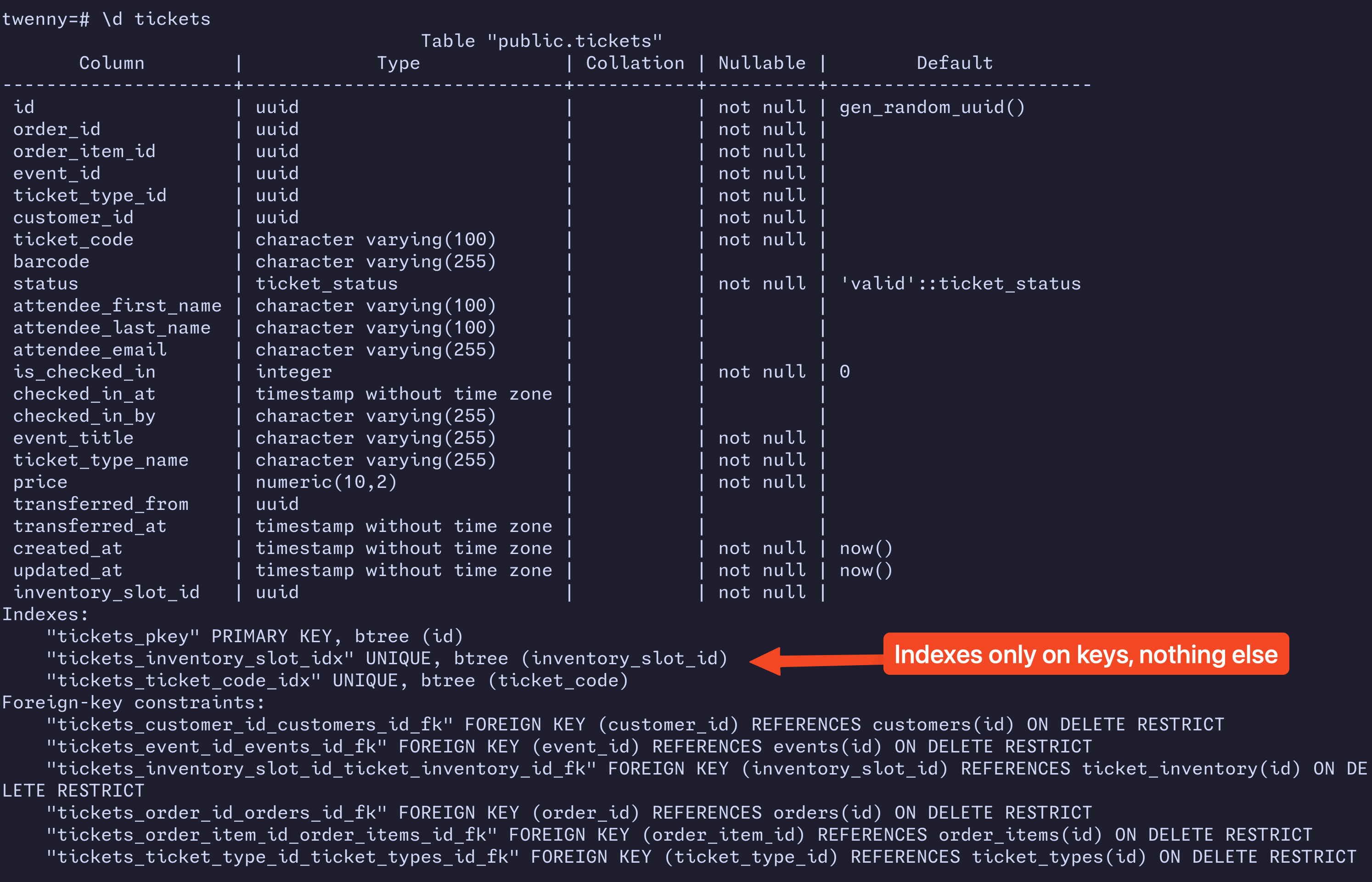
Seer was right! The combination of a large dataset, lack of database indexes, and an offset-based pagination is amplifying this issue. Because there’s no database index, and the pagination is offset-based, navigating to higher-numbered pages like in this case 321 forces the database to scan 321 × page_size rows. That’s where the slowdown happens.
The solution (indexes and cursors)
We can fix this issue by refactoring the pagination from offset-based to cursor-based, and for that we’ll also need to add a database index.
Database indexes
Database indexes are lookup structures that let the database find rows without scanning the whole table. Think of them as a sorted map the engine can jump through quickly instead of going through the data row by row. It’s not free - you pay for extra disk (not a lot really) and write cost (indexes need to be updated after every write), but reads become dramatically faster, especially at scale.
Cursor-based pagination
Offset-based pagination forces the engine to scan and skip N rows each time, which gets slower as N increases. Cursor-based pagination on the other hand uses a stable value from the last retrieved row (the “cursor”) to fetch the next page, letting the database jump directly to where it left off. The cursor is usually an indexed column, like created_at, or id, or a combination of both. Cursor-based pagination wins by a landslide in real-world performance and stability.
Applying the fix
Let’s create a composite index that combines the created_at and the id:
CREATE INDEX CONCURRENTLY IF NOT EXISTS tickets_created_at_id_idxON tickets (created_at DESC, id DESC);
We’re adding CONCURRENTLY to avoid write locks, and IF NOT EXISTS to keep migrations idempotent.
Now let’s modify our SQL to use the id and created_at derived from the cursor to fetch the next page:
-- Parameters:-- $1 = '2025-12-10T10:30:00Z' (cursor created_at)-- $2 = 'abc-123' (cursor id)-- $3 = 30 (results per page)SELECT tickets.id, tickets.ticket_code, tickets.status, tickets.event_title, tickets.ticket_type_name, tickets.price, tickets.is_checked_in, tickets.checked_in_at, tickets.attendee_email, customers.email, tickets.event_id, tickets.created_atFROM ticketsLEFT JOIN events ON tickets.event_id = events.idLEFT JOIN customers ON tickets.customer_id = customers.idWHERE ( -- Filter tickets older than the cursor created_at tickets.created_at < $1::timestamp OR ( -- Or tickets created at that timestamp, but "earlier" in sort (UUID comparison) tickets.created_at = $1::timestamp AND tickets.id < $2::uuid ))ORDER BY tickets.created_at DESC, tickets.id DESCLIMIT $3;-- ✅ No OFFSET present
Now since we need to calculate and pass the cursor when paginating, our URLs will change from: ?page=321 to ?cursor={nextCursor}&prevCursor={prevCursor}. Our backend will parse the nextCursor, extract the created_at and id from it, and properly construct the WHERE clause we see in the SQL above. The prevCursor is just for navigating to the previous page.
The Proof (watching duration drop)
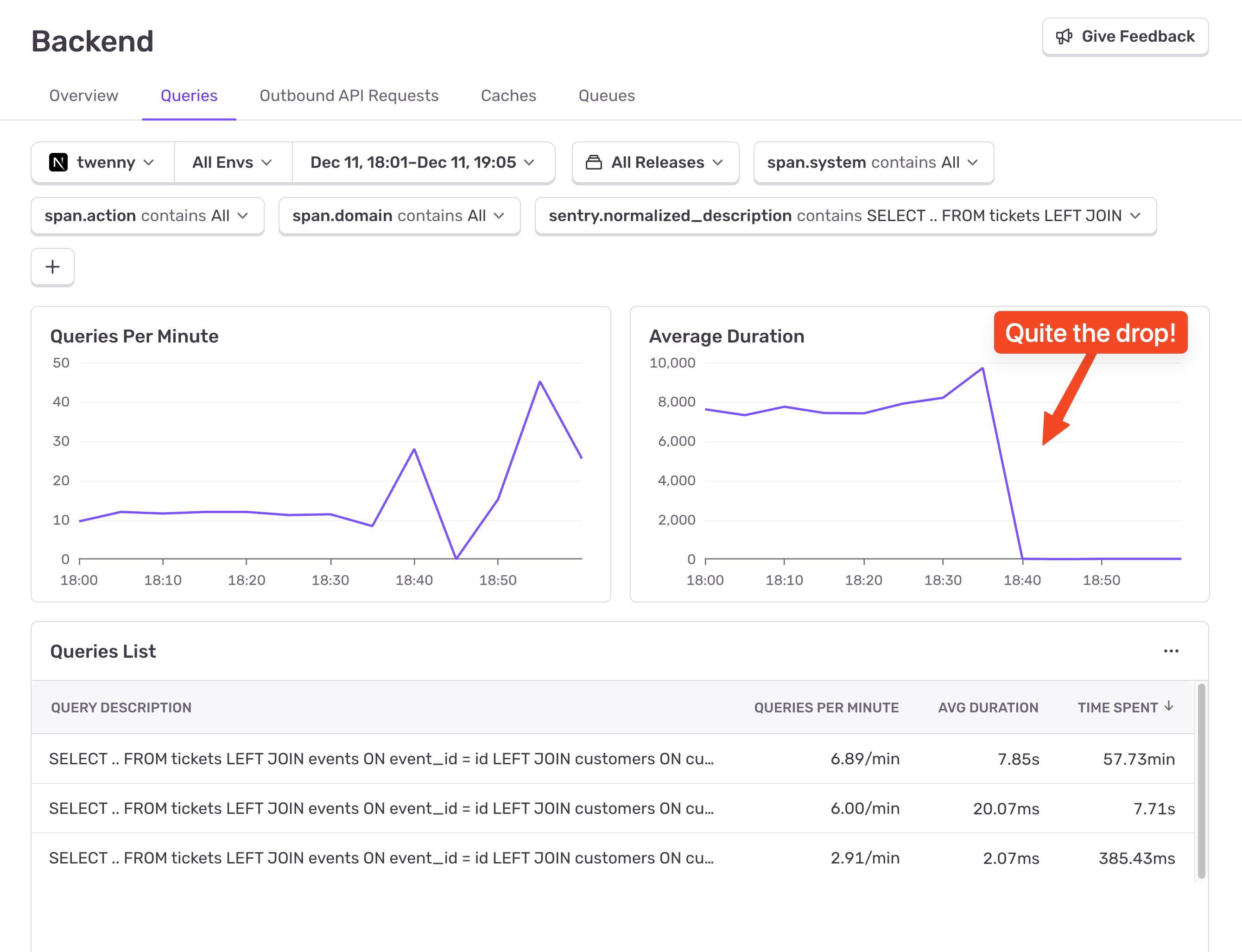
A few minutes after applying the changes, it’s time to check the results. We’ll go in Sentry > Insights > Backend > Queries, click on the “+” button to add a filter, select “Spans > sentry.normalized_description”, add it, and modify it to contain the start of our query: SELECT … FROM tickets LEFT JOIN. This filter will capture both the old offset-based query and the new one. This will update the charts below, and if we look at the “Average Duration” chart we’ll easily spot when we deployed the fix.
It’s easy to spot. And no, the chart doesn’t zero out. It dropped from ~8s to ~13ms. Mind you, this is running locally, but even in production it’s still going to be significantly faster.
That’s the effect of having database indexes and refactoring the pagination from offset-based to cursor-based. Our database doesn’t need to scan through thousands or millions of rows each time we want to navigate to a page. The index allows it to jump to a specific row instead of “walking” to it, and the cursor tells it which row it needs to jump to. Efficient!
The takeaway (what production actually demands)
This wasn’t a fancy optimization. No exotic data structures. No caching layer. No AI. Just respecting how databases work when the testing data is gone and reality shows up.
Offset-based pagination plus missing indexes is a tax you don’t notice until traffic forces you to pay it. The bill arrives late, compounds fast, and lands directly on user experience. Cursor-based pagination with proper indexes flips the cost model entirely: predictable, stable, and boring in the best possible way.
The important part isn’t that the query went from seconds to milliseconds. It’s that the shape of the performance curve changed. Offset pagination degrades linearly as your data grows. Cursor-based pagination stays flat. Flat curves are how systems survive growth.
Sentry’s role here isn’t just “finding a slow query.” It closes the feedback loop between theory and reality. You make a change, deploy it, and immediately see whether the system agrees with your mental model. In this case, the database nodded enthusiastically.
Production readiness lives in these details. Indexes. Access patterns. Measurement. Not glamorous, but decisive. MVPs prove ideas. Production systems prove discipline.
A full roundup of everything that shipped for Sentry Logs this summer — log pinning, overhauled exports, chart enhancements, terabyte-scale search, and a pile of usability fixes.
A stack trace tells you where your game died, not why. Session Replay for the Sentry Unreal Engine SDK attaches the last few seconds of gameplay to every crash report so you can watch what actually happened.