The way we build software has drastically changed over the past few years. What hasn’t changed is that this software ends up in front of real people: you, me, my mom.
And when those users inevitably run into something broken, you as the application’s developer need to be equipped with the right tools, context and understanding of what broke, where it broke, and how to fix it as quickly as possible.
Every day we’re inching closer to self-healing software. If you are building a Next.js application and are using Supabase as the backend service, the tooling described below can help you get one step closer to a self-closing loop of producing quality software and fixing what slipped through the cracks with minimal disruption.
TL;DR
Supabase gives you query performance insights, row-level security (RLS) advisories, and edge function logs out of the box, but it can’t trace across your full stack
Sentry fills that gap: distributed traces from your Next.js frontend through Supabase Edge Functions to Postgres, all in one place
Log draining from Supabase into Sentry gives you a single source of truth for errors, traces, and infrastructure logs
Sentry auto-detects N+1 queries, slow spans, and performance regressions without manual configuration
Seer, Sentry’s AI debugger, can suggest a likely root cause for new issues automatically and hand off fixes to your coding agent
The stack problem agents create
AI-assisted development has a specific failure mode: agents write working code that has no observability built in. You could end up with a Next.js app that talks to Supabase via three different connection methods (direct Postgres, the Supabase JS SDK, and Drizzle, because the agent kept switching strategies), edge functions running in Deno, and no unified view of what’s actually happening at runtime.
The other failure mode is subtler. Agents forget indexes. They could end up writing N+1 queries that are invisible locally because your dev database has 40 rows. You ship, your database grows to 400 rows, and suddenly a search query takes ten seconds. Sentry catches this automatically, but only if it’s instrumented correctly from the start.
Getting that instrumentation right requires understanding a few things about how Supabase and Sentry fit together.
Supabase’s built-in observability and its limits
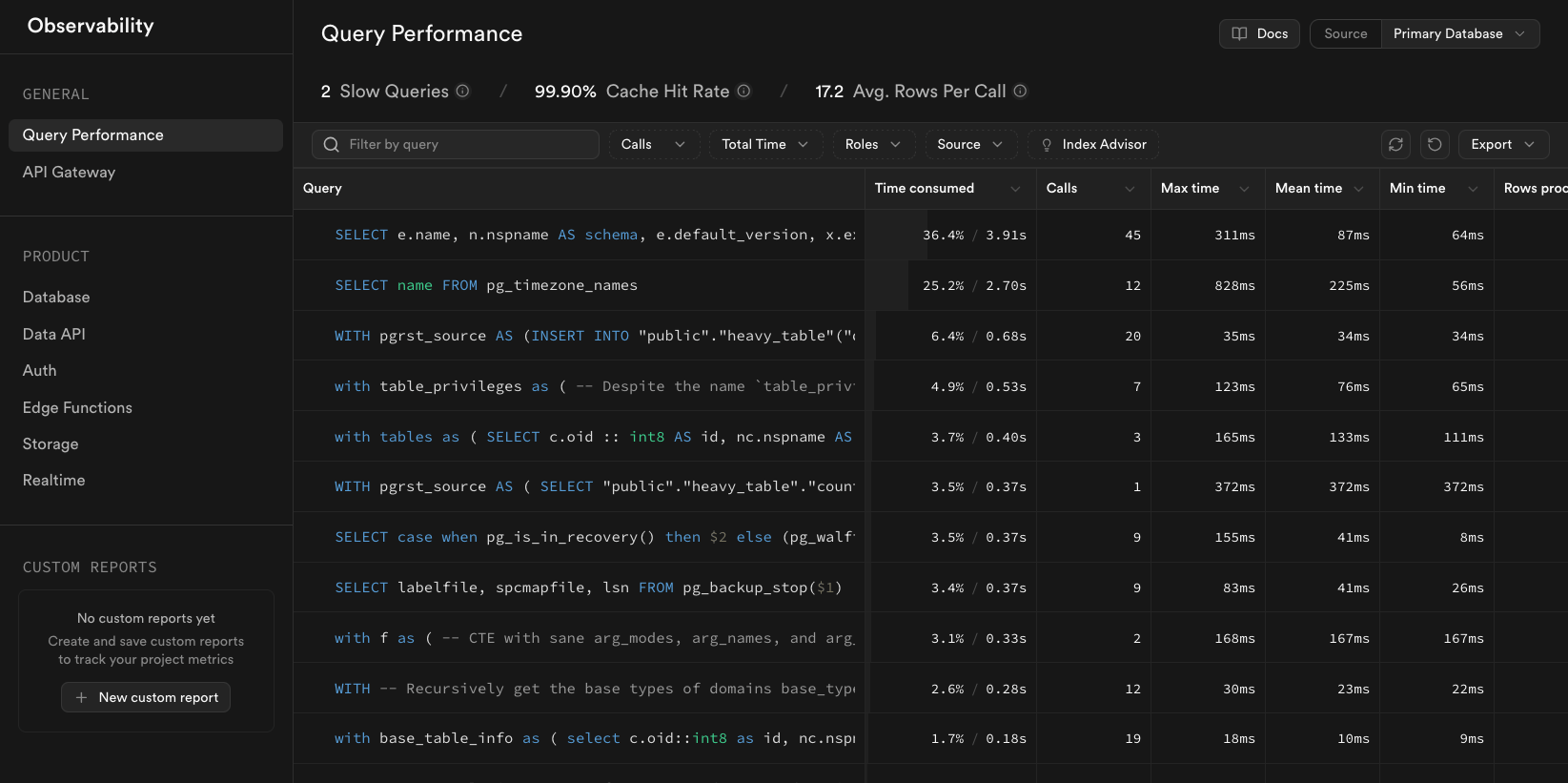
Supabase has solid built-in observability. The Query Performance panel in the dashboard shows which queries run most often and which consume the most time. That’s where you start when performance is the problem. The Advisors surface security issues like missing RLS policies and rank them by severity. The Index Advisor flags missing indexes before they become production incidents.
The Logs section gives you structured logs from every Supabase subsystem: edge functions, the Postgres REST API (PostgREST), the connection pooler, storage, and cron jobs. You can query them with SQL directly in the dashboard.
That’s genuinely useful. But it’s bounded by what Supabase can see, which is everything that happens inside Supabase. It can’t tell you that a slow Postgres query was triggered by a specific user action in your Next.js frontend, or that an edge function timeout caused a cascade of errors in your API layer. For that, you need distributed tracing across the full stack.
Connecting Supabase logs to Sentry
The fastest way to get Supabase data into Sentry is the log drain. In the Supabase dashboard, under Logs > Drain, you add a destination and paste your Sentry data source name (DSN). All logs from that Supabase project start flowing into a corresponding Sentry project.
A few things worth knowing about this:
It’s currently all-or-nothing. You can’t filter by log level on the Supabase side before the drain
Once logs are in Sentry, you can filter by severity (severity:warn, severity:error) in the Log Explorer
Keep the log drain in its own Sentry project, separate from your Next.js app and your edge functions. This keeps the signal clean and makes it easier to set project-specific alerts
The reason to bother with this, beyond convenience, is that Sentry can correlate these infrastructure logs with traces from your application layer. When an edge function throws an error, you can see the full request path: Next.js page load → API route → edge function → Postgres query, with timing for each span.
This is where most agent-generated setups go wrong. Next.js is a full-stack framework that runs in multiple runtimes: Node.js on the server, V8 in the browser, and potentially edge runtimes. Supabase Edge Functions run in Deno. These are not the same environment, and they need separate Sentry projects and separate SDK configurations.
For the Next.js app, your sentry.server.config.ts should include the Supabase integration to get automatic instrumentation of database queries:
import * as Sentry from "@sentry/nextjs";import { createClient } from "@supabase/supabase-js";const supabaseClient = createClient( process.env.NEXT_PUBLIC_SUPABASE_URL!, process.env.SUPABASE_SERVICE_ROLE_KEY!);Sentry.init({ dsn: process.env.SENTRY_DSN, tracesSampleRate: 0.1, integrations: [ // Instruments Supabase queries as spans in your traces // so you can see exactly which DB calls are slow Sentry.supabaseIntegration(supabaseClient, Sentry, { tracing: true, breadcrumbs: true, }), ],});
Without the Supabase integration, your traces will show that an API route was slow, but not which query caused it. With it, every Supabase SDK call becomes a named span with timing data. See the Next.js integrations docs for the full list of what’s available.
For edge functions running in Deno, initialize Sentry at the top of each function before any other imports:
import * as Sentry from "npm:@sentry/deno";Sentry.init({ dsn: Deno.env.get("SENTRY_DSN"), tracesSampleRate: 1.0, // sample everything in edge functions; volume is usually low});Deno.serve(async (req) => { return await Sentry.withIsolationScope(async () => { // your handler code });});
The reason for separate projects: when Sentry’s AI features (more on this below) analyze an issue, they work within a project’s context. Mixing Next.js errors with Deno errors and Postgres logs in a single project makes that analysis noisier and less useful.
Automatic detection: N+1 queries, slow spans, and Web Vitals
Once instrumented, Sentry starts surfacing issues you didn’t know to look for.
N+1 queries get detected automatically. If your code fetches a list of posts and then queries the database once per post to get comments, Sentry identifies the pattern and creates a performance issue. This is the kind of “logic” agents like to write constantly. It’s the natural way to express the functionality, and it’s invisible until you have real traffic.
Slow spans appear in the Trace Explorer. You can see exactly which database query, API call, or server-side render is consuming time, with the full request context attached.
Core Web Vitals for the frontend (LCP, INP, CLS) show up in the Next.js performance dashboard alongside your API latency and server transaction data. Having frontend and backend performance in one place makes it easier to figure out whether a slow page is a rendering problem or a slow API response.
The prebuilt Next.js dashboard in Sentry covers most of what you need out of the box and doesn’t count against your dashboard quota.
Setting up agents to instrument correctly
Two things make the difference between an agent that instruments your app correctly and one that produces outdated, incomplete configuration.
MCPs over training data
Both Sentry and Supabase have Model Context Protocol (MCP) servers. When your coding agent has access to the Sentry MCP, it can query your actual issues, traces, and project configuration in real time instead of guessing based on training data that might be two years old. Sentry’s SDK has changed significantly, and agents without current context will often configure it as if it’s only for error monitoring, missing performance tracing entirely.
Skills files
For Claude Code, this is .claude/. For Cursor and others, .agents/. These files give your agent project-specific context that persists across sessions. Take a look at our Agent Skills documentation for a detailed breakdown of all the skills Sentry offers.
A practical workflow: when you need to add Sentry to a project, go to the Sentry docs, find the SDK for your framework, copy the setup prompt they provide, and give that to your agent. The docs include current best practices and the right SDK version. Don’t just tell the agent to “add Sentry.” It will find a way to do it, and the result will probably work, but it won’t be right.
Monitoring beyond errors
Errors are the obvious case. But some of the most useful monitoring is for things that aren’t errors.
Log-based monitors let you alert on patterns in your log stream. If you’re draining Supabase logs into Sentry, you can create a monitor that fires when the count of connection received logs drops below a threshold in a given hour. Not an error, just a signal that something might be wrong with your database connectivity. In the Sentry UI: Alerts > Create Alert > Logs, filter by message content, set a count threshold, and assign it to yourself or a team.
Dynamic alerting is useful when you don’t know your normal thresholds yet. Set an alert to use anomaly detection instead of a fixed value. Sentry’s ML figures out what “normal” looks like for your transaction response times and fires when something falls outside that pattern. Start with dynamic, tune to specific values once you understand your baseline.
Sentry CLI for dashboards: The new Sentry CLI has a dashboards command that an agent can use to build a custom dashboard from your actual trace data. Point it at your project, ask it to build a performance dashboard for your application, and it will inspect your active transactions and spans to figure out what’s worth visualizing. The output isn’t perfect (you’ll want to review widget configurations), but it’s a reasonable starting point that takes about thirty seconds instead of thirty minutes.
Seer: from alert to fix
Seer is Sentry’s AI debugger. It has access to your full issue history, traces, logs, and session replays. You can ask it plain questions: “which of my open issues are getting worse?” or “what are my slowest database queries?” and it will pull from your actual data to answer.
The more interesting capability is Autofix. Configure it in your Sentry project settings by connecting your repository. When a new issue comes in, Seer automatically suggests a likely root cause and, if you want, generates a draft PR with a suggested fix. You can configure how far it goes: root cause only, or full fix with updated tests.
For the Supabase security advisory workflow: the Supabase MCP exposes RLS policy issues and other advisories. An agent with both the Supabase MCP and the Sentry MCP can fetch those advisories and create Sentry issues from them, putting security problems into the same workflow as application errors. From there, Seer can pick them up and attempt fixes automatically.
This is what “self-healing software” actually looks like in practice: not magic, but a pipeline where new issues get triaged, analyzed, and handed to a coding agent without you having to be the one who notices them first.
Where to start
The fastest path is three steps: run npx sentry@latest init to instrument your Next.js app, add the Supabase integration to your server config for query-level spans. Then set up a log drain from Supabase into its own Sentry project. That gets you unified tracing across the full stack. From there, connect your repo to Seer and let it start suggesting fixes for new issues as they come in.
The back/forward cache is one of the most impactful performance features on the web and one of the least observable, because success looks like silence. Here's how we made it measurable.
How we built zero-config Agent Tracing for Laravel AI during Agent Hackweek, from AI-generated defensive code to matching LLM calls with HTTP requests.