TL;DR: Chrome now reports web vitals for soft navigations, and JavaScript SDKs v11 capture Largest Contentful Paint (LCP), Cumulative Layout Shift (CLS), and Interaction to Next Paint (INP) for each one. It’s on by default.
If we were to reduce web performance into a single term, it would be “web vitals”. Web vitals are a universal signal that every developer can measure, and more importantly, optimize for. They describe many facets of the user experience when it comes to performance, but they were limited to specific types of navigations.
Capturing web vitals for your apps has been largely about users landing on your site from somewhere else. We measured that experience and you optimized for it. But most users land on one page and then click through ten more, and the pages behind the login are where they spend their day. That larger part of the user journey remained unmeasured, and so you couldn’t optimize for it.
So we turned on soft navigation web vitals for our app for 30 days, and we’ll share what we found along the way.
What is a soft navigation
Users can navigate your website in different ways. This is an incomplete list, but from a user’s perspective it covers the most common ones:
Hard navigations: Opens a link to a page in your website, or reloads the page. Usually handled by the browser. Think multi-page applications.
Back/forward navigations: Moves the user back or forward through the browser’s history. Also handled by the browser, which decides whether the page can be restored from the bfcache or has to be loaded again, effectively falling back to a hard navigation.
Soft navigations: Your JS app handles the navigation through the History or Navigation API. Think single-page applications (SPAs).
Soft navigations have become more common since SPAs arrived and websites started to behave more like apps. Even with server-side rendering (SSR), many websites start off with a hard navigation, and then switch to soft navigations as they effectively become SPAs after the initial load.
A page load and a soft navigation both change the URL. The difference is what happens behind it:
acme.app/issues/42
InboxIssues
TypeError in checkout
1,204 events from 311 users
GET /issues/42
returns a new HTML page
Server
The browser throws the page away and loads a new one from the server.
One of the difficulties in measuring soft navigations is first defining what a soft navigation is. For example, should every change to the URL count as an independent soft navigation?
At the moment, Chrome defines a soft navigation as one that meets these criteria:
The navigation is initiated by a user action.
The navigation results in a visible URL change to the user.
The interaction results in a visible paint.
These heuristics are not final, and Chrome may change them as it collects more feedback. From the browser’s point of view, a soft navigation does not always match a history state change. And because each browser will implement its own heuristics, they may differ from browser to browser. Either way, you want to know what users experienced in the browser they actually use.
Measuring rather than assuming
Until recently, the usual assumption was simple: “If my hard navigation is fast, my soft navigations should be faster.” So we checked. Across millions of soft navigations in our app, soft navigations loaded faster than page loads on every route we looked at, and almost all of them were rated good.
Soft navigation LCPs rated good, in our app over 30 days
Soft navigations96%
Core Web Vitals pass mark
Still, faster or slower was never the interesting question, and comparing the two isn’t fair anyway. A page load’s clock starts with a request for the document. A soft navigation’s clock starts at the user’s interaction, with no document request, your JS already parsed, and your app already running. What you want to know is how fast your soft navigations are, on which routes, and whether they stay that way. Until now, you couldn’t answer any of that.
What you couldn’t see before
Durations that match what users see
If you’ve been using the duration of navigation spans as a stand-in for “how long did this route take”, you’ve been measuring something slightly different.
A server request or a fetch call has a clear end. It’s when the response arrives, and the span’s duration is exactly how long it took. A client-side navigation doesn’t have a clear end. We know when it starts, but there’s no signal that tells you that the navigation is done, and that makes sense if you think about it. Did it end when your framework rendered the route? When all its fetch requests settled? When there was no activity left? What counts as activity then? Does “rendered” include fetching the data?
There’s no right answer, so our navigation span picks one: it ends once your app goes idle, that is, when no new spans have started for a while. That’s fine for what it is. It tells you when the activity settled, just not when the user could see the new route. The route can be fully ready and interactive at any point during the span’s duration.
Page loads have the same gap. In our app, the main content shows up at 2.85s at p75, about four seconds before the pageload span ends at 6.77s.
These are the same questions page loads had, and web vitals were the answer to them. Instead of an end that’s defined the same way for every app, they measure what the user experienced.
Soft navigation LCP, for example, is measured from the interaction that triggered the navigation to the moment the new route’s main content painted. From then on, the user can see the page and may start interacting with it. Whether it responds when they do is what INP measures.
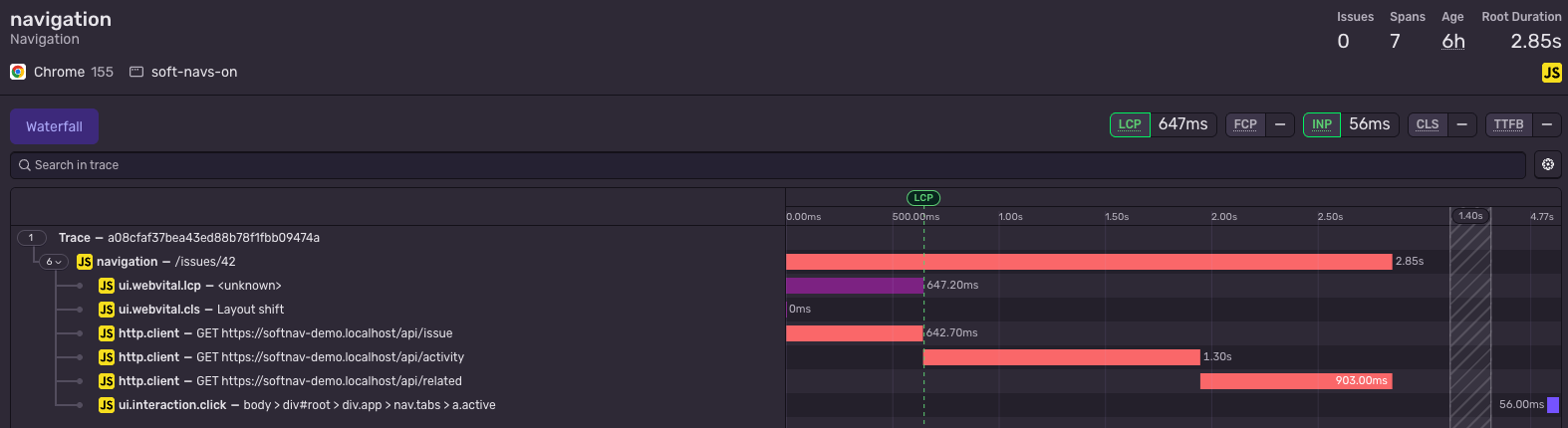
Here’s someone opening an issue. The page shows the issue first, then loads its activity and related issues underneath.
/issues/42
Navigation span2.85s
Click
Users see the issue
LCP 0.65s
The span ends
2.85s
The issue was on screen well before the navigation span ended. You can see the same thing in a real trace, where the LCP marker sits right where the request for the issue ends, more than two seconds before the span does.
You can now track these user-facing numbers per route.
Cleaner page loads
By definition, CLS and INP cover the whole time a page is open. Most tools follow that definition, so in an SPA a layout shift on a route the user clicked into five minutes later still counts against the page they landed on. With soft navigations, the page load’s vitals are finalized at the first soft navigation, and everything after that belongs to the route it happened on.
Other tools
pageload/CLS 0.17
Worst burst came from /issues/42
Sentry v11
pageload/CLS 0.02
navigation/issuesCLS 0.01
navigation/issues/42CLS 0.17
Pages nobody lands on
In an SPA, plenty of pages almost never get a page load. Think of a settings page, the second step of a checkout, or a details page that users only ever reach by clicking through a list. Page load vitals only measure where users land, so those pages had little to no web vitals data, no matter how much traffic they got.
Here are a few users landing on an application and navigating within it, and how the two versions of our SDK report web vitals for them.
Your turn: switch versions and watch which pages get a score.
In our app, some pages are reached almost only by a click, and others ten times more often by a click than by loading them directly. Page load vitals only ever saw a small slice of those visits. With soft navigations, every page users actually visit gets measured, not just the ones they enter from.
How it works with Sentry
To recap how web vitals are reported today, Sentry attaches web vital measurements as spans onto the pageload spans you’ve been getting. That is still the case for hard navigations.
For soft navigations, the Sentry SDK attaches web vital measurements as spans onto the navigation spans you’ve been getting in your SPA tracing setup, so you’ll see them in the trace view along with the markers for each vital.
Each soft navigation gets its own LCP, CLS, and INP. Time to First Byte (TTFB), First Paint (FP), and First Contentful Paint (FCP) are only reported for page loads.
Setting it up
There’s nothing to set up. If you’re on v11 with browserTracingIntegration, soft navigation vitals are on by default:
They rely on span streaming, which is also the default in v11, because a soft navigation’s vitals are finalized long after its navigation span has ended. If you’d rather keep a single set of vitals for the whole page lifetime, add Sentry.webVitalsIntegration({ softNavigations: false }) to integrations.
Keep in mind that the browser decides what counts as a soft navigation on its own, independently of your router, so not every route change gets web vitals. Sentry joins the two through the interaction that triggered them. In our app, about three in four route changes in Chrome qualify.
Also, only Chromium 151 and later report soft navigations for now, so these numbers describe that slice of your users.
In the dashboard
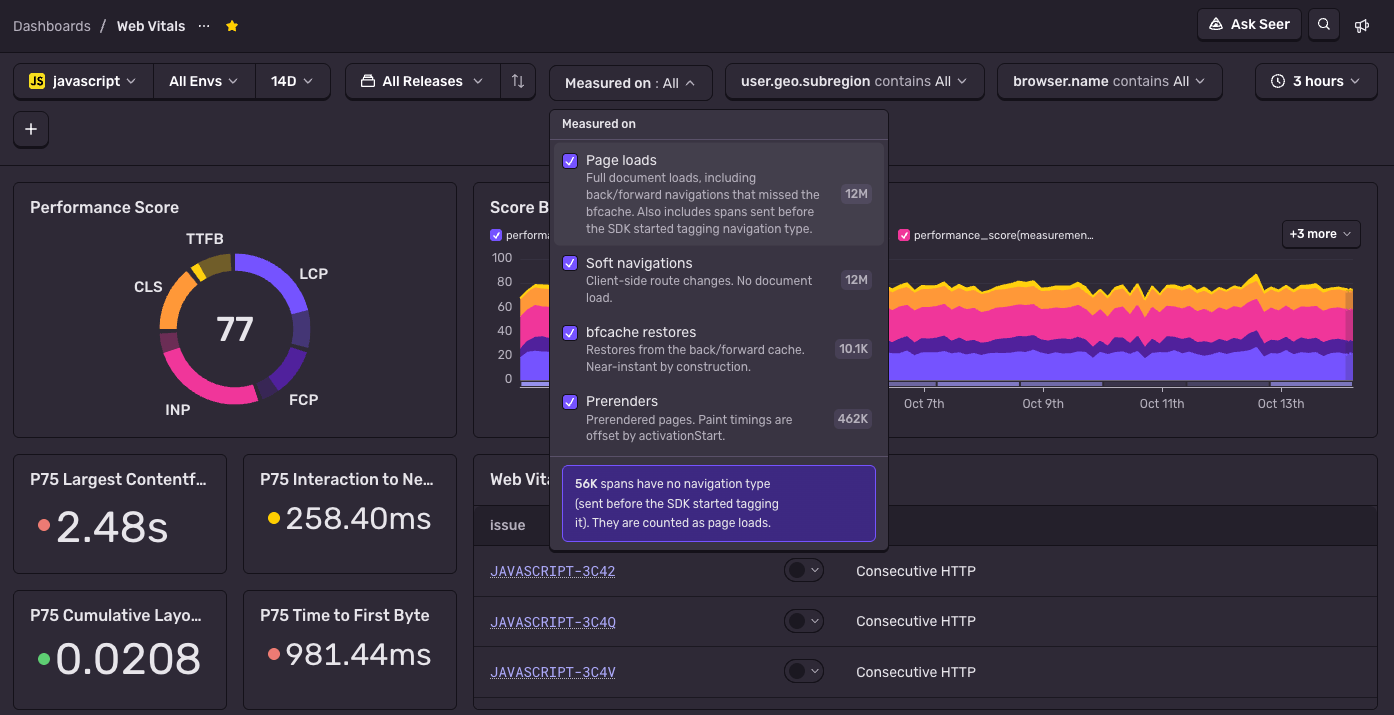
v11 also adds two new kinds of web vitals: soft navigations and bfcache restores. The latter is different from the bfcache metrics we wrote about recently. Those tell you whether the back button was instant, while these are the web vitals of the navigation itself.
Every reported web vital now carries a browser.navigation.type attribute, and the web vitals dashboard has a new “Measured on” filter to go with it. You can pick page loads, soft navigations, bfcache restores, and prerenders, in any combination. Page loads also include spans sent before the SDK started tagging the navigation type, so your older data stays where it was.
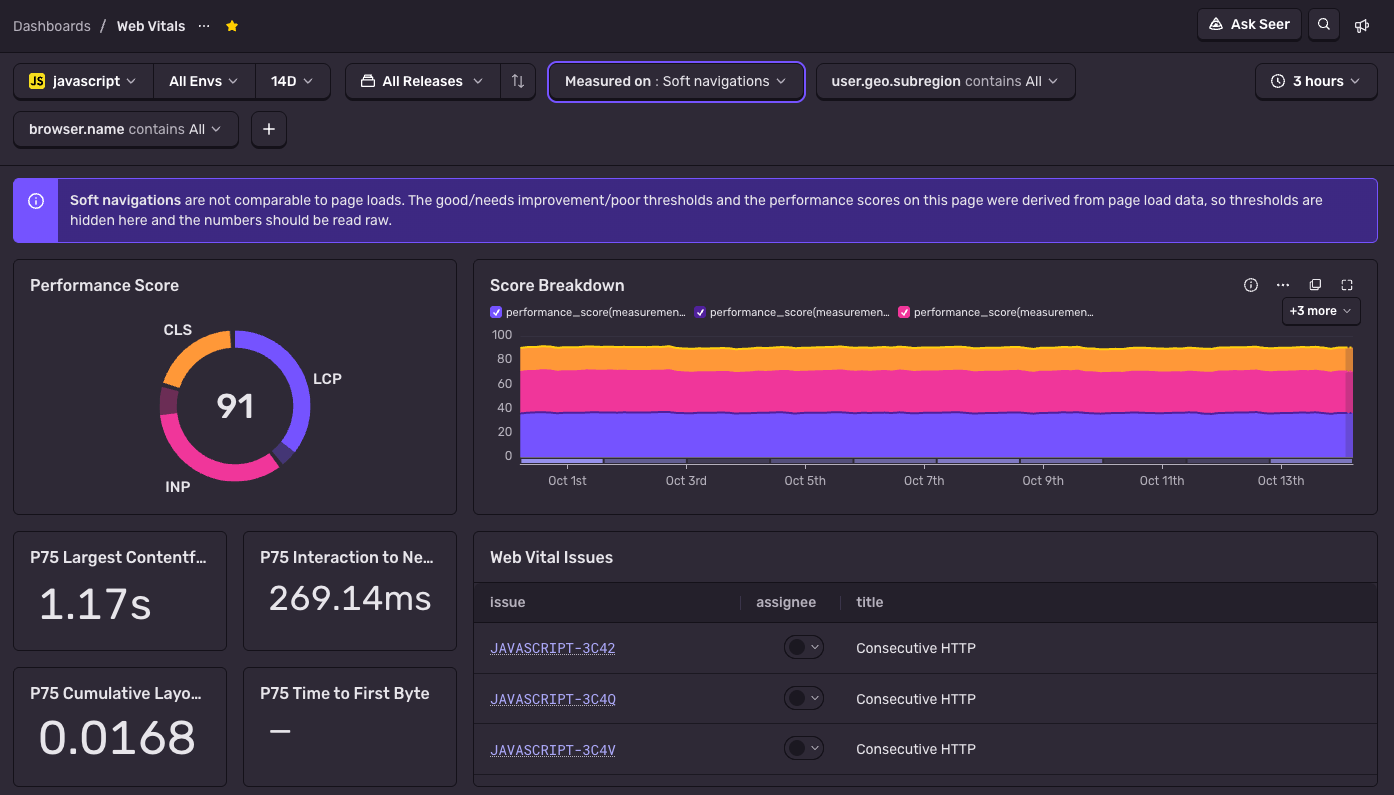
You’ll need that filter, because soft navigation scores are mixed into the scores you’ve been seeing. Soft navigations skip the document request, so they’re usually faster, and your overall numbers will most likely improve once you upgrade. In our app, p75 LCP is 2.48s across all navigations and 1.17s for soft navigations alone. Your app didn’t suddenly get faster. The mix of navigations changed.
When you pick soft navigations, the dashboard tells you they aren’t comparable to page loads and hides the good/poor thresholds, because those were derived from page load data.
One thing to note if you duplicated the web vitals dashboard in the past: your copy won’t get the “Measured on” filter. You can either duplicate it again to pick it up, or filter on the attribute yourself.
The same goes for any other dashboards or alerts you’ve built on web vitals. Soft navigations are soft-navigation and bfcache restores are back-forward-cache. Page loads don’t have a single value of their own: they keep the type the browser reports, like navigate, reload, or back-forward. So to keep an existing alert about page loads, exclude soft-navigation and back-forward-cache rather than including specific values. That way, older spans without the attribute are still counted.
Reading soft navigation scores
When a route stands out, open one of its worst-scoring soft navigations. The trace view for that navigation span carries the web vital spans and their markers, the same way a pageload trace does, so you can read everything that happened between the interaction and the LCP marker.
What you see there is a bit different from a page load. There’s no document request, so there’s no TTFB, and everything between the click and LCP happens in the browser: running the router, loading the route’s code, fetching its data, and rendering it. A slow API can hurt both kinds of navigation, but it shows up in a different place. On an SSR page load it’s buried in TTFB, while on a soft navigation it’s a fetch span sitting right between the click and the LCP marker.
A few patterns worth looking for:
If fetch spans dominate the time before LCP, start the request earlier. Use a route loader, or prefetch when the user hovers over the link.
If downloading the route’s chunk dominates, preload it, or reconsider whether that route needs to be split out at all.
If CLS on a route is high, check your loading placeholders. Content replacing a skeleton of the wrong size is a common culprit.
Measuring the whole journey
Most of a session happens after the page users landed on. In our app, about 62% of page views are soft navigations. Now your web vitals cover that part too, and every page users visit gets its own LCP, CLS, and INP, reported by the browser itself.
The browser side is still moving, and so is ours. Soft navigations are Chromium-only for now, and the heuristics for what counts as one may still change. We followed the origin trials closely to get here, and how we surface these numbers will keep evolving as the platform settles.
To try it, upgrade to v11 of the Sentry JavaScript SDK, then pick “Soft navigations” in the web vitals dashboard’s “Measured on” filter. The pages you’ve never had numbers for are a good place to start.
Two people and one beagle-shaped AI agent run madewithvuejs.com. Here's how Milly connects to GitHub, Linear, and Sentry to ship code and fix production bugs on her own.
Logs and metrics look nearly identical when you're instrumenting code. Using a signup handler as the example, here's how to tell which question each one answers, and when you can just count the logs.
Over 40 changes between 8.43.0 and 8.54.0 cut SentryAndroid.init time by 20-30%, reduced memory allocation, fixed memory leaks, and lowered background CPU time.