
← Back to Blog Home


Choosing a JavaScript logging library: The 2026 definitive guide
With AI writing more and more of our code, properly monitoring and debugging that code has become an increasingly critical part of the development workflow that can’t be ignored. Luckily, we have more time than ever to implement the right tools to do so.
Implementing a production-ready logging solution is easy to do, and provides you and your LLM Agents with a wealth of debugging information from your app, across users and environments.
Why you need a logging library
If you’re still using console.log for debugging, you might be wondering why you should bother with a logging library. For a hands-on walkthrough, see how to replace console.log with structured, trace-connected logging using LogTape and Sentry.
- High performance - Logging libraries are asynchronous, beating native console logging in performance.
- Structured Outputs - Output structured objects rather than strings, and simplify managing additional context and child loggers.
- Transports and Sinks - Send logs to one or more destinations, including the console, files, streams, and observability platforms.
- Filtering - Filter logs by severity, category, or other criteria to reduce noise. Redact sensitive data before it leaves your application.
- Integrations - Integrate with web frameworks, ORMs, and other libraries to automatically log context and errors with a consistent API across all layers of your application.
- Trace-connected logging - With Sentry, logs are automatically trace-connected to errors and other events, making it easier to debug and correlate issues.
Picking a logging library
Here’s how the big four stack up at a glance.
| Library | Version | Runtime | Released | Transports / Sinks | Minified + gzip | Dependencies | Tree-shakable |
|---|---|---|---|---|---|---|---|
| Pino | 10.2.0 | Node | 2016 | ✓ | 3.3 KB | 11 | ❌ |
| Winston | 3.17.0 | Node | 2010 | ✓ | 38.3 KB | 17 | ❌ |
| Bunyan | 1.8.15 | Node | 2012 | ✓ | 5.6 KB | 0 | ❌ |
| LogTape | 2.0.2 | Universal | 2023 | ✓ | 8.3 KB | 0 | ✅ |
Source: Bundlephobia API.
Quick selection guide
- Pick Pino when you’re Node-only and care most about speed and a small bundle.
- Pick Winston when you want the most transports and configuration options and bundle size isn’t a concern.
- Pick Bunyan only if you’re maintaining an existing codebase that already uses it (not recommended for new projects).
- Pick LogTape when you need one logger for Node + browser/edge, or when writing a library that must work everywhere without forcing a choice on the app.
All of the libraries above support custom transports or sinks, so you can pipe logs to whatever backend you use. If you use Sentry for errors and performance, Sentry’s logging capabilities and integrations for Pino, Winston, Bunyan, and LogTape let you send logs into the same place as your issues and traces, so you can search and correlate without juggling multiple tools.
Pino
Best for: Node backends where speed and small bundle size matter.
GitHub: pinojs/pino · Docs: getpino.io · npm: pino
// Setup
const pino = require('pino');
const logger = pino({ name: 'user-service' });
// Usage
logger.info('Request received');
const child = logger.child({ userId: 'u-123', action: 'login' });
child.info('User action');Pino was created in 2016 by Matteo Collina, creator of Fastify and member of the Node.js Technical Steering Committee. It’s one of the most popular and fastest JSON loggers for Node.js; it can run in the browser via a polyfill, but you lose most of the speed benefits there.
Key features:
- Reports to be ~2.5x faster than Winston
- Smallest bundle here (3.3 KB gzipped);
- Node.js only; browser via polyfill
- Pluggable transports and a wide ecosystem
Pino’s popularity grew quickly as it provided a huge leap in performance at a smaller size than the competition at the time, and it provides sensible defaults out of the box. Every log will automatically include a timestamp, pid, and level, along with any structured data you provide.
Winston
Best for: Node apps that need a rich ecosystem of transports and familiar, flexible configuration.
GitHub: winstonjs/winston · Docs: GitHub README · npm: winston
// Setup
const winston = require('winston');
const logger = winston.createLogger({
  level: 'info',
  format: winston.format.json(),
  defaultMeta: { service: 'user-service' },
  transports: [new winston.transports.Console()],
});
// Usage
logger.info('Request received');
logger.info({ userId: 'u-123', action: 'login' }, 'User action');Winston was released in 2010 by Charlie Robbins, a former Node.js Foundation board member (now OpenJS Foundation). It’s the most popular and one of the oldest logging libraries for Node.js, with a large ecosystem and many built-in transports. The trade-off is it’s the largest bundle size (38.3 KB) and 17 dependencies in this comparison.
Key features:
- Many built-in transports (console, file, HTTP, and many community options) with flexible formatting
- Mature, well-documented, and widely used in production
- Not tree-shakeable; you pay for the full feature set in bundle size
- Node.js only
- No data redaction
To call Winston “legacy” would be a disservice, but it does follow an older design pattern that leads to a larger bundle size and more dependencies. Without question, Winston is your choice for mature, well-established Node.js applications that need a wide range of transports and flexible configuration right out of the box.
While all of the libraries mentioned in this list offer custom filtering capabilities, Winston does not explicitly support data redaction. Most loggers offer some form of redaction function that uses regex to replace private or sensitive data before it leaves your application.
Bunyan
Best for: Node services that want a simple, JSON-first API and minimal dependencies.
GitHub: trentm/node-bunyan · Docs: GitHub README · npm: bunyan
// Setup
const bunyan = require('bunyan');
const logger = bunyan.createLogger({ name: 'user-service' });
// Usage
logger.info('Request received');
logger.info({ userId: 'u-123', action: 'login' }, 'User action');Bunyan was created by Trent Mick in 2012, making it one of the oldest libraries in this list. It’s a simple JSON-first logger with zero dependencies and a small bundle size.
Key features:
- Zero dependencies; small bundle (5.6 KB gzipped)
- Node.js only
- No data redaction
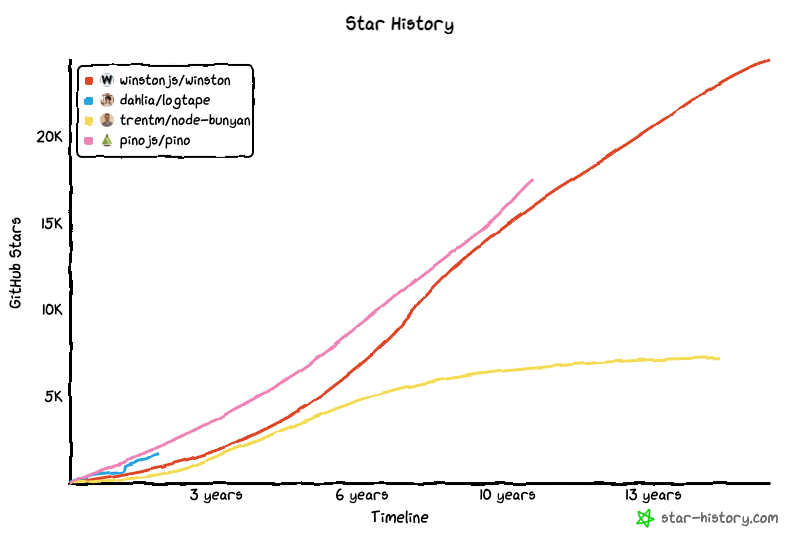
Some libraries are small and simple, and so don’t require updating often. That said, it’s been 5 years since the last release, and it doesn’t appear there has been much activity in the GitHub repository. At this time, I am not recommending Bunyan for new projects, though it remains one of the most popular libraries for Node.js.
Like Winston, Bunyan does not support data redaction.
LogTape
Best for: Modern TypeScript applications and libraries designed to run on Node, Deno, Bun, browsers, and edge.
GitHub: dahlia/logtape · Docs: logtape.org · npm: @logtape/logtape
// Setup
import { configure, getConsoleSink } from "@logtape/logtape";
await configure({
  sinks: { console: getConsoleSink() },
  loggers: [{ category: ["user-service"], lowestLevel: "info", sinks: ["console"] }],
});
// Usage
import { getLogger } from "@logtape/logtape";
const logger = getLogger(["user-service"]);
logger.info("Request received");
logger.info("User action", { userId: "u-123", action: "login" });LogTape is the newest library here (2023) and the only one in this list that’s fully tree-shakable and runs natively on every major JavaScript runtime: Node, Deno, Bun, browsers, and edge. Their comparison page goes deep on how it stacks up against Pino, Winston, Bunyan, and others.
LogTape reports to be ~2x faster than Pino, and over 10x faster than Winston. Its cross-runtime compatibility comes with a slight increase in bundle size, making it the second smallest library in the list, only beaten by Pino.
Key features:
- Universal runtime: Perfect for full stack and serverless applications
- Zero dependencies and tree-shakable
- Hierarchical categories
LogTape is our “Editor’s Favorite”. New to the scene, LogTape is the only option in our list that runs natively on Bun, Deno, browsers, and edge platforms like Cloudflare Workers and Vercel Edge Functions.
Special mention
Sentry Logger
Best for: Sentry users, capturing with existing console logs, compatible with all runtimes.
GitHub: getsentry/sentry · Docs: docs.sentry.io
// Setup
import * as Sentry from "@sentry/browser"; // Change SDK as needed
Sentry.init({
  dsn: process.env.SENTRY_DSN,
  enableLogs: true,
});
// Usage
import * as Sentry from "@sentry/browser"; // Change SDK as needed
Sentry.logger.info("User signed up", {
userId: user.id,
plan: "pro",
referrer: "google",
});If we are including libraries that aren’t dedicated to logging, Sentry actually takes the award for the newest logging library. The Sentry monitoring platform added logging in late 2025, which can be accessed via the same SDKs you may already be using if you are monitoring your application with Sentry.
Sentry’s logger is the only other logger besides LogTape in this list that is runtime agnostic. You can use Sentry in the browser, or anywhere you deploy your JavaScript code.
Sentry offers a wide selection of SDKs, meaning you can use Sentry’s standard logging across languages. Have a Go backend? Sentry supports logging there too.
Summary
- Pino: Small and fast for Node; best when performance and bundle size are your top priority.
- Winston: Most options and transports; best when you want one mature, configurable logger and aren’t constrained by bundle size.
- Bunyan: Tiny and simple JSON logger; Currently not recommended for new projects as it may no longer be receiving updates.
- LogTape: Universal runtimes, zero deps, tree-shakable, library-friendly; best when you need one logger for Node and browser/edge, or when libraries need to log without forcing a choice on the app.
- Sentry: Easily integrates into existing projects using the Sentry SDK; universal runtime; multiple SDKs for other languages.
What to do next
After picking a logging library, you’ll want to start collecting structured logs, and send them to a monitoring platform like Sentry. All of the libraries mentioned above support sending logs to external sources via transports or sinks.
- How to query and aggregate logs on Sentry
- Trace-connected structured logging with LogTape and Sentry
- [Video] Production Logging for JS with LogTape + Sentry
FAQs
What does "transports" mean in a logging library?
A transport (or sink) is a destination where log output is sent, such as the console, a file, an HTTP endpoint, or an observability platform. All major JavaScript logging libraries support multiple simultaneous transports so you can write logs locally and ship them to a remote platform at the same time.
What is trace-connected logging?
Trace-connected logging automatically links log entries to the distributed trace they were emitted during. This means when debugging an error in Sentry, you can see the exact log lines that occurred within the same request trace, without manually correlating IDs.
What is structured logging and why does it matter?
Structured logging means emitting logs as JSON objects rather than plain strings. This lets you include queryable fields (user ID, request ID, severity level) alongside log messages, making it far easier to search, filter, and aggregate logs in monitoring platforms like Sentry.
What is data redaction in logging and which libraries support it?
Data redaction automatically strips or masks sensitive values (passwords, tokens, PII) from log output before it's transmitted to external services. Most loggers use regex-based redaction rules. Pino and LogTape support it natively.
Which JavaScript logging library works in the browser and Node.js?
LogTape and Sentry's logger are the only options in this comparison that run natively across all runtimes; Node, Deno, Bun, browsers, and edge (Cloudflare Workers, Vercel Edge Functions). Pino and Winston are Node.js only (Pino can run in the browser via polyfill, but loses performance benefits).
What is the fastest JavaScript logging library?
LogTape reports ~2x faster than Pino and over 10x faster than Winston.