← Back to Blog Home

AI agent observability: The developer's guide to agent tracing
Most discussions about agent observability read like outdated compliance checklists with “AI” substituted for older technologies. They emphasize comprehensive logging, evaluation metrics, and governance frameworks—but provide no actual code examples or guidance for real debugging scenarios.
Effective agent tracing requires two essential components: dashboards showing aggregate behavior across all agents, and detailed traces explaining specific failures. Most platforms provide only one. Here’s what having both looks like in practice.
What is Agent Observability?
Agent observability provides complete visibility into AI agent operations: model invocations, tool selections, decision sequences, handoffs, token consumption, and associated costs.
Traditional application monitoring focuses on requests, errors, and response times. This works adequately for stateless HTTP services where requests are independent.
AI agents operate fundamentally differently. A single agent execution might involve multiple model calls, tool invocations, sub-agent transfers, and reasoning loops—all interdependent. When outputs are incorrect, failure points could be anywhere: incorrect tool responses, context window limitations, wrong function selection, or lost state during handoffs.
Agent observability provides comprehensive visibility into the complete decision-making process across these interconnected operations. Agent quality assessment, workflow debugging, and cost control all require this visibility level.
Why Traditional Monitoring Fails for AI Agents
Standard APM tools report that POST /api/chat returned status 200 in 4.2 seconds. They won’t reveal that internally, the agent executed 5 model calls, with the third call selecting an incorrect tool that returned outdated information, which the model then accurately summarized as garbage.
An “log everything later” approach produces dashboards showing counts and averages without enabling deeper investigation. An agent producing incorrect output might have completed 12 model calls, executed 4 tools, transferred to a sub-agent, then generated incorrect output. Aggregate metrics indicate error rate increases. They don’t indicate where reasoning failed.
The solution requires structured tracing based on consistent standards, allowing dashboards, traces, and alerts to communicate uniformly.
The OpenTelemetry Standard for Agent Observability
The OpenTelemetry gen_ai semantic conventions establish standardized instrumentation for agent systems. Instead of custom logging, every AI operation produces a structured span containing consistent attributes. Core operations include:
| Span Operation | Captured Information |
|---|---|
gen_ai.request | Single model call: model name, prompt, response, token counts |
gen_ai.invoke_agent | Complete agent lifecycle from task initiation to final output |
gen_ai.execute_tool | Tool/function invocation: name, input, output, duration |
These compose hierarchically:
POST /api/chat (http.server)
└── gen_ai.invoke_agent "Research Agent"
    ├── gen_ai.request "chat claude-sonnet-4-6"        ← initial reasoning
    ├── gen_ai.execute_tool "search_docs"              ← tool call
    ├── gen_ai.request "chat claude-sonnet-4-6"        ← process results
    ├── gen_ai.execute_tool "summarize"                ← second tool call
    ├── gen_ai.request "chat claude-sonnet-4-6"        ← decides to hand off
    └── gen_ai.execute_tool "transfer_to_writer"       ← handoff via tool
        └── gen_ai.invoke_agent "Writer Agent"
            ├── gen_ai.request "chat gemini-2.5-flash"
            └── gen_ai.execute_tool "format_output"
This is an open standard, not proprietary. Any platform following it can ingest these spans. The span operation follows the pattern gen_ai.{operation_name}. For manual instrumentation, gen_ai.request covers all model calls. SDK auto-instrumentation may generate more specific operations like gen_ai.chat or gen_ai.embeddings depending on API calls. Because these are structured spans rather than unstructured logs, they enable both dashboards and trace visualization.
Key Metrics for Agent Tracing
Before selecting tools, track these measurements for production agents:
Reliability metrics:
- Agent error rate — percentage of agent executions that fail or produce errors
- Tool failure rate — identifies unreliable tools and their impact on agent success
- Latency (p50, p95) — per-agent and per-model tracking to identify regressions
Cost metrics:
- Token usage — input, output, cached, and reasoning tokens per model. Cached and reasoning tokens are subsets, not cumulative. Incorrect calculation means fictional cost dashboards.
- Cost per model — compare similar workloads. Example:
claude-sonnet-4-6costs $10.8K weekly whilegemini-2.5-flash-litehandles equivalent volume for $645. - Cost per user/tier — identifies which users or pricing levels consume most AI resources
Quality metrics:
- Tool call frequency — tracks how often agents invoke each tool and invocation sequence
- Token efficiency — average tokens per successful completion. Growing numbers suggest inflating prompts or context windows.
- Cache hit rate — percentage of input tokens served from cache. If caching is enabled but this metric isn’t improving, something needs investigation.
Comprehensive platforms following OpenTelemetry conventions surface these metrics automatically from trace data. To go beyond aggregate quality signals, the cookbook on how to turn agent conversations into evals shows how to build repeatable quality checks from real traces.
Auto-instrumentation for 10+ Frameworks
Sentry auto-instruments major AI frameworks in Python and Node.js, including OpenAI, Anthropic, Google GenAI, LangChain, LangGraph, Pydantic AI, OpenAI Agents SDK, Vercel AI SDK, and others. Manual span creation isn’t needed. Installation, tracing enablement, and automatic pickup occur.
Complete setup:
import sentry_sdk

sentry_sdk.init(
    dsn="YOUR_DSN",
    traces_sample_rate=1.0,
)
# OpenAI, Anthropic, LangChain, LangGraph, Pydantic AI,
# Google GenAI -- all auto-instrumented when detected.
That’s the entire configuration. Making Anthropic or OpenAI calls produces visible spans. For end-to-end, framework-specific walkthroughs, follow the cookbooks on how to instrument Flue agents with Sentry and send Eve agent traces to Sentry.
Pre-built Agent Tracing Dashboards
Most observability platforms include pre-built agent tracing dashboards. Once instrumentation is active, Sentry’s AI Agents dashboard provides three views:
AI Agents Overview
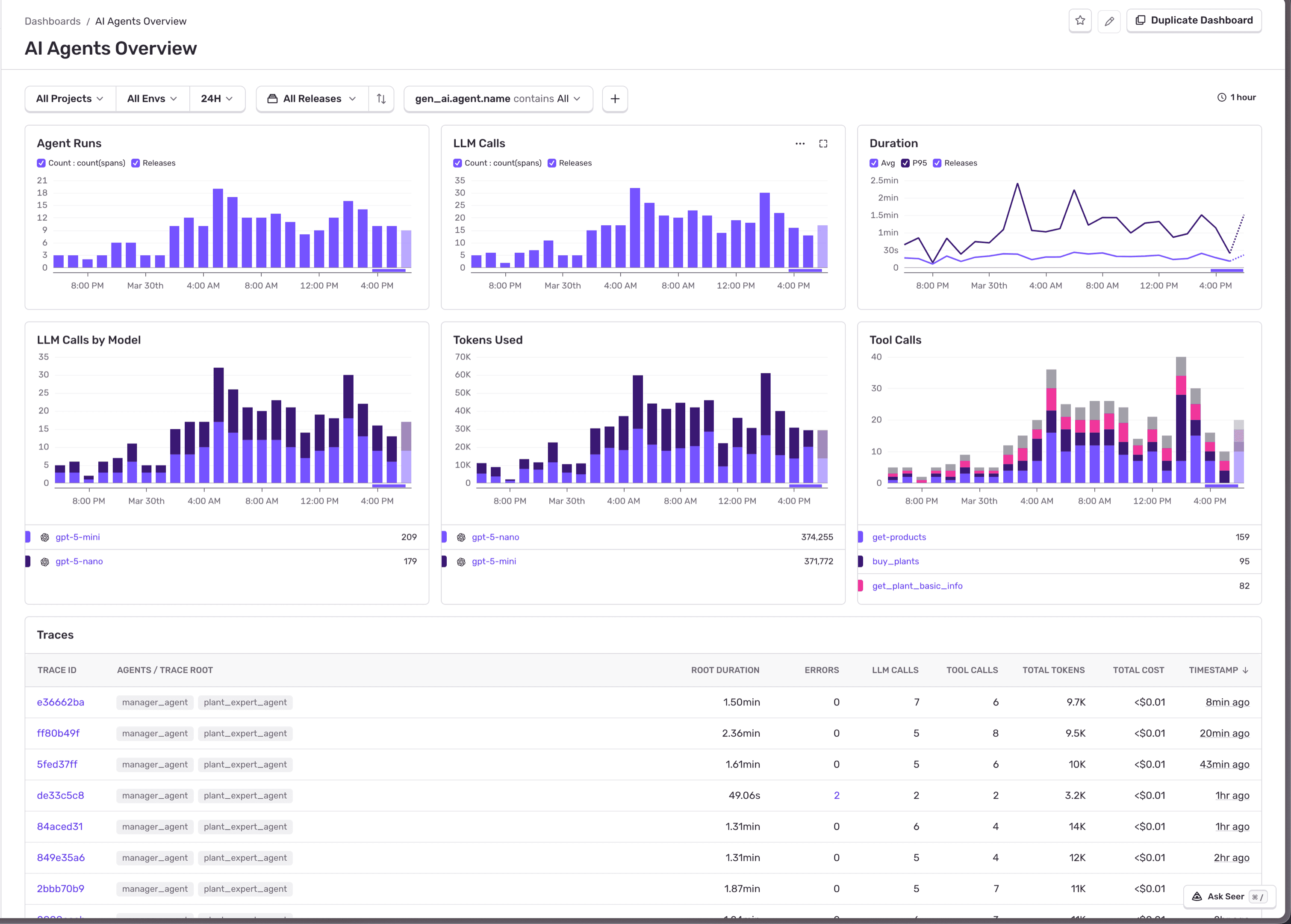
Displays agent runs, duration, total model calls, tokens consumed, and tool invocations. This is the “is everything functioning?” view.
AI Agents Model Details
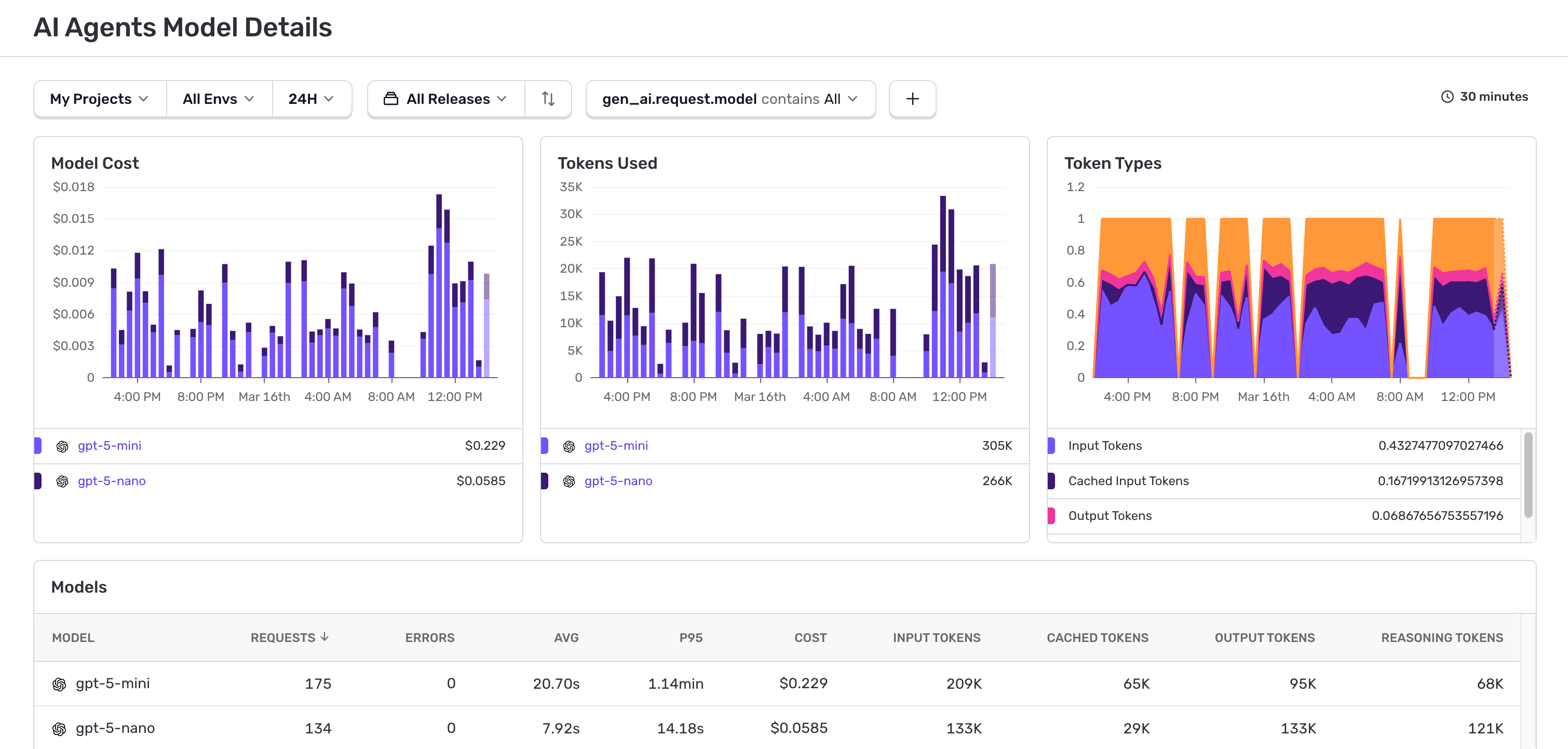
Per-model cost projections, token breakdown (input/output/cached/reasoning), and latency. This automatically displays cost metrics.
AI Agents Tool Details
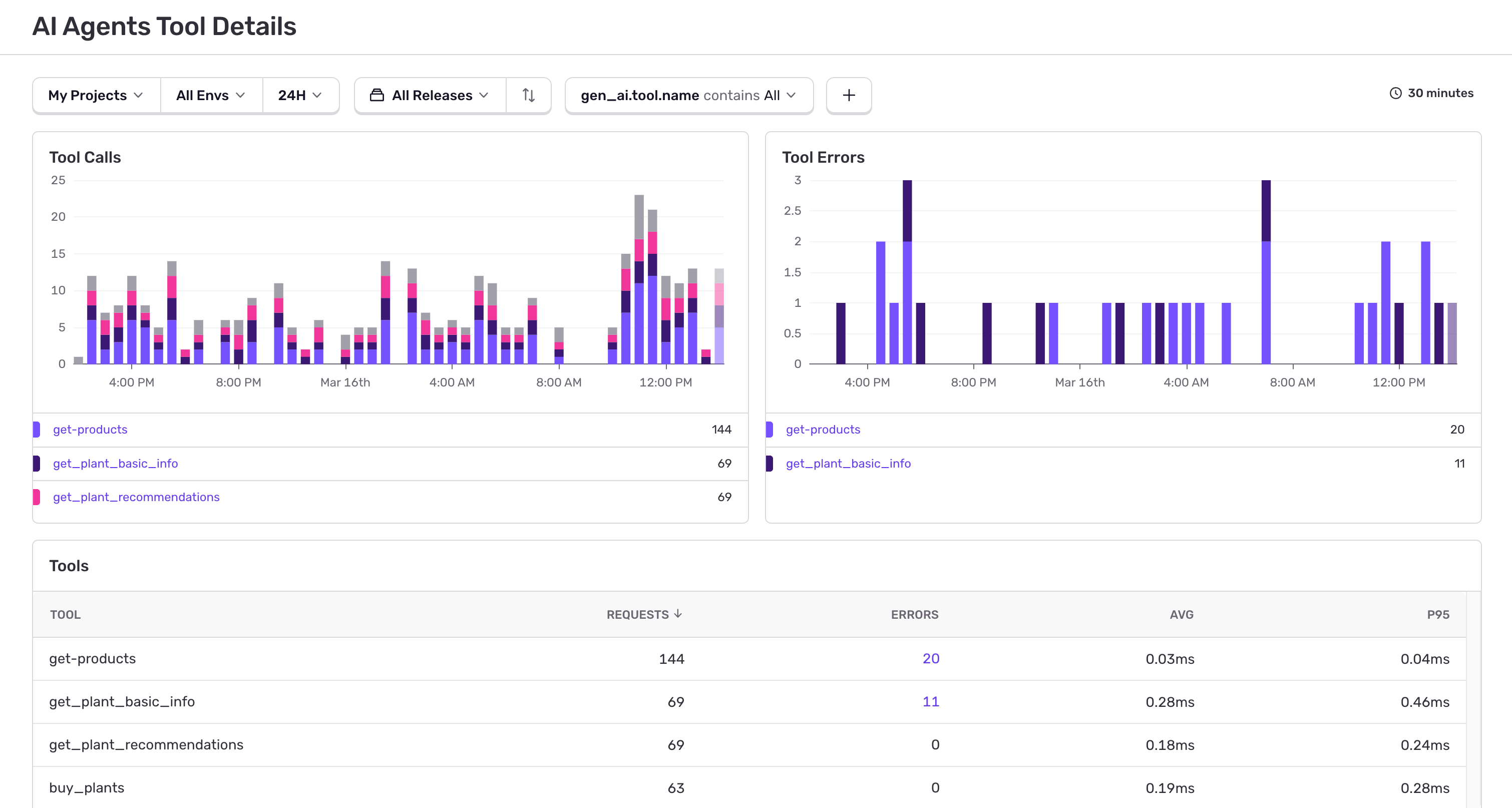
Per-tool invocation frequency, error rates, and p95 latency. A tool failing 12% of the time appears here before users report problems.
These dashboards appear immediately once spans flow. However, they display aggregates: per-model totals, per-tool error rates, overall agent counts. They answer technical questions and highlight problems—but what about business-level inquiries?
Custom Agent Tracing Dashboards
Pre-built dashboards show aggregate health signals. They don’t show who drives AI costs, which features justify spending, or whether caching strategies save money. Addressing these questions requires slicing trace data by custom dimensions: user tier, feature flag, experiment group.
Some platforms enable custom queries against span data. With the Sentry CLI, you can script this—and its agent skill system allows AI coding assistants like Claude Code to build dashboards:
“Who are my most expensive users?”
sentry dashboard create 'AI Cost Attribution'

sentry dashboard widget add 'AI Cost Attribution' "Most Expensive Users" \
  --display table --dataset spans \
  --query "sum:gen_ai.usage.total_tokens" \
  --where "span.op:gen_ai.request" \
  --group-by "user.id" \
  --sort "-sum:gen_ai.usage.total_tokens" \
  --limit 20
“Which pricing tier is eating my AI budget?”
Tag users with their plan, then group in the dashboard:
sentry_sdk.set_tag("user_tier", user.plan) # "free", "pro", "enterprise"sentry dashboard widget add 'AI Cost Attribution' "AI Cost by Tier" \
--display bar --dataset spans \
--query "sum:gen_ai.usage.total_tokens" \
--where "span.op:gen_ai.request" \
--group-by "user_tier" \
--sort "-sum:gen_ai.usage.total_tokens"This reveals that free-tier users consume 60% of AI budget. The same tagging pattern works for any dimension: team, feature_flag, experiment_group.
“Which agents are token-hungry?”
sentry dashboard widget add 'AI Cost Attribution' "Avg Tokens per Agent" \
  --display table --dataset spans \
  --query "avg:gen_ai.usage.total_tokens" "count" \
  --where "span.op:gen_ai.invoke_agent" \
  --group-by "gen_ai.agent.name" \
  --sort "-avg:gen_ai.usage.total_tokens"
If “Research Agent” averages 15K tokens per run while “Summarizer Agent” averages 2K, you know where to focus prompt optimization.
“Is my prompt caching actually saving money?”
sentry dashboard widget add 'AI Cost Attribution' "Cache Hit Rate" \
  --display line --dataset spans \
  --query "sum:gen_ai.usage.input_tokens.cached" "sum:gen_ai.usage.input_tokens" \
  --where "span.op:gen_ai.request"
If cached-to-total ratio isn’t improving after enabling caching, your prompt structure needs investigation. For a step-by-step build, follow the cookbook on how to monitor AI agent spend with dashboards and alerts.
Why Tracing Matters for Agents
Dashboards show totals. Traces show decisions.
A dashboard indicates error rates increased or latency spiked. A trace identifies which agent, which model call, and which tool caused it.
Distributed tracing already captures complete span hierarchies for requests: browser interactions, HTTP calls, server routing, database queries. Agent observability integrates into this. Your gen_ai.* spans appear as children within existing traces, so model calls, tool executions, MCP server interactions, and sub-agent transfers sit alongside regular application spans. No separate system required.
This integration is powerful. You’re examining agent data within full request context, from user click to final tool response, with agent decisions as one layer in the entire stack.
Here’s what this looks like in Sentry’s trace view:
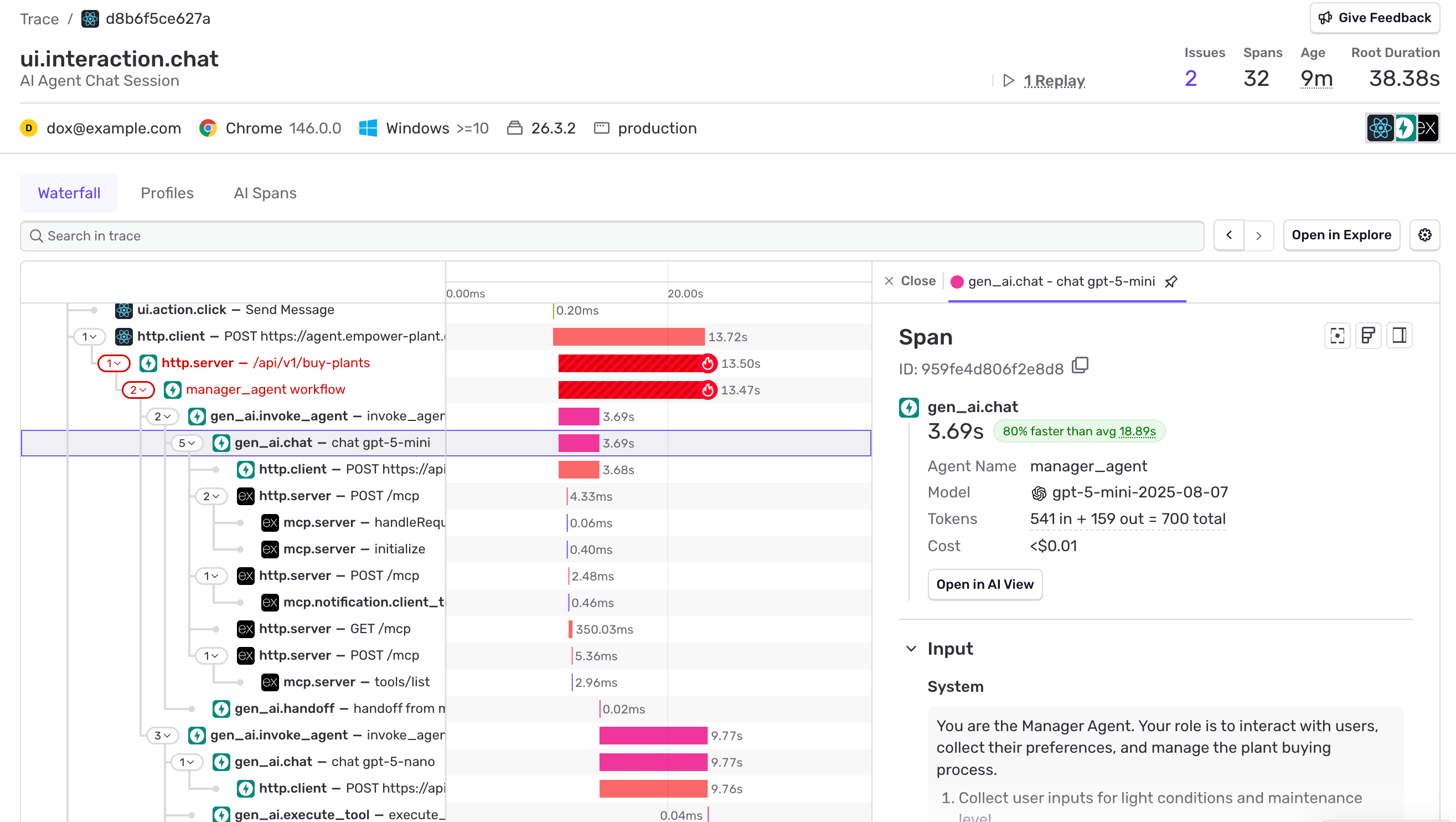
Single request, end-to-end: from user clicking “Send Message” through API, agent orchestration with model calls and MCP server interactions, through handoff to second agent. Clicking any span reveals model, tokens, cost, and system prompt details.
Agent Observability Best Practices
Whatever platform you choose, implement these practices:
-
Use structured tracing, not logs. Unstructured logs can’t reconstruct reasoning chains. OpenTelemetry
gen_aispans provide searchable, filterable hierarchies powering dashboards and trace views simultaneously. -
Sample AI traces at 100%. Agent runs are span hierarchies. Sampling drops complete executions, not individual calls. If
tracesSampleRateis below 1.0, you’re losing entire agent runs. UsetracesSamplerto keep AI routes at 100% while sampling everything else at baseline. (Detailed sampling guide) -
Track cost by user, not just by model. The pre-built dashboard shows per-model totals. You need per-user and per-tier attribution for business decisions about rate limiting, pricing, and model routing.
-
Monitor tool reliability separately. A tool failing 5% of the time might not appear in overall error rates, but causes 1 in 20 agent runs to produce bad output. Your dashboard should surface per-tool error rates distinctly.
-
Connect AI observability to your full stack. Agent failure might stem from slow database queries, failed external API calls, or frontend timeouts. Isolated AI observability can’t reveal these root causes.
Full-Stack Agent Observability
Agent observability becomes most powerful when layered on top of comprehensive APM platforms, linking agent spans to errors, performance traces, session replays, and logs across your entire system.
Isolated AI observability shows gen_ai spans separately. You see that Research Agent completed 8 model calls costing $0.04. What remains invisible is why it made 8 instead of 3: your search_docs tool executes a slow Postgres query timing out, causing the agent to retry with rephrased queries repeatedly.
When agent spans share context with your broader infrastructure, everything clarifies. Errors include their complete span hierarchy. Session replays show user interactions triggering bad agent runs. Upstream issues (sluggish vector databases, unreliable external APIs) appear in the same trace as resulting agent behavior.
Four Steps to First Trace
- Install the SDK:
pip install sentry-sdkornpm install @sentry/node - Initialize with tracing enabled
- Make an AI call; spans and dashboards populate automatically
- (Optional) Install the CLI skill for your AI assistant:
npx skills add https://cli.sentry.devIf your framework is auto-instrumented, you’re complete. If not, manual instrumentation requires approximately 10 lines per span type.
For comprehensive guidance on capturing 100% of AI traces, see our companion post on sampling strategies for agentic applications.
Try Sentry at no cost - AI observability is included across all plans.
Agent Tracing FAQs
What is agent observability?
Agent observability is complete visibility into AI agent operations: model calls, tool selections, decision chains, handoffs, token consumption, and costs. It transcends traditional monitoring by tracking complete reasoning sequences across multi-turn interactions.
How is agent tracing different from LLM monitoring?
LLM monitoring measures individual model calls (latency, tokens, errors). Agent tracing tracks complete agent cycles: multi-step reasoning, tool execution, agent-to-agent transfers, and how individual calls combine into workflows.
What metrics should I track for AI agents?
Minimum metrics: agent error rate, tool failure rate, latency (p50/p95), token usage per model, cost per user/tier, and cache hit rate. These divide into reliability (functioning properly?), cost (expenditure?), and quality (improving?) categories.
What tools support agent observability?
OpenTelemetry gen_ai semantic conventions represent the emerging standard. Sentry, LangSmith, Langfuse, Arize, and Datadog all provide agent observability with distinct approaches. Sentry distinguishes itself through full-stack context: agent data connected to errors, performance traces, session replays, and logs unified in one system.